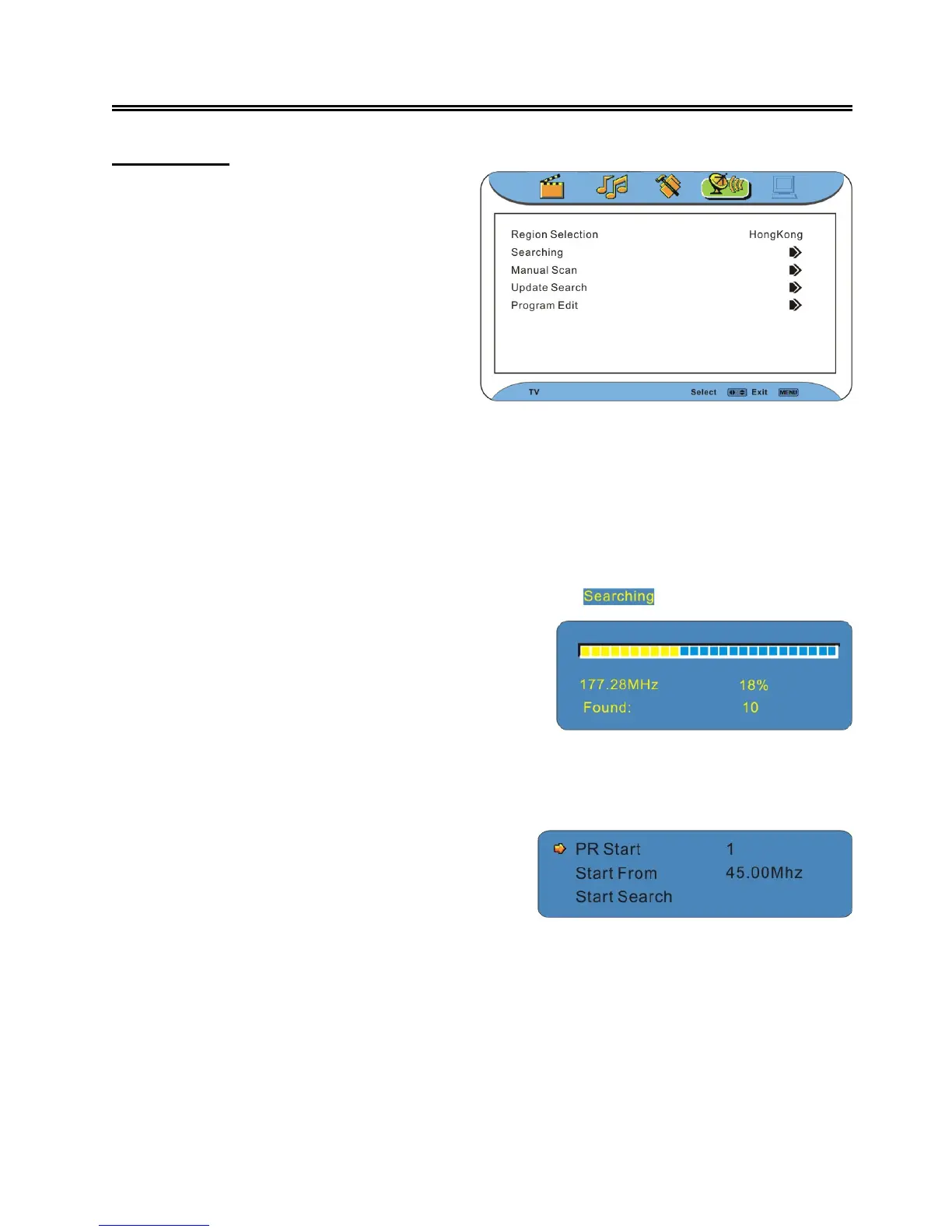
TV Setting
Region Selection
Press the ▲▼ button to select Region Selection. Press the ◄ ► button to select the desired
region.
Searching
Press the ▲▼ button to select Searching. Press the
OK or ► button to start auto searching and the screen
will display as shown on the right:
When auto-searching is over, all searched programs
will be stored automatically and it will return to the first
searched channel. During searching, press the MENU
button to stop searching and return to the previous
menu.
Manual Scan
Press the ▲▼ button to select Manual Scan. Press
the OK or ► button to enter the manual scan menu
as shown on the right:
Press the ▲▼ button to select PR Start or Start
From. Press the ◄ ► button to set the start program number or the start frequency.
Select Start Search and press the OK button to begin searching.
When a program is searched, it will stop searching automatically. Press the MENU button to store
and return.
Press the MENU button once to enter the
main setup menu. Press the ◄ ► button to
select TV, and the screen will display as
shown on the right:
In the menu, press the OK or ▼ button to
enter the menu. Press the ▲▼ button to
select an item. Press the MENU button to
return to the previous menu.
Press the EXIT button to exit the menu.



 To Next Page