- 28 -
NICAM Function
The unit supports NICAM function when in TV mode.
Under NICAM TV broadcast:
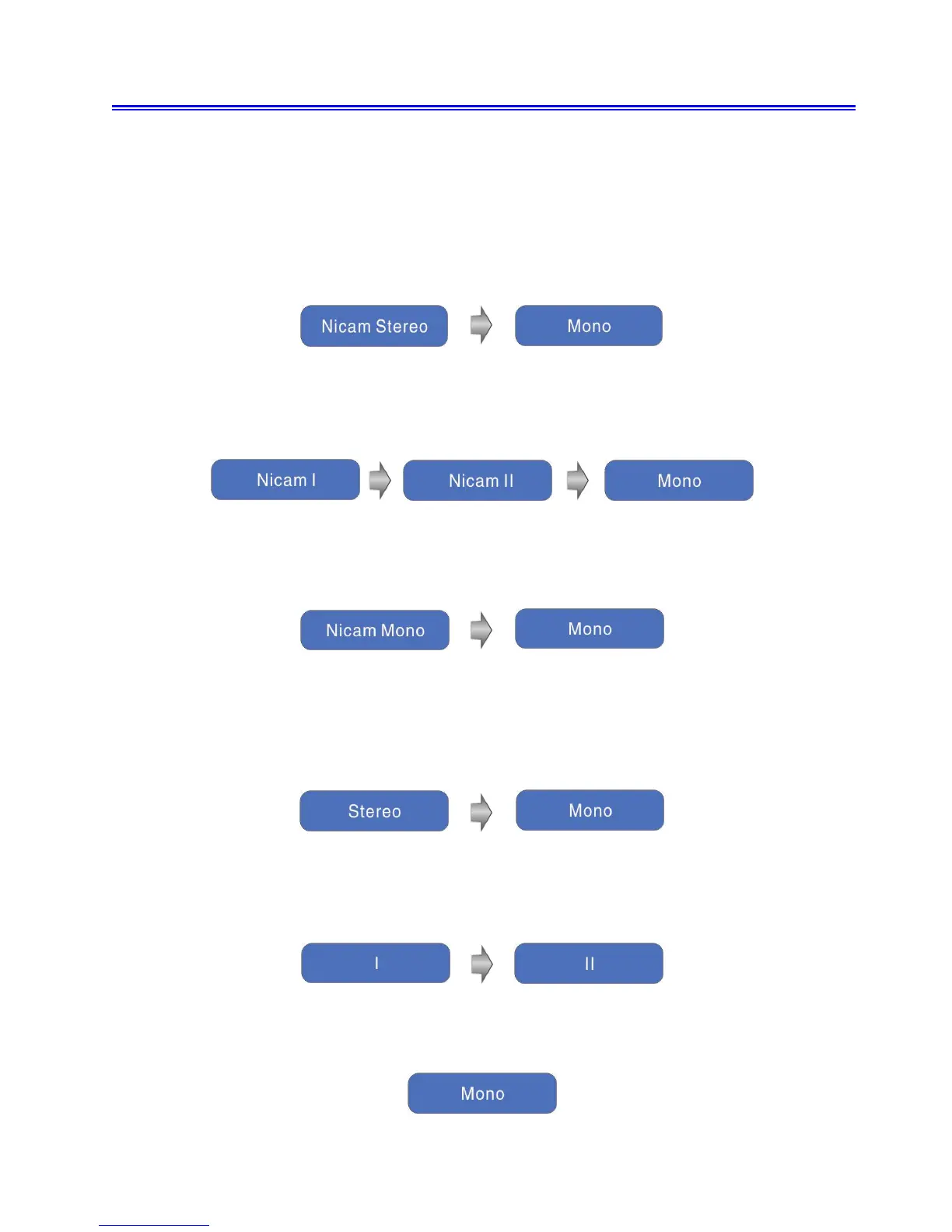
1. When receiving stereo audio signals, press the STEREO button on the remote control
repeatedly to select the sound tracks between Nicam Stereo and Mono and the screen will
show the corresponding display as shown below:
2. When receiving bilingual audio signals, press the STEREO button on the remote control
repeatedly to shift the sound tracks between Nicam I, Nicam II and Mono and the screen will
show the corresponding display as shown below:
3. When receiving mono audio signals, press the STEREO button on the remote control repeatedly
to shift the sound tracks between Nicam Mono and Mono and the screen will show the
corresponding display as shown below:
Under A2 TV broadcast:
1. When receiving stereo audio signals, press the STEREO button on the remote control
repeatedly to shift the sound tracks between Stereo and Mono and the screen will show the
corresponding display as shown below:
2. When receiving bilingual audio signals, press the STEREO button on the remote control
repeatedly to shift the sound tracks between I and II and the screen will show the corresponding
display as shown below:
3. When receiving mono audio signals, press the STEREO button on the remote control to display
sound track Mono on the screen.



 To Next Page