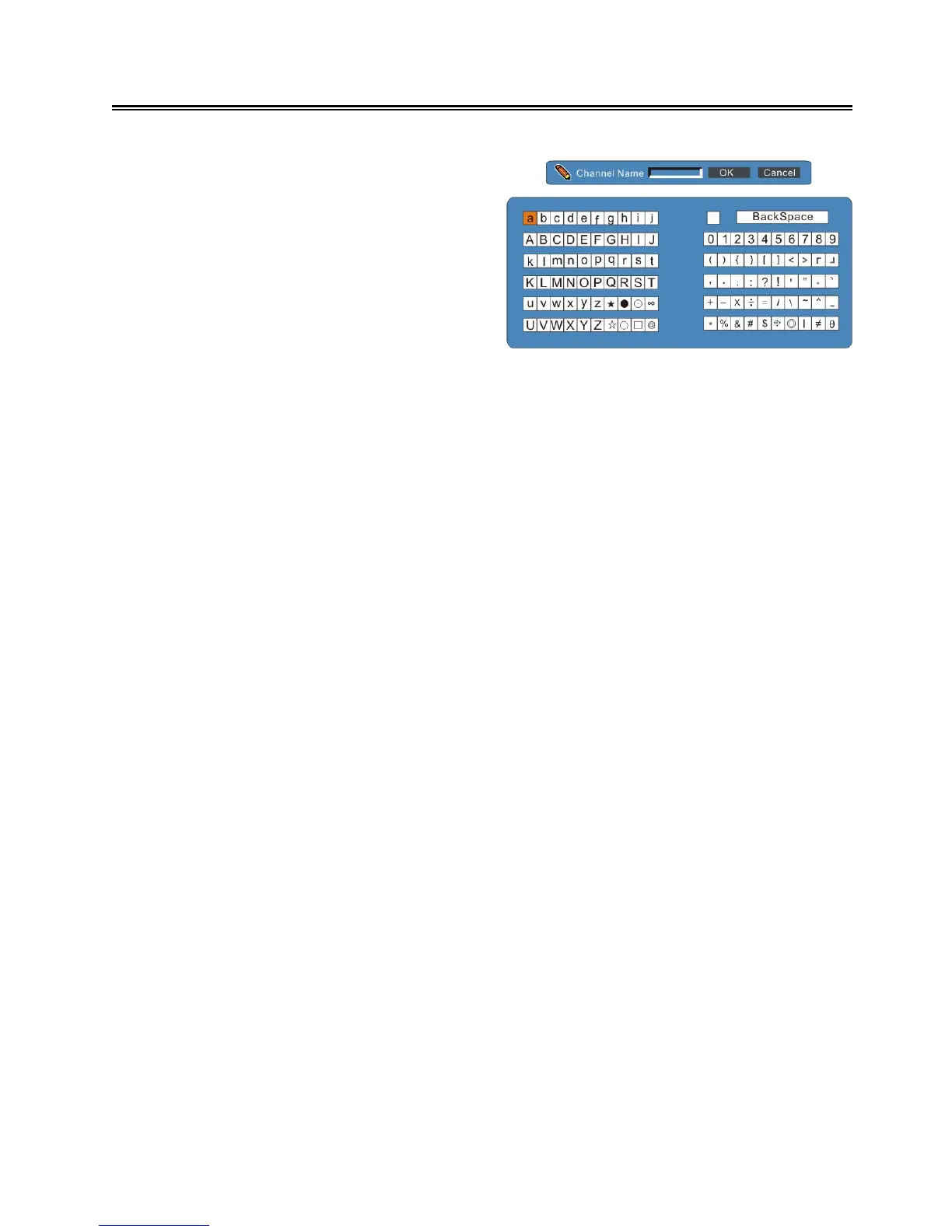
PR Name
In the program Edit Menu, press the ▲▼ button
to select PR Name and press the OK button to
enter the channel name edit menu. See the
figure on the right:
In the menu, press the ▲▼◄ ► buttons to
select characters or numbers and press the OK
button to confirm. You can enter 6 characters at
most. After entering characters, select “Cancel”
and press the OK button to cancel; select “OK” and press the OK button to confirm.
Press the EXIT button to return to the previous menu.
Sound System
In the program Edit Menu, press the ▲▼ button to select Sound System. Press the ◄► button to
select the desired item.
Frequency
In the program Edit Menu, press the ▲▼ button to select Frequency. Press the ◄► button to
select frequency forward or backward and press the OK button to confirm.
Fine Tuning
When the picture quality and the accompanied sound are not good, you use the fine tuning to
improve this.
In the program Edit Menu, press the ▲▼ button to select Fine Tuning. Press the OK button to fine
tune and again to return.
Skip
In the program Edit Menu, press the ▲▼ button to select Skip. Press the ◄► button to select On or
Off.
Decoder
In the program Edit Menu, press the ▲▼ button to select Decoder. Press the ◄► button to select
On or Off.
Store
In the program Edit Menu, press the ▲▼ button to select Store. Press the OK button to store the
settings and return to the previous menu.



 To Next Page