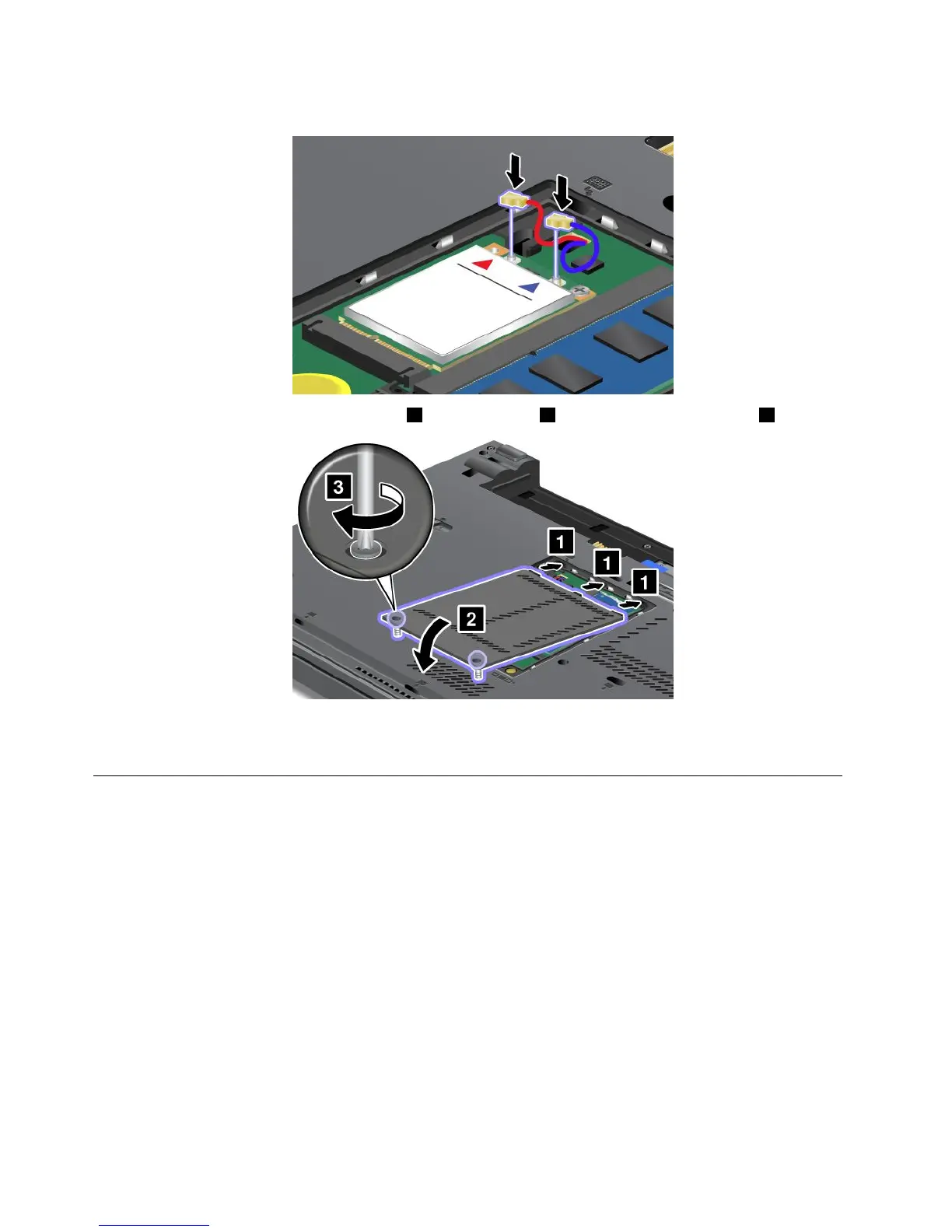
10.ConnectthecablestothenewwirelessWANcard.
11.Putthememoryslotcoverbackinplace1,closethecover2,andthentightenthescrews3.
12.Reinstallthebattery.See“Replacingthebattery”onpage71.
13.Turnthecomputeroveragain.Reconnecttheacpoweradapterandallcables.
ReplacingtheSIMcard
Beforeyoustart,printtheseinstructions.
YourcomputermightrequireaSIMcardtoestablishwirelessWANconnections.Dependingonthecountry
ofdelivery,theSIMcardmightbealreadyinstalledinyourcomputerorispartoftheshippingcontents
thatcomewithyourcomputer.
IfyoundaSIMcardincludedintheshippingcontents,adummycardisinstalledintheSIMcardslot.Then
proceedwiththefollowinginstructions.
Note:TheSIMcardisidentiedbytheICchipmountedononesideofthecard.
ToreplacetheSIMcard,dothefollowing:
1.Turnoffthecomputer;thendisconnecttheacpoweradapterandallcablesfromthecomputer.
2.Closethecomputerdisplay,andturnitover.
3.Removethebattery.See“Replacingthebattery”onpage71.
96UserGuide














 To Next Page