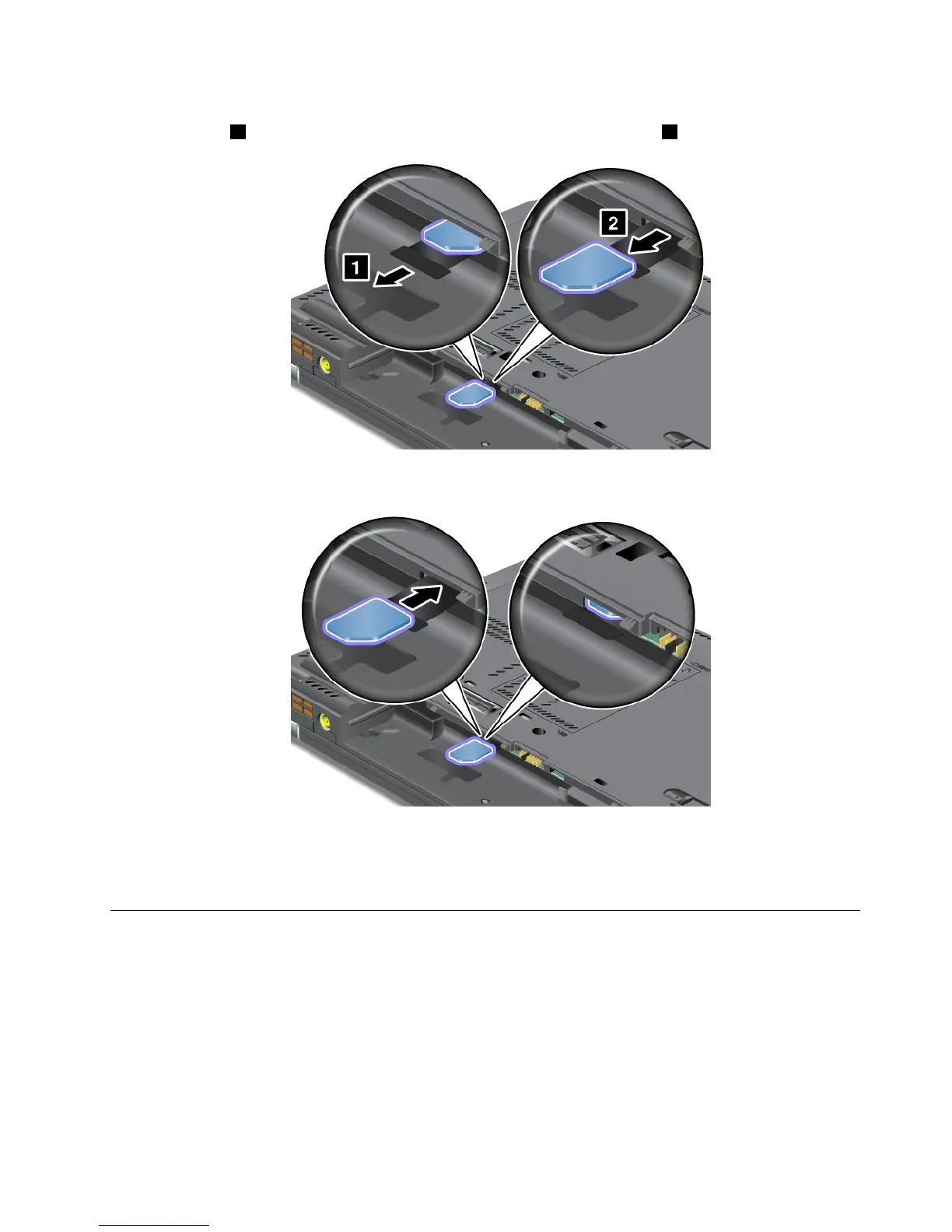
4.LocatetheSIMcardslotinsidethebatterycompartment.Gentlypullthetabextendingfromtheslot
untilitstops1.Thecardcomespartwayoutoftheslot.Removethecard2.
5.Holdthenewcardwiththemetalcontactfacingupwardandgoingintotheslotrst.Then,insert
thecardrmlyintotheslotuntilyouhearaclick.
Note:MakesurethatyouinserttheSIMcardallthewayintotheslot.
6.Putthebatterybackinplace,turnthecomputeroveragain,andreconnectthecables.Formore
informationabouthowtoreinstallthebattery,referto“Replacingthebattery”onpage71.
ReplacingtheUltrabaydevice
Beforeyoustart,printtheseinstructions.
ToreplacetheUltrabaydevice,dothefollowing:
1.Turnoffthecomputer;thendisconnecttheacpoweradapterandallcablesfromthecomputer.
Chapter6.Replacingdevices97













 To Next Page