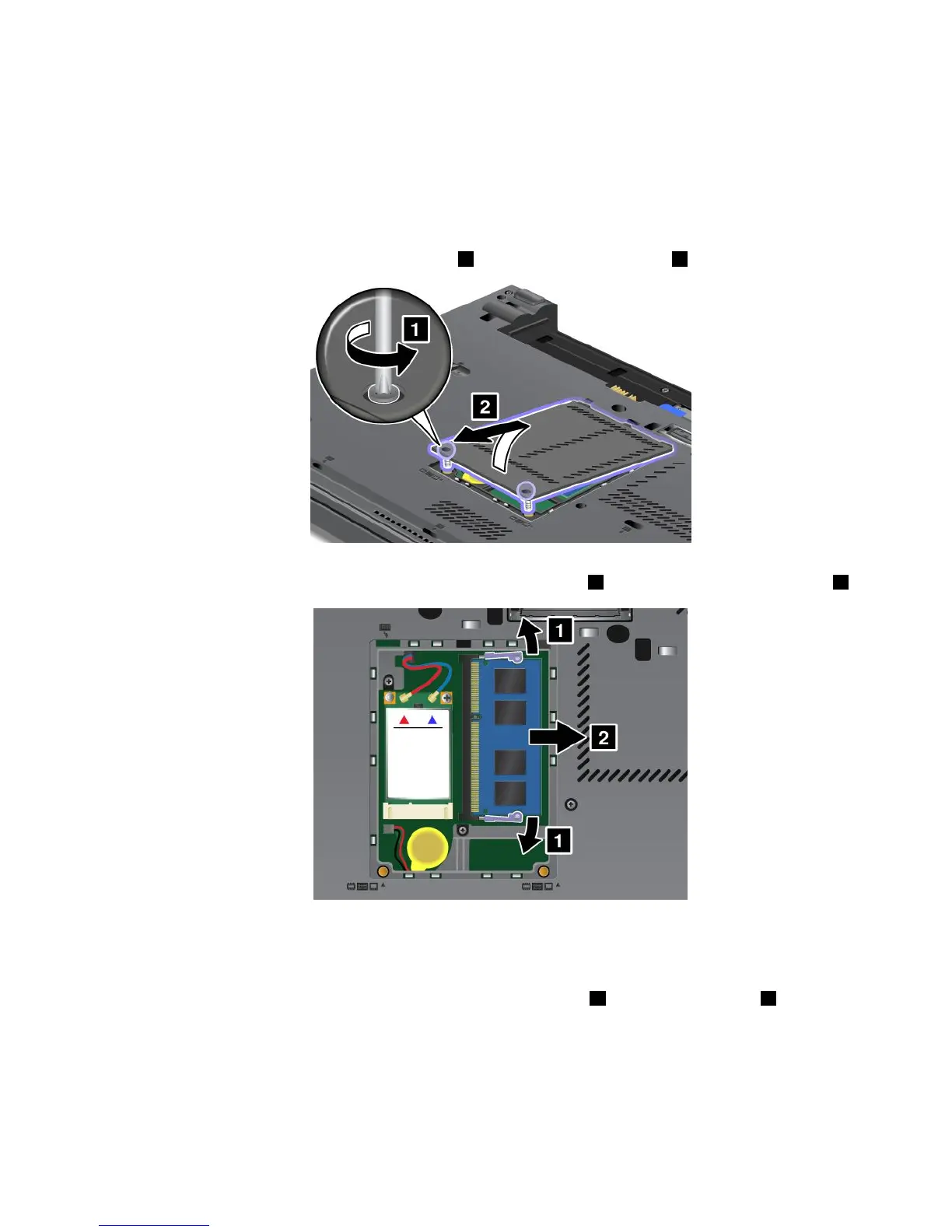
Replacingmemoryintheslotontheundersideofthecomputer
Yourcomputerhastwomemoryslots:oneunderthekeyboardandanotherontheundersideofthe
computer.Toreplacethememorymodule,followtheprocedurebelow:
1.Turnoffthecomputer;thendisconnecttheacpoweradapterandallcablesfromthecomputer.
2.Closethecomputerdisplay,andturnitover.
3.Removethebattery.See“Replacingthebattery”onpage71.
4.Loosenthescrewsonthememoryslotcover1,andthenremovethecover2.
Ifamemorymoduleisalreadyinthememoryslot,removeittomakeroomforthenewonebypressing
outonthelatchesonbothedgesofthesocketatthesametime1.Besuretosaveitforfutureuse2.
5.Findthenotchonthecontactedgesideofthememorymoduleyouareinstalling.
Note:Toavoiddamagingthememorymodule,donottouchitscontactedge.
6.Withthenotchedendofthememorymoduletowardthecontactedgesideofthesocket,insertthe
memorymoduleintothesocketatanangleofabout20degrees
1;thenpressitinrmly2.
Chapter6.Replacingdevices83














 To Next Page