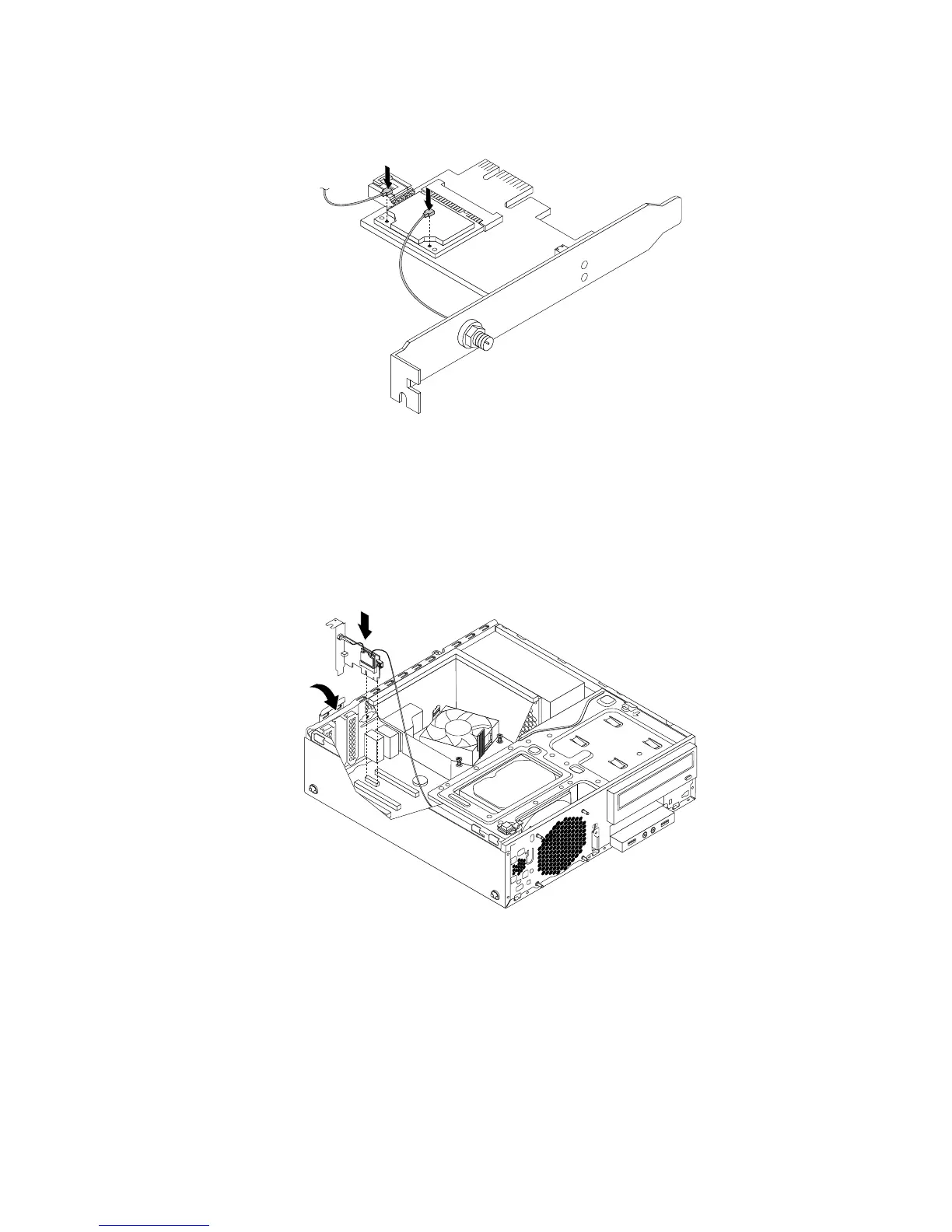
2.ConnectthefrontantennacableandrearantennacabletotheWi-Ficardmodule.
Figure95.InstallingtheWi-Fiantennacables
3.InstalltheWi-FiadaptercardintothePCIExpressx1slotonthesystemboard.See“Locatingpartson
thesystemboard”onpage12.
4.IftheinstalledWi-FicardmodulesupportstheBluetoothfunction,useaBluetoothcabletoconnectthe
BluetoothconnectorontheWi-FiadaptercardtothefrontUSBconnectoronthesystemboard.
5.PivotthecardlatchtotheclosedpositiontosecuretheWi-Fiadaptercard.
Figure96.InstallingtheWi-Fiadaptercard
Whattodonext:
•Toworkwithanotherpieceofhardware,gototheappropriatesection.
•Tocompletetheinstallationorreplacement,goto“Completingthepartsreplacement”onpage93
.
Chapter5.Installingorreplacinghardware87











 To Next Page