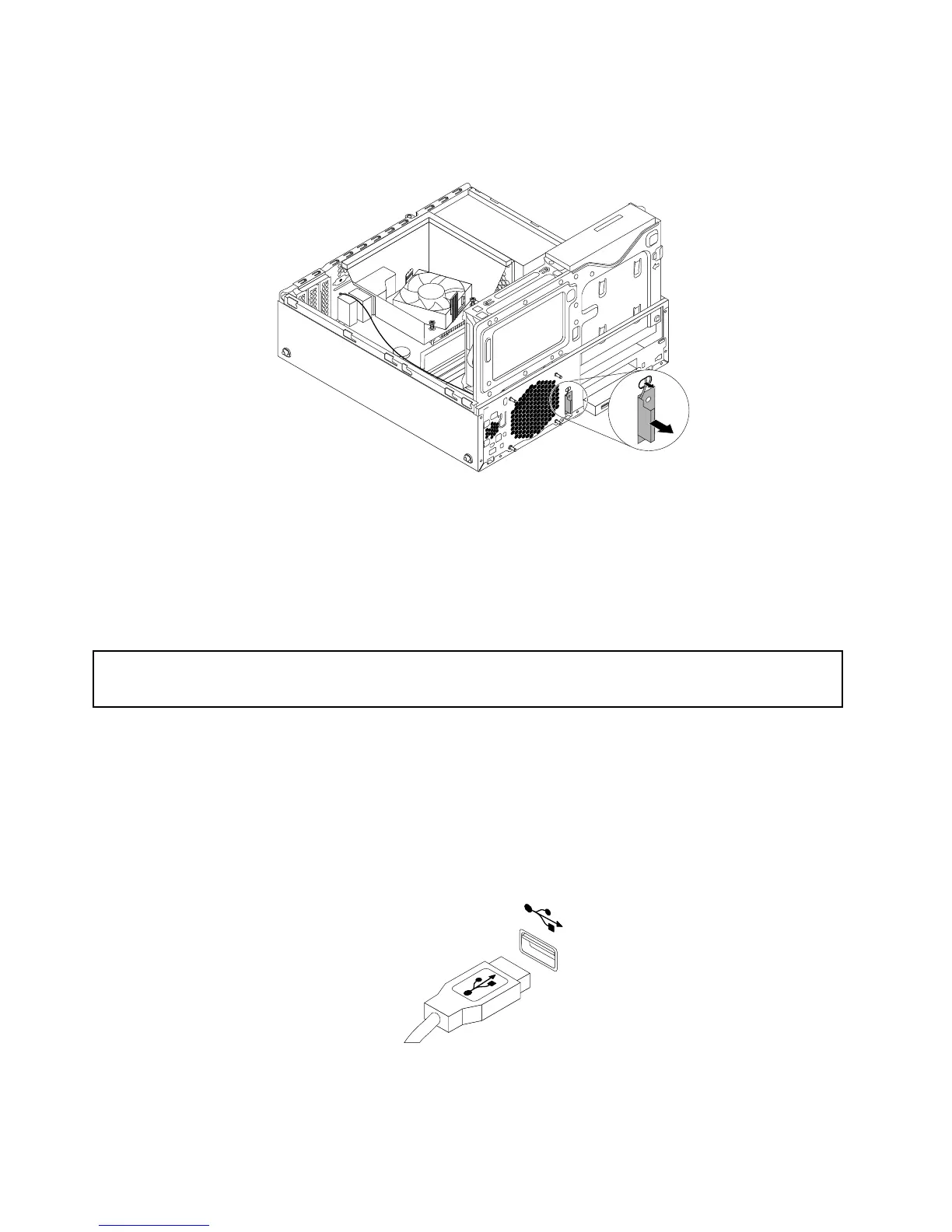
5.DisconnectthefrontantennacablefromtheWi-Ficardmodule.
6.Removethefrontantennaandcablefromthefrontofthecomputer.
Figure103.RemovingthefrontWi-Fiantenna
Whattodonext:
•Toworkwithanotherpieceofhardware,gototheappropriatesection.
•Tocompletetheinstallationorreplacement,goto“Completingthepartsreplacement”onpage93.
Replacingthekeyboardormouse
Attention:
Donotopenyourcomputerorattemptanyrepairbeforereadingandunderstandingthe“Importantsafetyinformation”
onpagev.
Thissectionprovidesinstructionsonhowtoreplacethekeyboardormouse.
Toreplacethekeyboardormouse,dothefollowing:
1.Disconnecttheoldkeyboardcableormousecablefromthecomputer.
2.ConnectanewkeyboardormousetooneoftheUSBconnectorsonthecomputer.Dependingonwhere
youwanttoconnectthenewkeyboardormouse,see“Locatingconnectors,controls,andindicatorson
thefrontofyourcomputer”onpage8
or“Locatingconnectorsontherearofyourcomputer”onpage9.
Figure104.ConnectingtheUSBkeyboardormouse
92ThinkStationE32UserGuide











 To Next Page