InstallingorremovingtherearWi-Fiantenna
Attention:
Donotopenyourcomputerorattemptanyrepairbeforereadingandunderstandingthe“Importantsafetyinformation”
onpagev
.
ThissectionprovidesinstructionsonhowtoinstallorremovetherearWi-Fiantenna.
InstallingtherearWi-Fiantenna
ToinstalltherearWi-Fiantenna,dothefollowing:
1.Turnoffthecomputeranddisconnectallpowercordsfromelectricaloutlets.
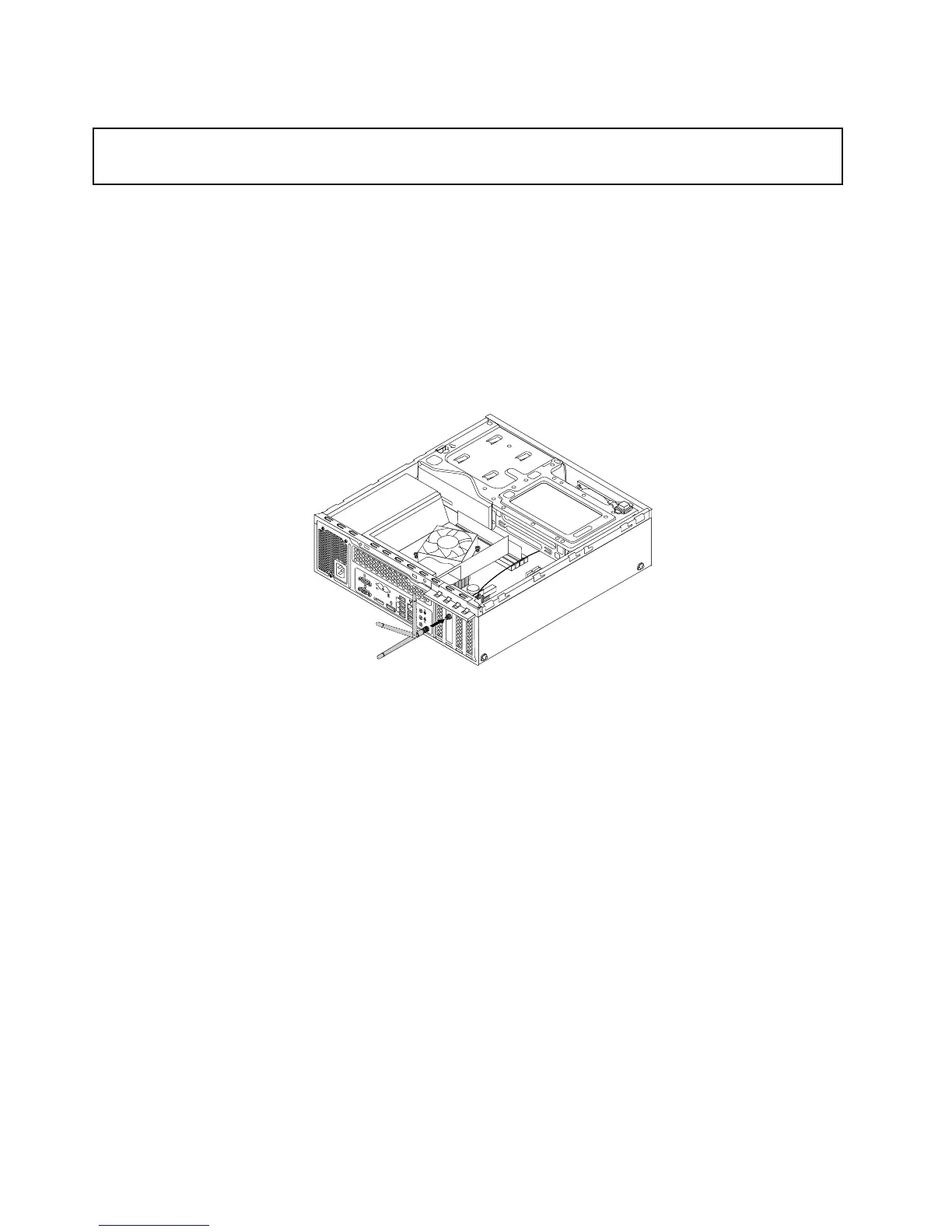
2.InstalltherearWi-FiantennatotherearWi-Fiantennacableconnectorattachedontherearofthe
computer.
3.Adjusttheangleoftherearantennatolowertheriskofbreakingtheantennabyaccident.
Figure97.InstallingtherearWi-Fiantenna
Whattodonext:
•Toworkwithanotherpieceofhardware,gototheappropriatesection.
•Tocompletetheinstallationorreplacement,goto“Completingthepartsreplacement”onpage93.
RemovingtherearWi-Fiantenna
ToremovetherearWi-Fiantenna,dothefollowing:
1.Turnoffthecomputeranddisconnectallpowercordsfromelectricaloutlets.
2.StraightentherearWi-Fiantennasothatitcanbemoreeasilytwisted.
88ThinkStationE32UserGuide











 To Next Page