M.2 solid-state drive in an M.2 solid-state drive PCIe adapter
To remove or install the M.2 solid-state drive in the M.2 solid-state drive PCIe adapter, do the following:
1. Prepare your computer. See “Preparing your computer” on page 98.
2. To remove the M.2 solid-state drive in the M.2 solid-state drive PCIe adapter, do the following:
a. Locate and remove the M.2 solid-state drive adapter from the PCIe card slot. See “PCIe card” on
page 103.
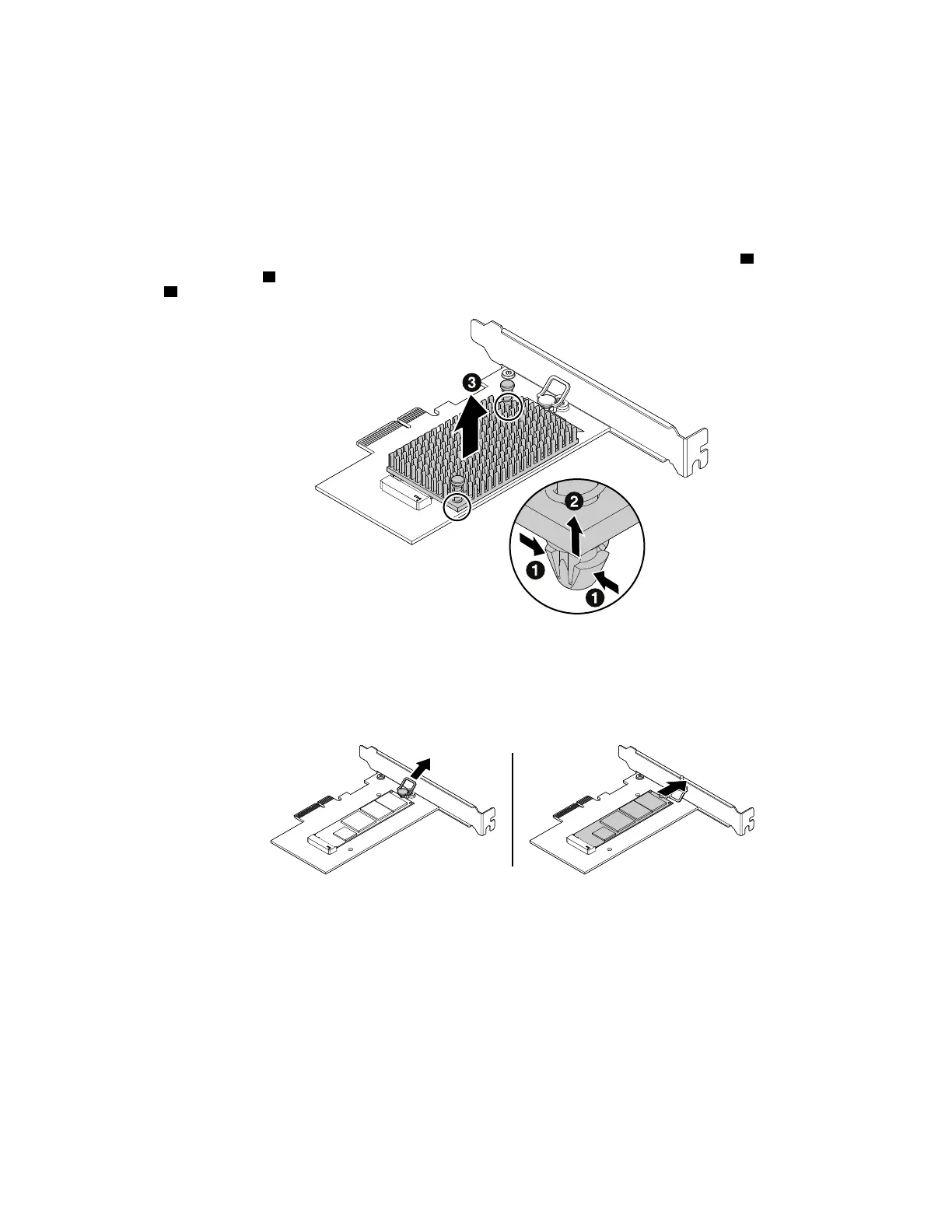
b. The heat sink is secured by two mounting studs. Pinch the clips of the studs inward
1 and push the
studs upward
2 to release the heat sink. Then, lift the heat sink off the M.2 solid-state drive adapter
3 .
Figure 42. Removing the heat sink from the M.2 solid-state drive adapter
c. The M.2 solid-state drive is secured by a retention latch. Pull the handle of the retention latch
outward to release the M.2 solid-state drive. Then, gently pull the M.2 solid-state drive out of the M.2
slot.
Figure 43. Removing the M.2 solid-state drive
3. To install the M.2 solid-state drive, do the following:
Chapter 9. Hardware removal and installation 113














 To Next Page