• Front-access storage enclosure
Note: The following instructions on how to remove or install an flex storage enclosure also apply to other
supported devices in the flex bay.
To remove or install an flex storage enclosure, do the following:
1. Prepare your computer. See “Preparing your computer” on page 98.
2. Locate the flex bay. See “Computer components” on page 33.
3. To remove the flex storage enclosure, do the following:
a. Disconnect the signal cable and the power cable from the rear of the flex storage enclosure.
Note: If you are removing other supported devices from the flex bay, disconnect any additional
cables first.
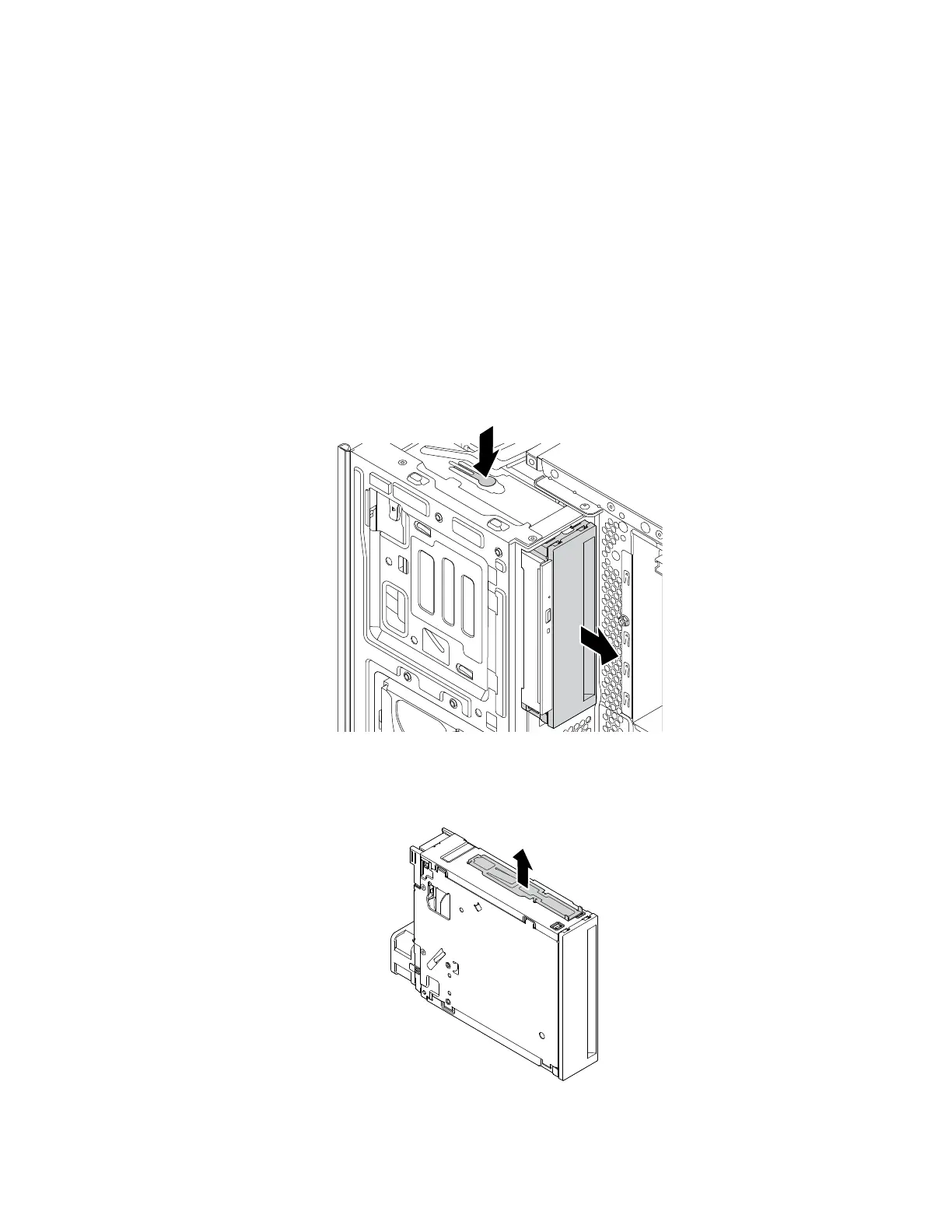
b. Press the tab downward as shown and push the rear of the flex storage enclosure simultaneously to
slide it out of the computer.
Figure 51. Removing the flex storage enclosure
c. Remove the retainer from the flex storage enclosure as shown.
Figure 52. Removing the retainer
118 P330 Hardware Maintenance Manual














 To Next Page