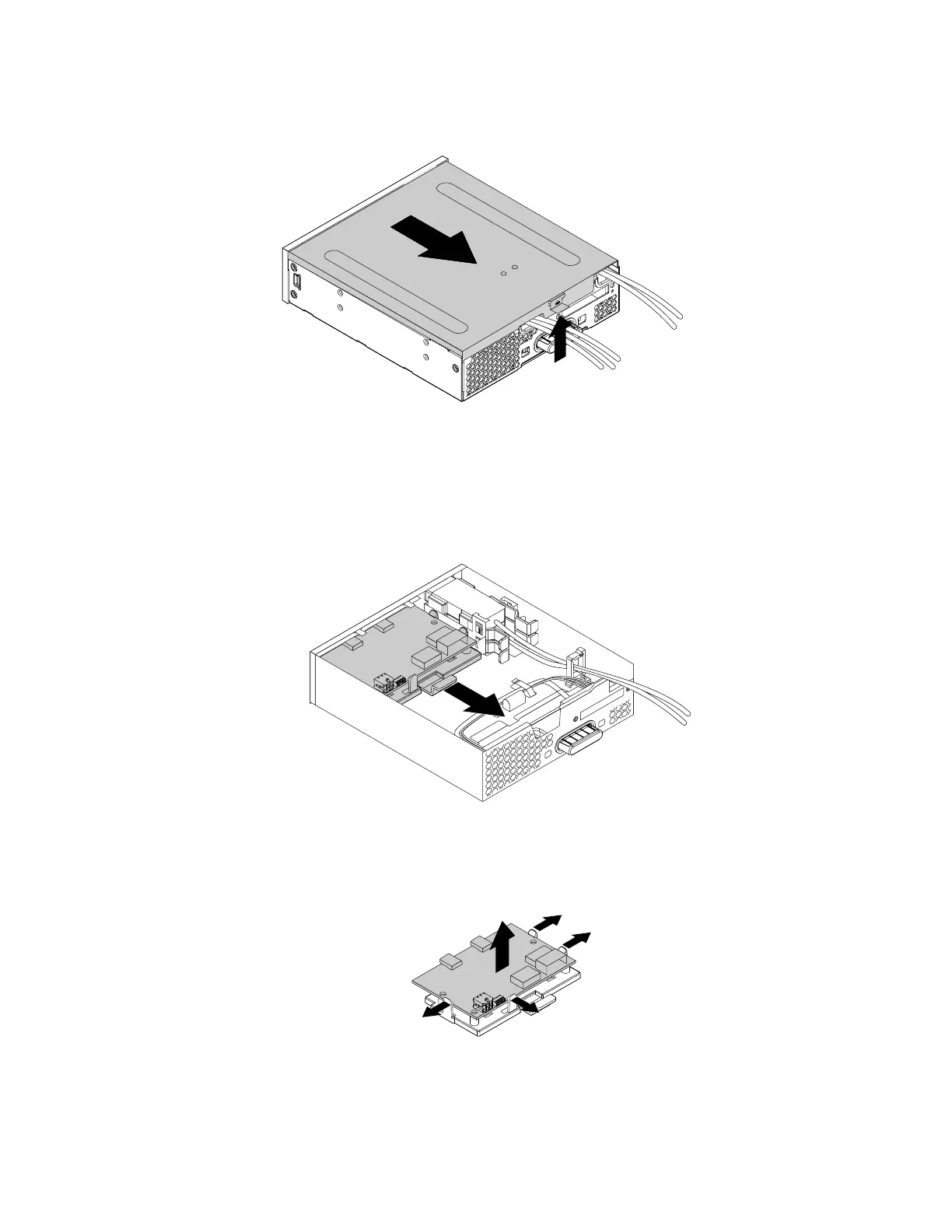
4. Lift the clip on the rear of the flex module, and then slide the flex module cover to the rear of the flex
module.
Figure 168. Removing the flex module cover
5. To remove a front Thunderbolt I/O adapter, do the following:
a. Disconnect all the cables from the front Thunderbolt I/O adapter.
b. Pull the clip as shown to remove the front Thunderbolt I/O adapter and the retaining bracket out of
the flex module.
Figure 169. Removing the front Thunderbolt adapter and the retaining bracket out of the flex module
c. Flex the four clips on the sides of the retaining bracket to remove the front Thunderbolt I/O adapter
from the bracket.
Figure 170. Removing the front Thunderbolt I/O adapter from the retaining bracket
6. To install a new front Thunderbolt I/O adapter, do the following:
184
P330 Hardware Maintenance Manual














 To Next Page