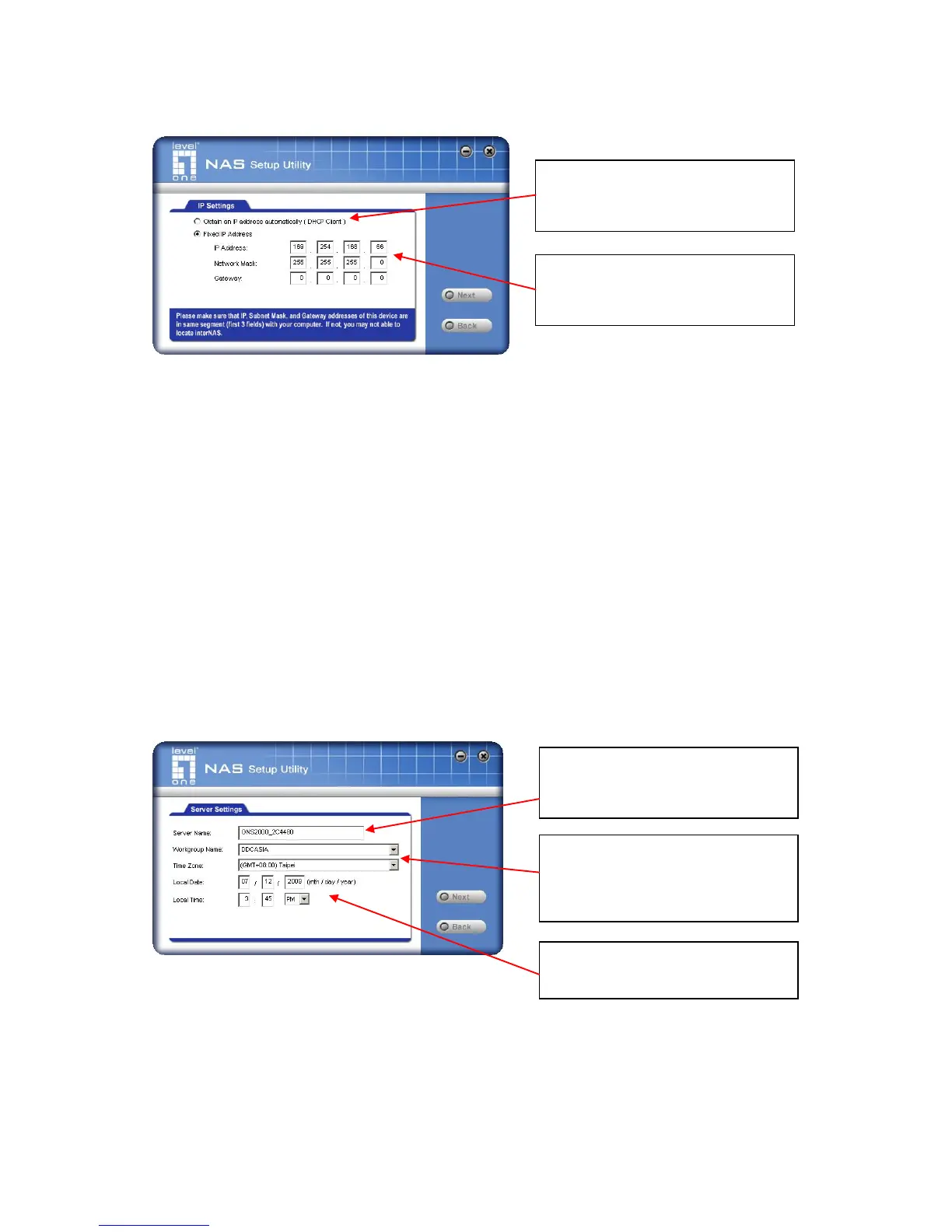
3. The following screen will then be displayed.
Obtain an IP address
automatically
(DHCP Client)
Select this only if your LAN has a DHCP Server. Normally,
it is better for servers to use a Fixed IP address (see below)
This option is recommended. If this option is used, the IP
address or GNS-2000 will never change. You need to
enter the following data.
IP address - The utility will suggest an unused IP
address within the address range used on your LAN. If
you wish, you can change this, but you must ensure the
address is unused.
Network Mask - This must match the value used by
PCs on your LAN.
Gateway - This must match the value used by PCs on
your LAN.
4. Click "Next" to continue. The following screen will then be displayed:
The following data is required.
The Default Name is shown. Change this if you wish.
Normally, this name should match the Workgroup name used by
PCs on your LAN.
Select this if your LAN has a DHCP
server, otherwise select “ Fixed IP
Address” .
Suggested values are compatible
with your LAN. Suggested IP ad-
dress is currently unused.
Each interNAS/USB comes with an
unique server name. You may
change it if you wish.
All workgroups on the network are
listed. You may select one from the
pull-down menu, or create a new
one.
Set the proper Time-Zone, Date and
Time here.



 To Next Page