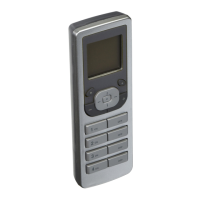
NOTE: Upon initial power up of
the VRCPG, the Vizia
RF +
TM
logo
will appear briefly and then the
DATE & TIME screen will display,
prompting the user to change
the settings. NOTE: Leviton
recommends setting the date and
time before proceeding. Failure to
do so will disable your events (refer to EVENTS pg.
15). NOTE: The time will blink if the VRCPG loses
power to indicate there may be an error. Set the date
and time for your VRCPG as follows:
STARTUP
5
TIME
1. Use the arrow buttons to navigate and set the
date & time using the and buttons.
2.
Press right soft key (Save).
You will be prompted to START
INSTALLATION CHECKLIST.
Press right soft key (YES).
NOTE: When you select YES to
begin the Installation Checklist,
the LANGUAGE screen will
appear. Use up and down arrow
buttons to scroll between
"ENGLISH" and "SPANISH".
Press center button to select
your language choice and right
soft key (Save) to complete.


 To Next Page