7
Using TEXT EDITOR you can
either assign a name from a list of
templates or assign a unique name
to your device.
NOTE: The right soft key will
toggle from Template to Abc to
ABC to abc to 123 and back to
Template again. This feature allows
you to access the template names or to select capital/
undercase letters and numerals to name your device.
To use the pre-made Templates,
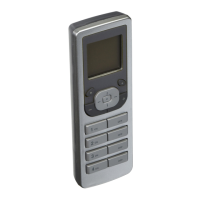
with Template displayed, use the
up and down arrow buttons
to select a name.
The VRCPG offers a list of over 100
commonly used names to choose
from. NOTE: The template names
are editable for customization if you
choose to alter them.
To create a unique name or modify text, under
ABC (or Abc, abc, 123) use the up and down arrow
buttons to change each letter or numeral and
side arrow buttons to navigate. The and
buttons can be used to insert and delete characters.
Once your template or created
name is displayed, press the
center button .Your device
has now been included in
the network with your chosen
name. The VRCPG will confirm
inclusion with the name displayed
and prompt you to continue to
INCLUDE DIM/SWCH by pressing the center button
or to continue to the
NEXT STEP by pressing
the right soft key . After all Dimmers/Switches are
included, proceed to the NEXT STEP.


 To Next Page