GS350_OM_OM30D41U_(U)
527
5-4. Using the hands-free phone system (for cellular phone)
5
Interior features
For PBAP compatible Bluetooth
®
phones
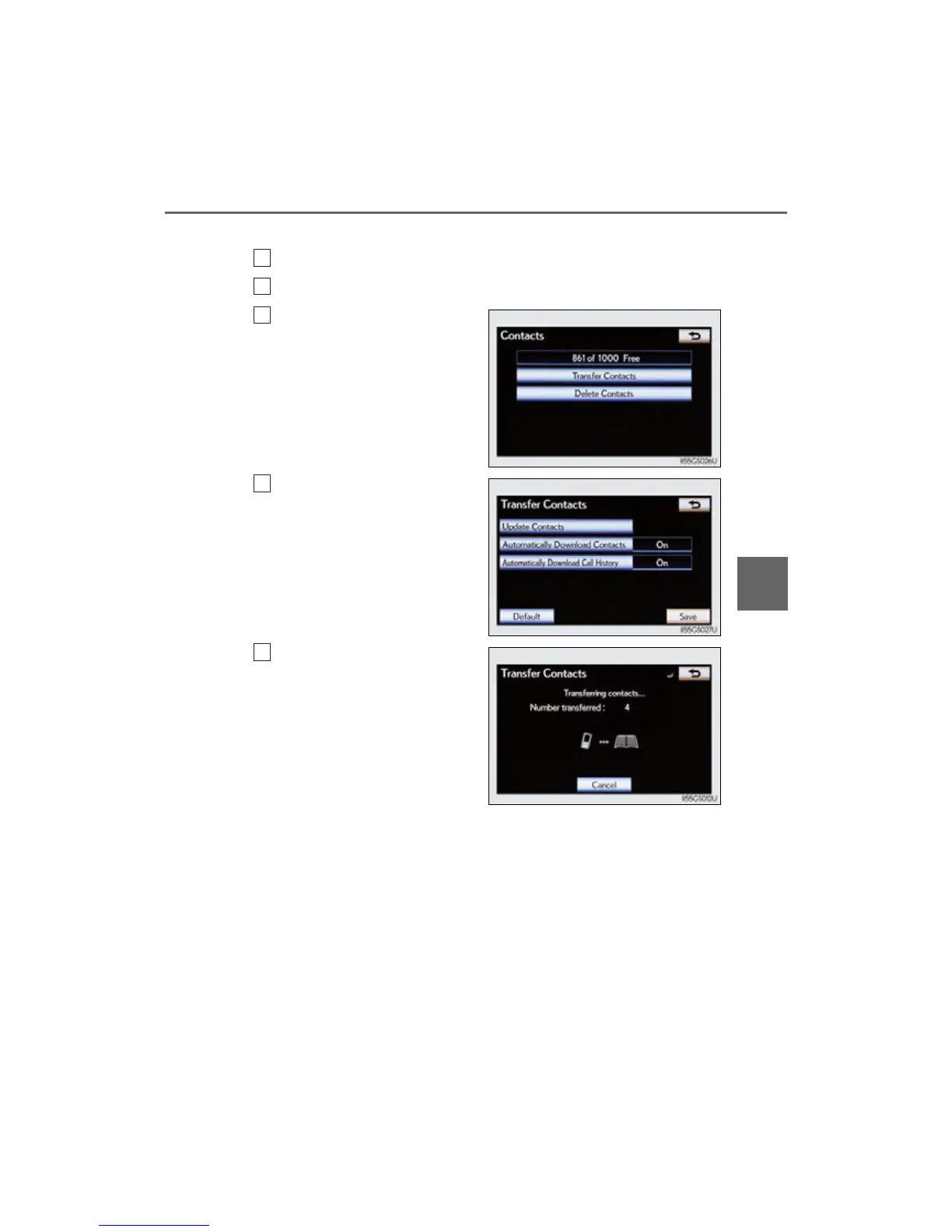
Display the “Phonebook Settings” screen. (P. 526)
Select “Manage Contacts” on the “Phonebook Settings” screen.
Select “Transfer Contacts”.
Select “Update Contacts”.
Transfer the phonebook data
to the system using the
Bluetooth
®
phone.
This operation may be unnecessary
depending on the cellular phone
model.
Depending on the type of
Bluetooth
®
phone:
• OBEX authentication may be
required when transferring
phonebook data. Enter “1234”
into the Bluetooth
®
phone.
• The registered image on the
phonebook may not appear
when phonebook data is trans-
ferred.
If you wish to cancel the transfer
before it finishes, select “Cancel”.
1
2
3



 To Next Page