29 Infotainment System
Pause [Level 4]9
Press [w] during playback.
Press [r] to resume playback.
Playing the next movie [Level 4]
Press [u] to play the next movie.
Playing the previous movie [Level
4]
Press [t] within 5 seconds of playback
time to play the previous movie.
Returning to the beginning of the
current movie [Level 4]
Press [t] after 5 seconds of playback
time.
Scanning forward or backward
[Level 4]
Hold down [t] / [u] during playback to
rewind or fast-forward. Release the
button to resume playback at normal
speed.
Viewing to full screen [Level 4]
From the movie screen, press [ ] to
view to full screen. Press [
] again to
return to the previous screen.
Using the USB movie menu [Level
4]
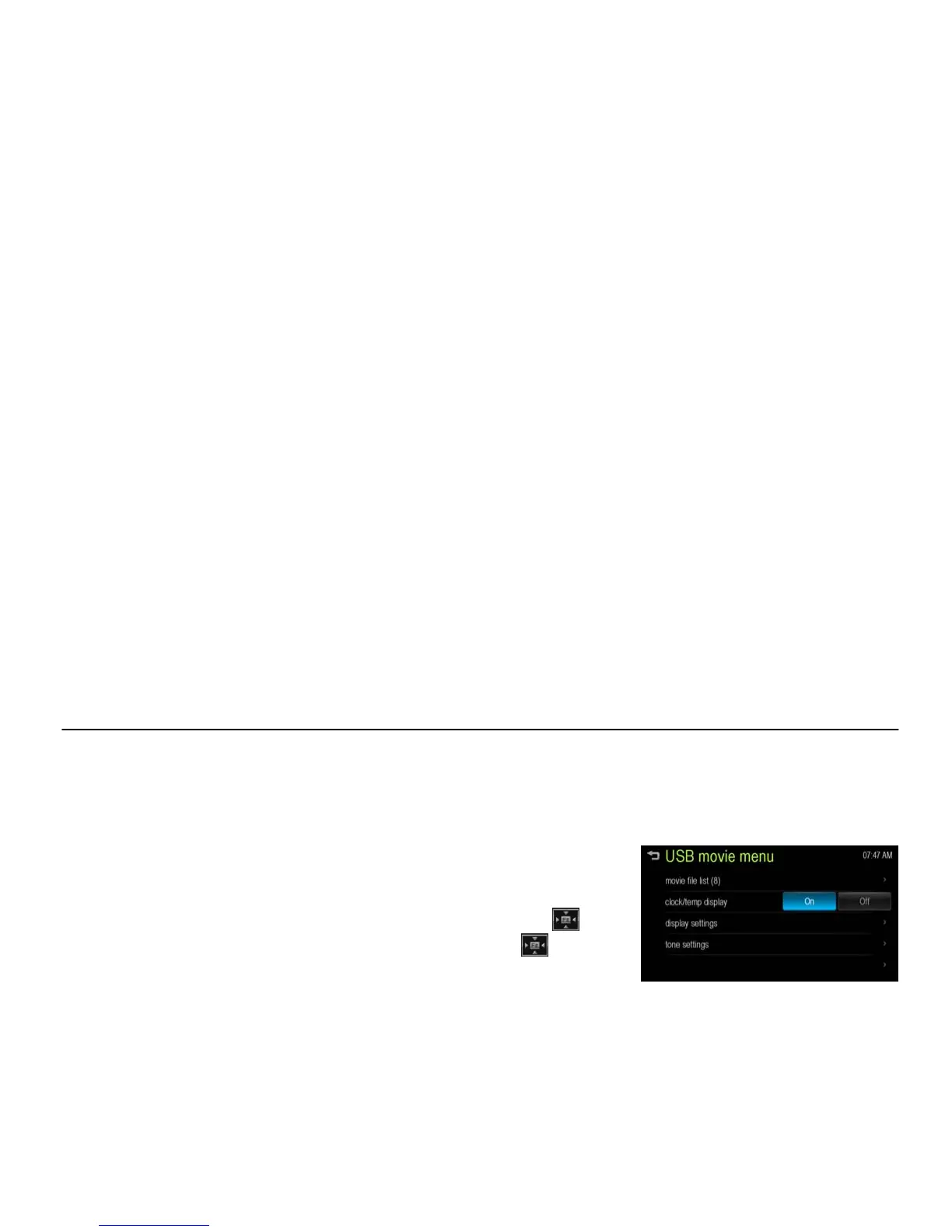
1. From the movie screen, press
[MENU]. The USB movie menu is
displayed.
[USB movie menu_BYOM]
2. Press the desired menu.
[movie file list]: Displays all movie file
list.
[clock/temp display]: To display the
clock and temperature on the full
screen, select On or Off.
[display setting]: Adjust the Brightness
and Contrast.
[tone settings]: Adjust the sound setup.
For details, refer to the “Tone settings
(FM/AM menu)” of the “Radio” section.
3. After the setting is complete, press
[4].



 To Next Page