43 Infotainment System
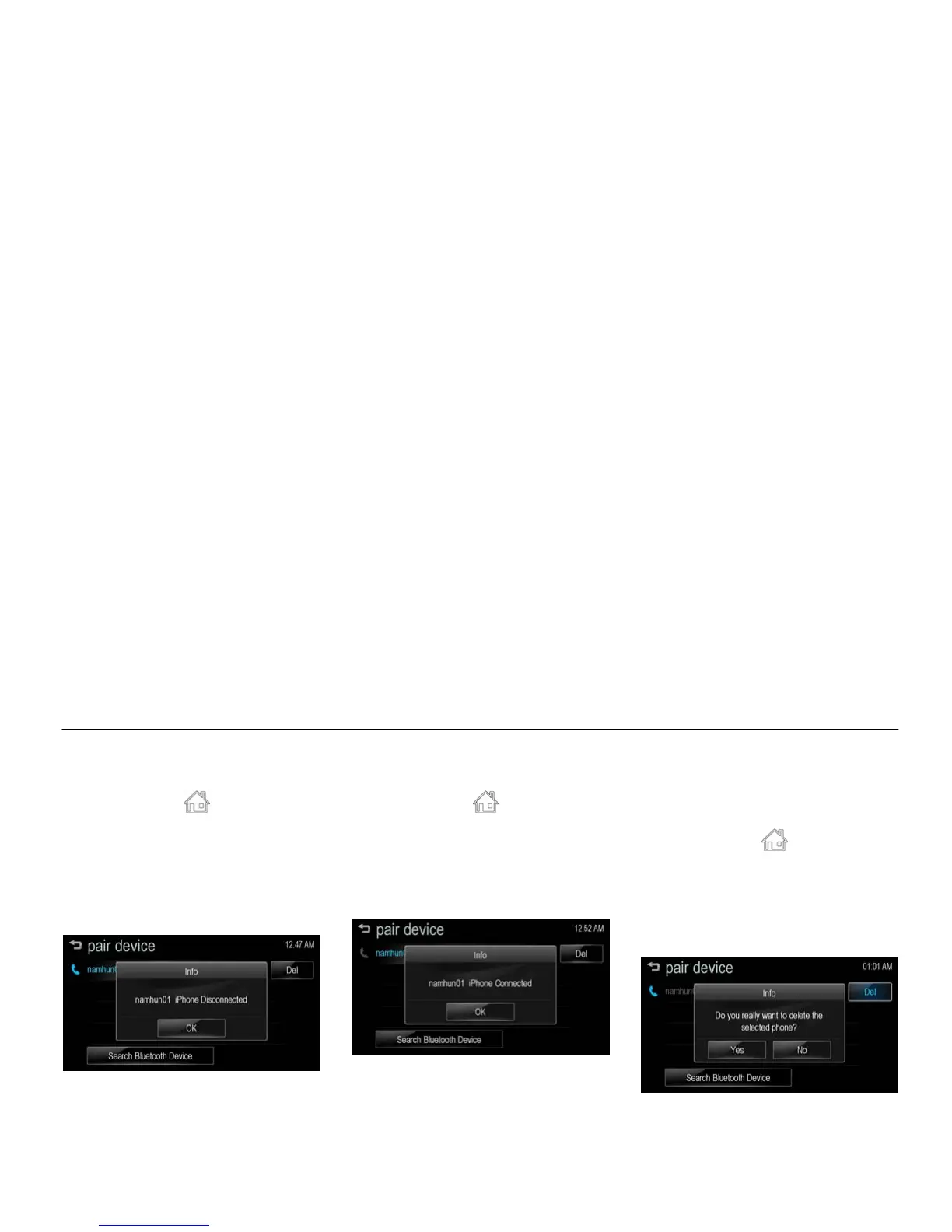
Disconnecting the Bluetooth
Device [Level 4]
1. Press [HOME ( )] on the control
panel.
2. Press [settings] on the home menu.
3. Press [connection settings] >
[bluetooth settings] > [pair device].
4. Press the name of the device you
wish to disconnect.
[bt disconnect_BYOM]
5. Press [OK].
Connecting the Bluetooth Device
[Level 4]
1. Press [HOME ( )] on the control
panel.
2. Press [settings] on the home menu.
3. Press [connection settings] >
[bluetooth settings] > [pair device].
4. Press the device you wish to pair.
[bt connect_BYOM]
5. Press [OK].
Deleting the Bluetooth Device
[Level 4]
If you no longer need to use the
Bluetooth device, you can delete it.
1. Press [HOME (
)] on the control
panel.
2. Press [settings] on the home menu.
3. Press [connection settings] >
[bluetooth settings] > [pair device].
4. Press [Del].
[bt del_BYOM]
5. Press [Yes].



 To Next Page