Infotainment System 32
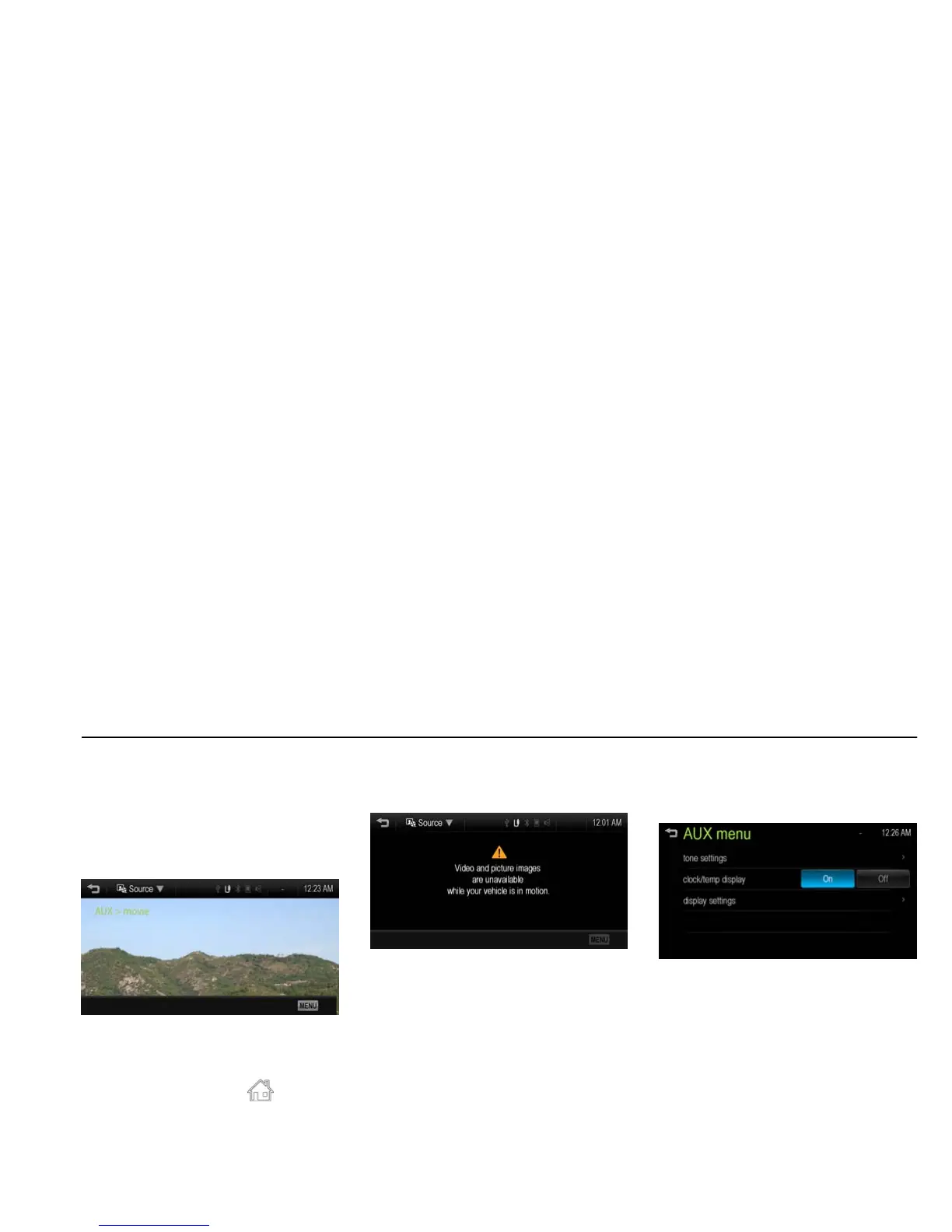
Playing movie of auxiliary device
[Level 4]
Connect the auxiliary device containing
movie source to the AUX input terminal.
Once the Infotainment system finishes
reading the information on the auxiliary
device, it will be automatically played.
[aux movie_J300 EU]
Note
If the auxiliary device is already
connected, press [HOME (
)] > [picture
& movie] > [Source R] > [AUX (movie)] to
play movie of auxiliary device.
In case of the iPod/iPhone, connect the
iPod/iPhone to the AUX input terminal by
using the AUX cable for iPod/iPhone to
play the movie file of iPod/iPhone.
Movie is not available while driving.
(Based on the traffic regulation, Movie is
only available whenever vehicle is
parked.)
[aux movie no_J300 EU]
Using the AUX movie menu
1. From the AUX movie screen, press
[MENU]. The AUX menu is
displayed.
[aux movie menu_BYOM]
2. Press the desired menu.
[tone settings]: Adjust the sound setup.
For details, refer to the “Tone settings
(FM/AM menu)” of the “Radio” section.
[clock/temp display]: To display the
clock and temperature on the full
screen, select On or Off.
[display settings]: Adjust the
brightness and contrast.
3. After the setting is complete, press
[
4].



 To Next Page