28
6
-
1.
Using network
Connecting in Windows OS
3. Using a function of Windows file share
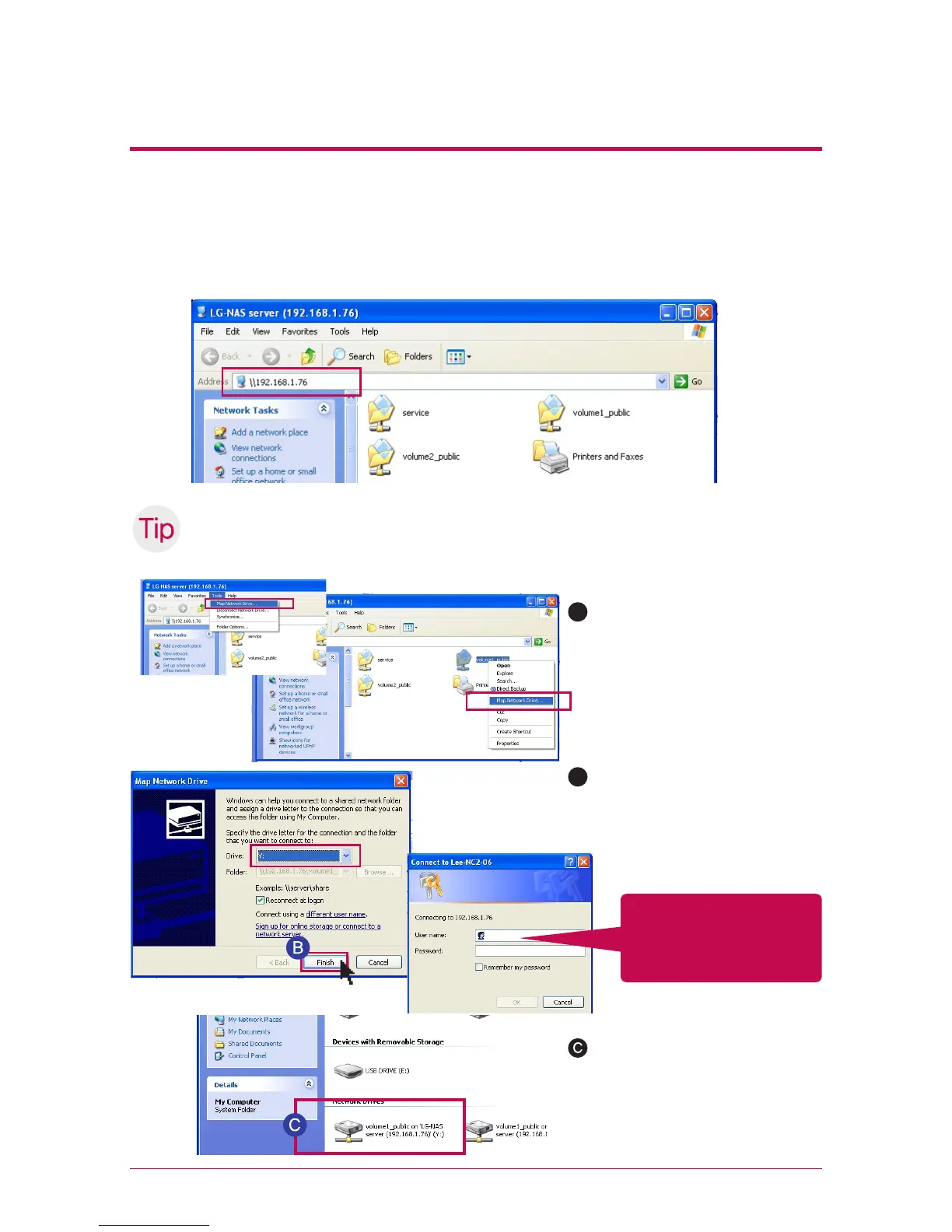
Open the search engine of Windows, and enter ‘\\IPaddress’ in the address window.
You can access to the server after logging in. Please refer to 5-1. Using Network Storage
[Using NAS Detector] if you do not know IP address.
Set-up as a network drive after Tip server connection.
※
If you set up as a network drive, you can connect to LG Network Storage more conveniently
next time.
A
“tool” -> network drive connec-
tion” or click on network drive
using the right button of the
mouse.
After assigning drive letter and
connection folder on the ‘net-
work drive connection’ window,
click on ‘finish’.
After creating the drive in my
computer, it can be simultane-
ously used with the hard disk.
B
Logging in by entering
an user ID, ‘admin’, and a
password, ‘admin’.



 To Next Page