96
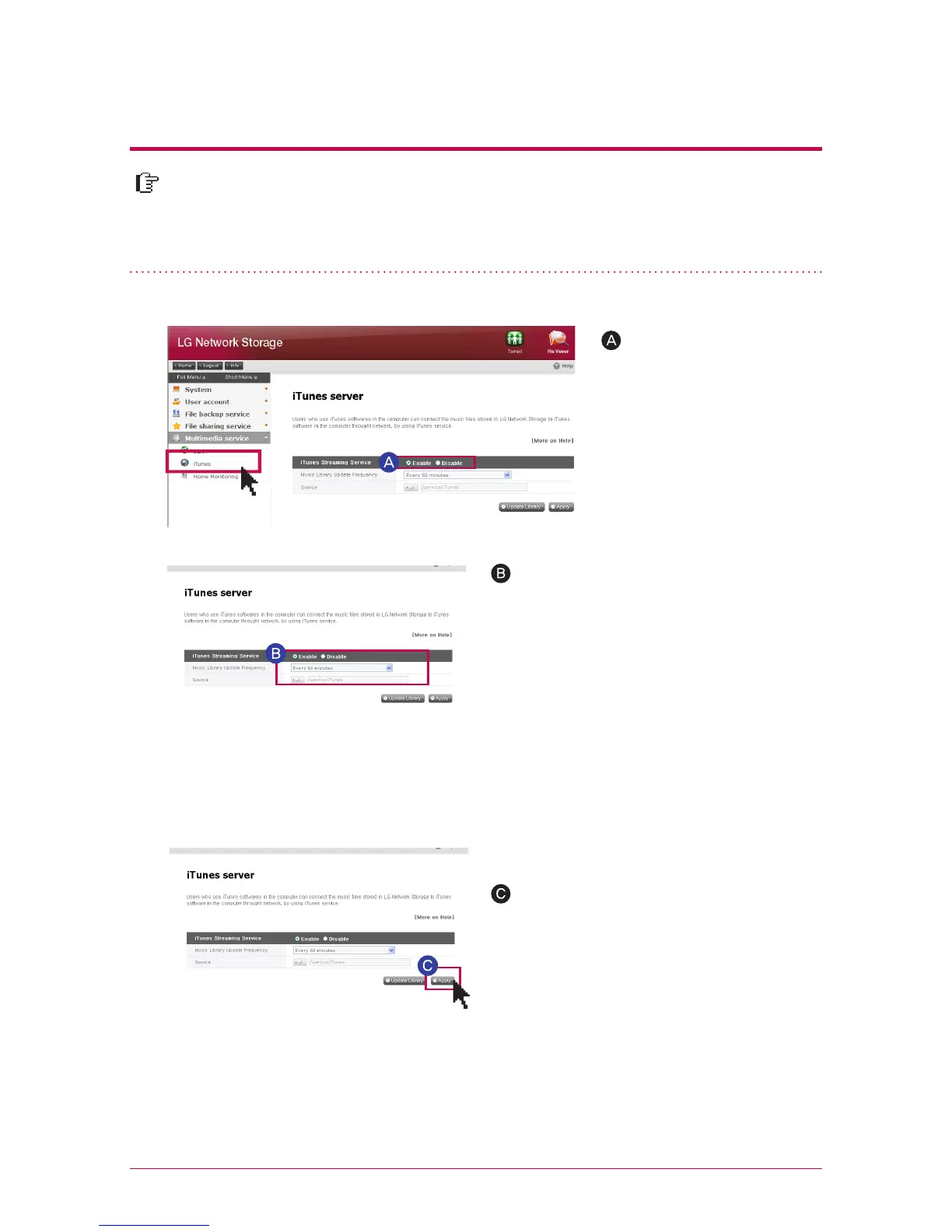
It is possible to play music file saved in LG Network Storage using iTunes service
with iTunes program for PC/Mac. It does not affect a storage space of PC/Mac
as all music are transferred with streaming type.
11
-
2.
Multimedia service
iTunes
It sets up an interval of update of music file.
-
manual update (compulsory)
It is performed one time when the service of
the music file list for streaming operates.
-
every 60 minutes (automatic)
Music file list is updated regularly every 60
minutes. You should restart a client program
in order to obtain an updated music file list.
※
If the music file is not updated on a regular basis, compulsory update option is rec-
ommended as creation of the music file list may take some time.
‘Multimedia service’ ->
click on use ‘iTunes’ ->
click on use ‘Enable’
Click on ‘Apply’
If you do not want to use,
choose ‘Disable’
※



 To Next Page