102
It explains about maintenance management and self-diagnostic function of LG
Network Storage in general.
14.
Network Storage management and
self-diagnostic function
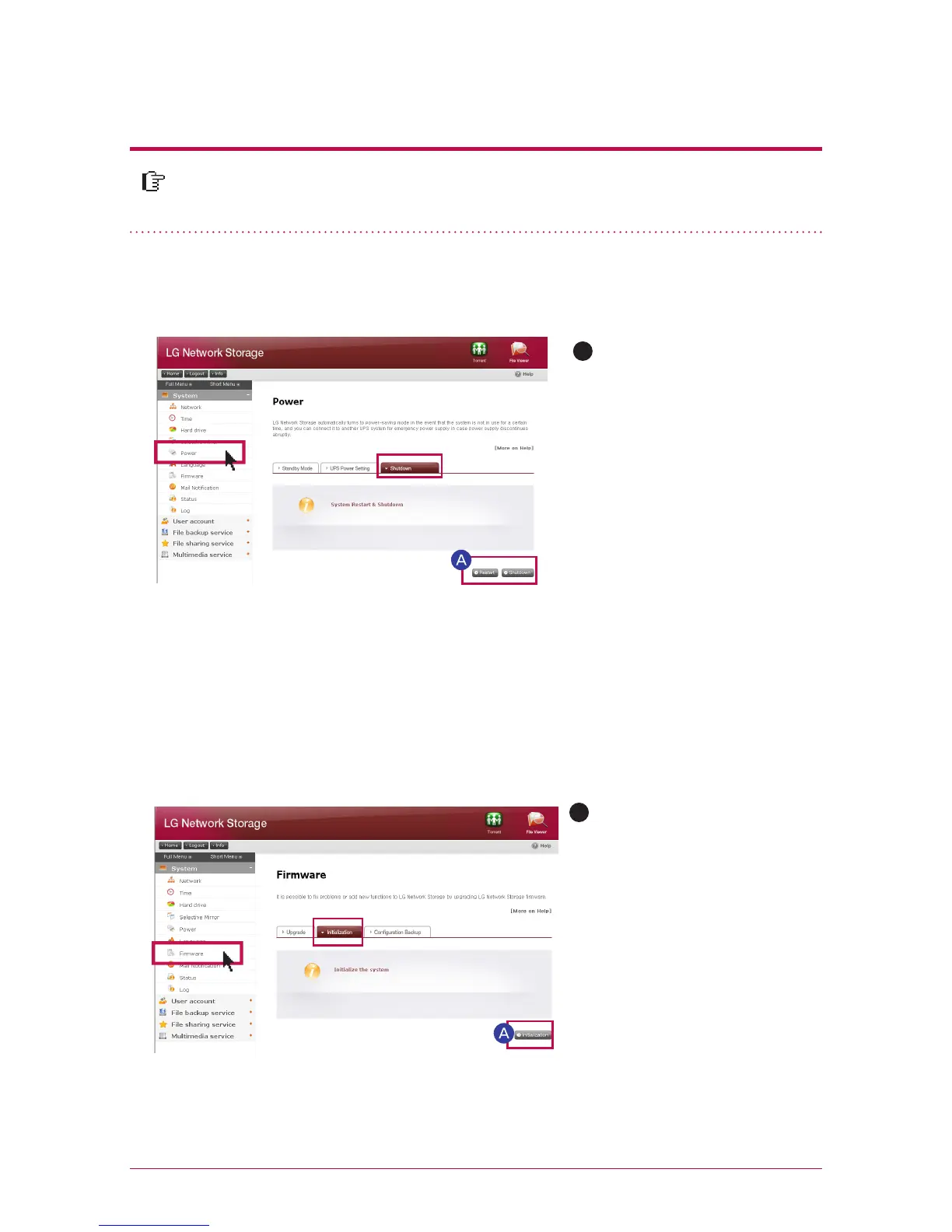
1. LG Network Storage shut down/restart
A
It gives notice to all users connected to save files in operation and stop using
LG Network Storage.
Move to a tab of administrator
web menu -> System -> Power
->‘Shut down’. You can restart
the system by pressing ‘restart’
or end by pressing ‘shut down’
according to the explanation.
※
A
Categories initialized with LG
Network Storage default
- system administrator ID
password: admin, admin
- network set-up/TCP/IP orga-
nization:
DHCP mode set as a standard
- organization information of the
hard disk
- set-up value of the service
-user / folder / group list
Log in by entering user ID ‘ad-
min’ and password ‘admin’.
If you shut down LG Network Storage using a button, press on the power button until you
hear a buzzer sound. LG Network Storage starts shutting down if you remove your hand
after the buzzer beeps, which means the start of shut-down.
Move an administrator web
menu to -> system -> firmware
-> “initialization” tab. Click on the
‘initialization’ button according to
the explanation.
2. Administrator password and initialization of the network set-up
You can initialize the system with default.
※
In this case, registered user information and data disappear completely and they are not
restorable, therefore please set up with a caution.



 To Next Page