33
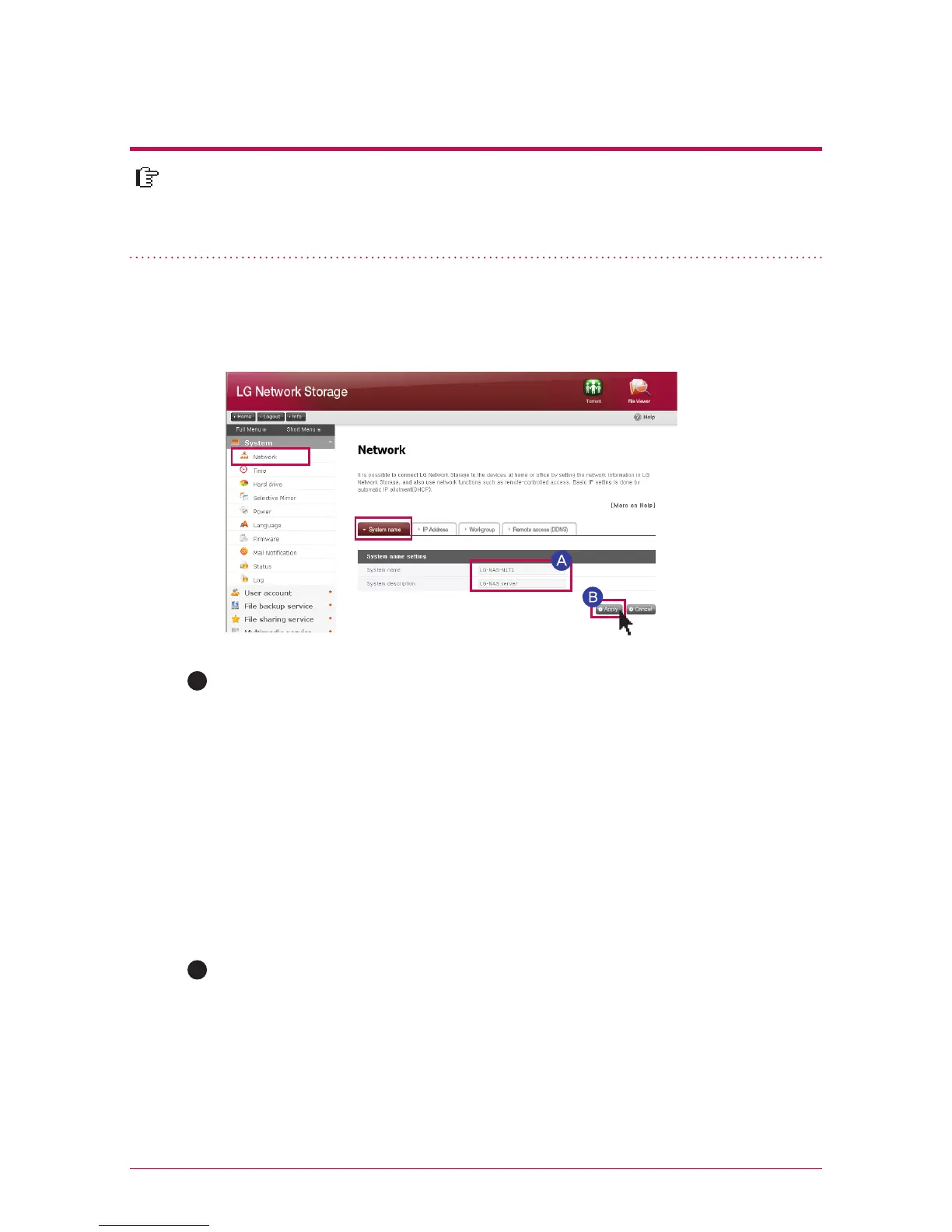
In a ‘network set-up’ menu, you make an important configuration to connect
LG Network Storage to the network. Please be cautious in setting up as a fault
generated in set-up may create a problem in connection.
7
-
1.
System set-up
Network set-up
Click on ‘system name’ tab at the ‘network’
Enter the system name of LG Network Storage. For system name, you can use a
minimum of 3 letters to a maximum of 12 letters, and combine alphabets (A-Z or
a-z),numbers (0-9), hyphen(-) as you want, however numbers or hyphen cannot be
placed at the very front. Special characters cannot be used.
Name that can be used : LG-NAS, LGNAS-123
Name that can not be used : LG_NAS, -LGNAS, 123-LG, LG-#, LG/N
Enter the explanation of the system. For the explanation of the system, you can use
a maximum of 24 letters with a combination of alphabet, numbers, under bar (_),
hyphen (-), space. This set-up only affects a client.
A
1. System name
Click on ‘Apply’ button .
B



 To Next Page