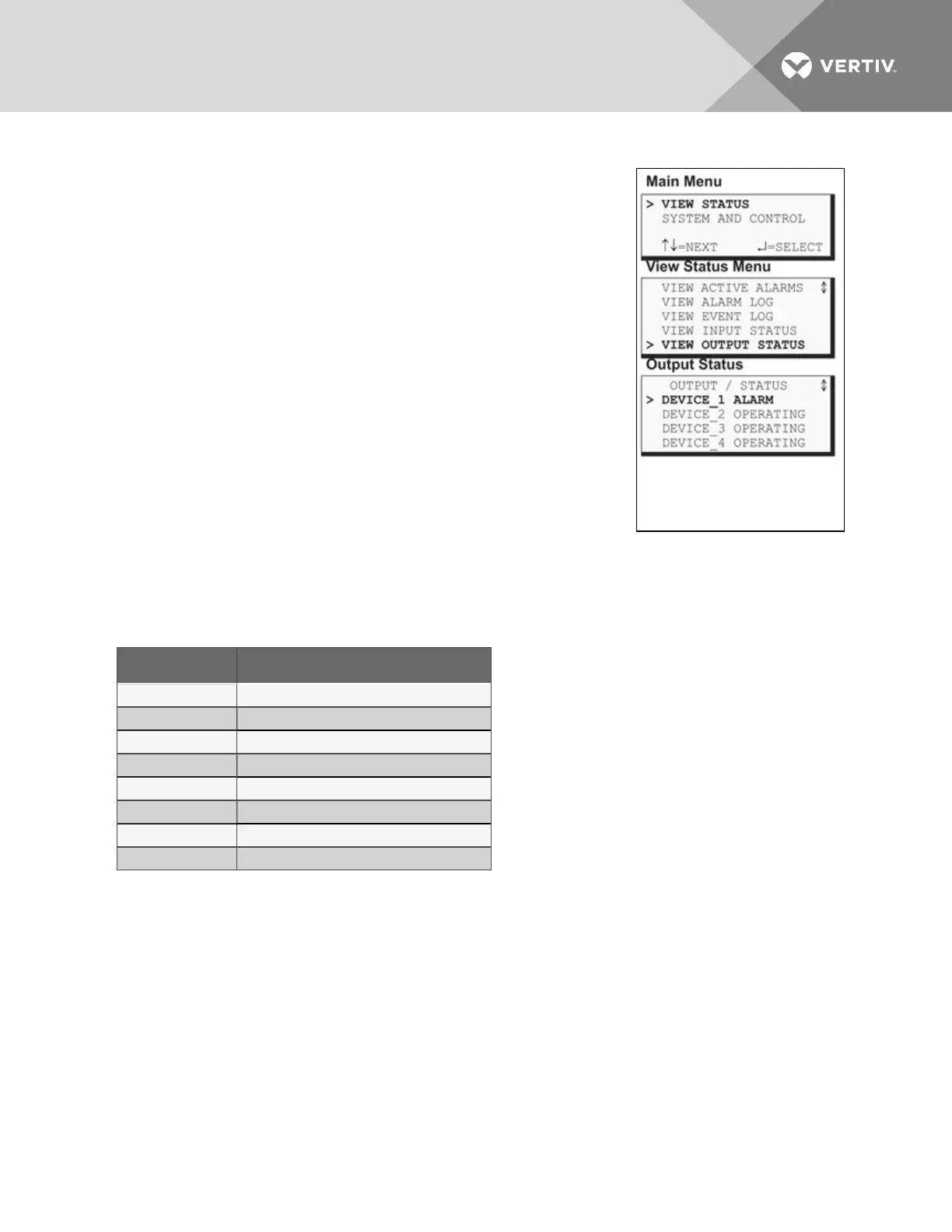
5.5 View Output Status
The Output Status option allows you to view the current status of all four
outputs.
To view the Output Status:
• From the Main Menu, use the arrows to choose View Status, then
press Enter.
• From the View Status Menu, use the arrows to choose View
Output Status, then press Enter.
5.5.1 Output Status
The Output Status screen displays the status of each digital output.
The following details appear for digital outputs:
• the name of the output (for example, DEVICE_1)
• the current status (ALARM)—values are updated constantly
while being viewed
There are eight possible states for a digital output, as shown in Table 5.4
below.
State Description
OPERATING Device operating, or ON
STANDBY Device in standby mode
ALARM Device in alarm
FORCE ON Device forced ON by operator
FORCE OFF Device forced OFF by operator
HW FORCE ON Device forced ON by hardware switch
PENDING Pending delay timer
NOT USED Device not used
Table 5.4
Digital output states
Viewing Additional Output Data
All output data may be viewed by scrolling beyond the four lines that appear on the LCD at one time:
• To view all outputs, use the arrows¯.
• To return to the previous screen, press the ESC key.
Vertiv | Liebert® AC4 User Manual | 36


 To Next Page