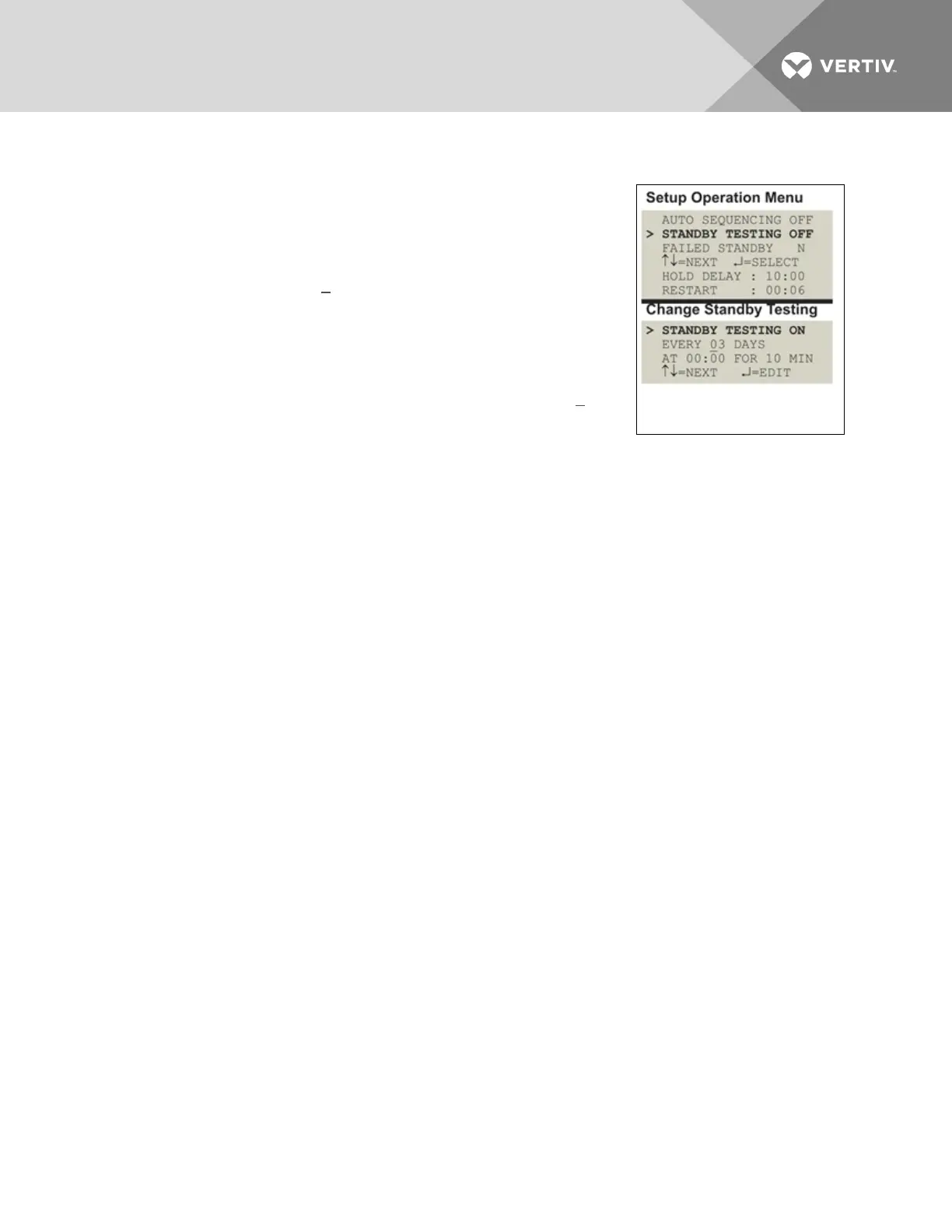
• From the Setup System Operation Menu, use the arrows to choose Standby Testing, then
press Enter.
• In the Change Standby Testing screen, press Enter to edit
Standby Testing, then use the arrows to choose ON to activate
or OFF to deactivate the standby testing feature. Press Enter.
• Select the desired interval for how frequently the testing should
occur in the Every03 Daysfield. The default is 3 days; valid
entries range from 0 to 99 days.
• For each digit, use the arrows to choose a number from 0 to
9, then press Enter to advance to the next digit.
• When finished, press Enter to configure the time of day.
• Specify the time of day the test should begin in the At00:00
field. The format is HH:MM for hours and minutes.
• Use the arrows to choose from available entries for hours
(00-23), then press Enter to advance to minutes.
• Use the arrows to select minutes (00-59).
• When finished, press Enter again.
• Specify the duration of the test in minutes—the length of time the standby units will be turned
On—in the For 10 Min field. Use the arrows to choose a number from 0 to 59 minutes. The
default is 10 minutes.
• When finished, press Enter.
Vertiv | Liebert® AC4 User Manual | 62


 To Next Page