Message Description
AUTO Automatic
Controlled by Liebert AC4
(default for all outputs)
FORCE ON Manually ON
This output has been forced ON (operating) or OFF
via the Override Output menu
FORCE OFF Manually OFF
HW FORCE ON
Manually ON
(all outputs)
All outputs have been forced ON (operating) via the
hardware switch on the circuit board (see Controller
Board Overview on page9)
Table 7.9
Automatic / manual control - output points
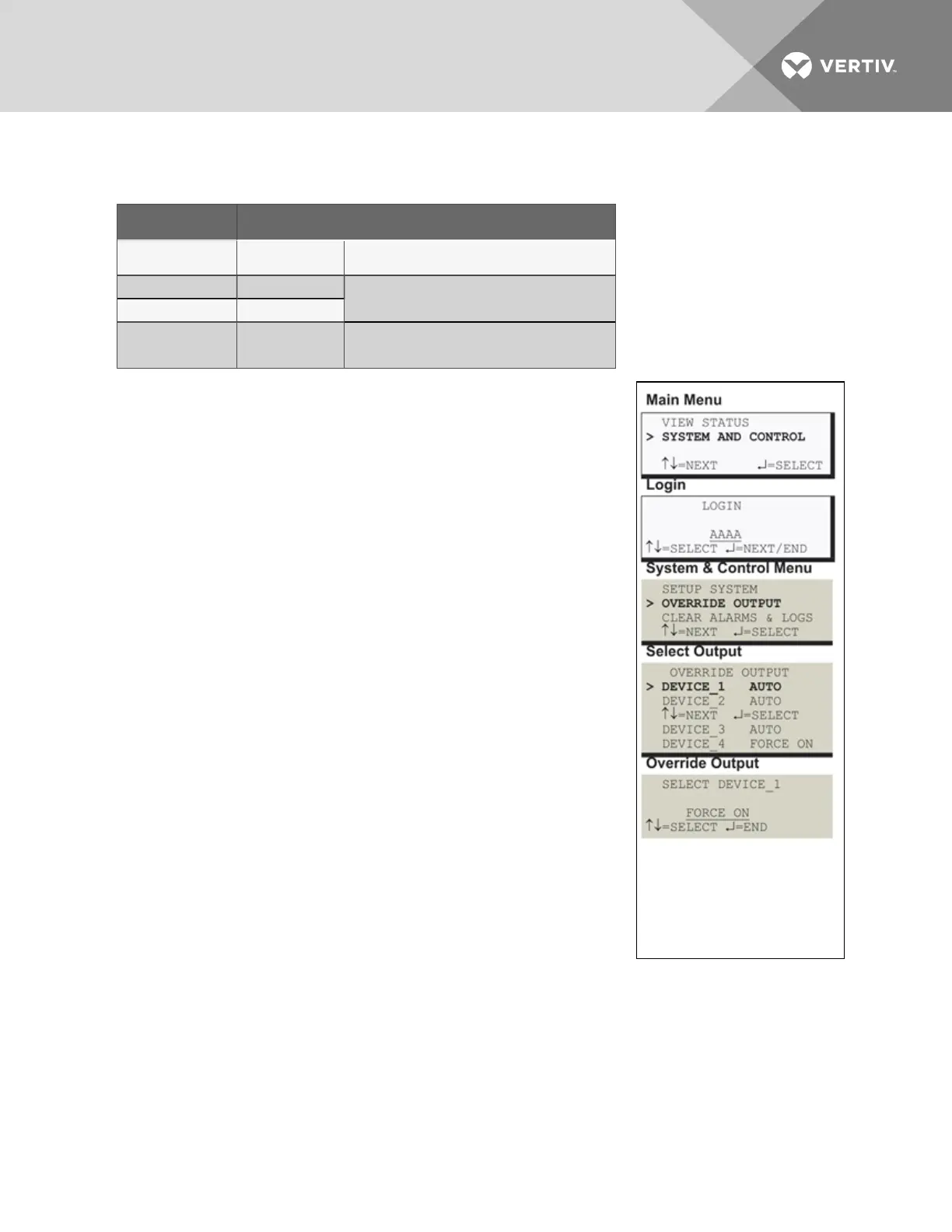
To force an output point ON or OFF or return it to automatic control:
Log In and Choose Override Output
• From the Main Menu, use the arrows to choose System and
Control, then press Enter (see Login on page41 for help).
• Enter your password at the Login screen.
• From the System and Control Menu, use the arrows to choose
Override Output, then press Enter.
Select an Output
The Select Output menu, shown at right, displays the current status of all
four outputs.
• Use the arrows to choose the output you want—for example,
Device_1—and press Enter.
Turn Output ON or OFF / Return to Automatic
• From the Override Output menu, use the arrows to choose one
of these options:
• AUTO - return to automatic control
• FORCE ON - manually turn this output ON (operating)
• FORCE OFF - manually turn this output OFF
• Press Enter.
Vertiv | Liebert® AC4 User Manual | 65


 To Next Page