3.3 RS Topologies
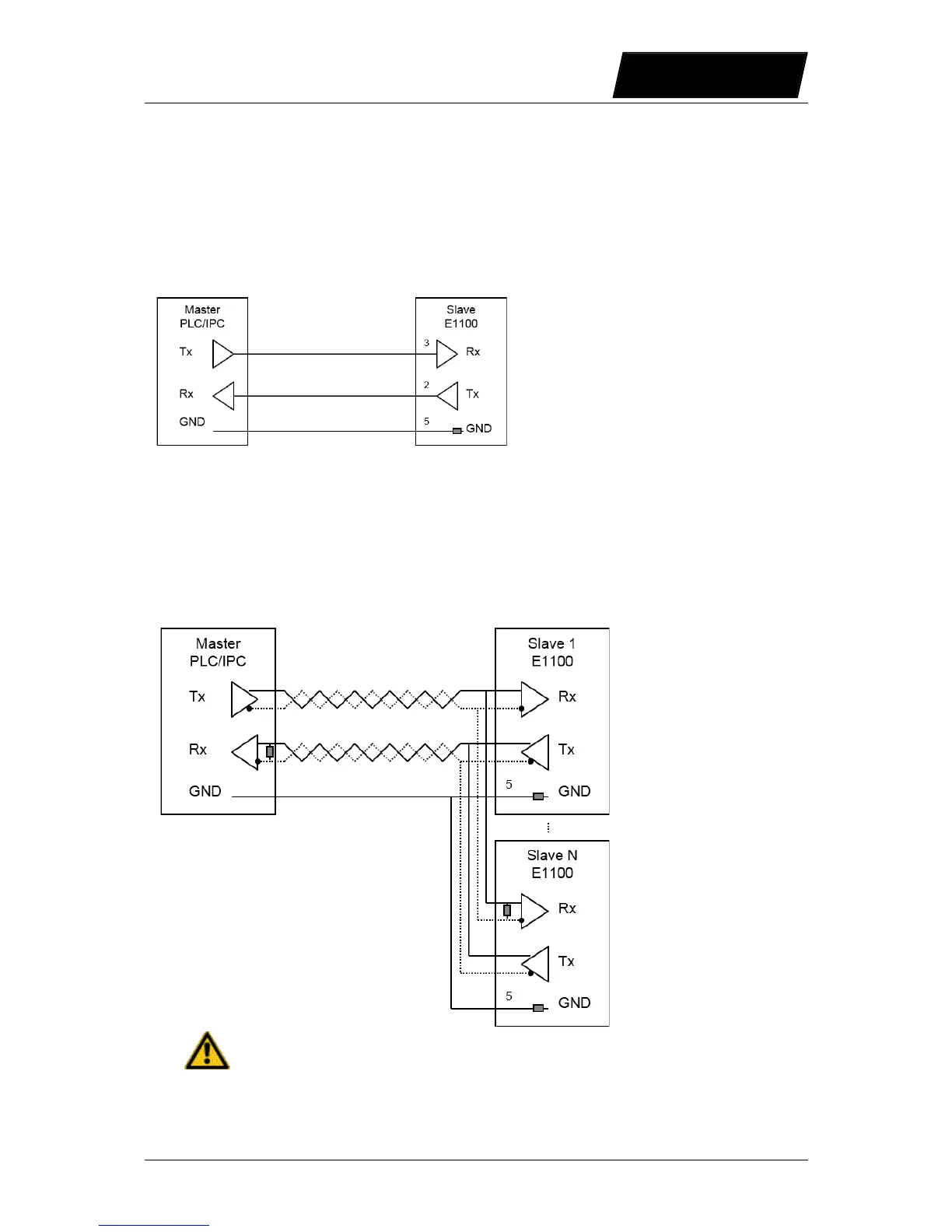
3.3.1 RS232 Topology
Over a RS232 line only one slave can be connected to the master, controlling several slaves
needs several RS232 lines.
The RS232 serial lines are only on the COM connector X5 available.
3.3.2 RS422 Topology
With the RS422 topology several Slaves can be accessed. The master transmit lines are
connected to all slave receive lines and all slave transmit lines are connected with the master
receive lines. With this topology debugging is quiet easy because the master and slave
communication is separated. The easiest way to loop through the communication lines at
slave side, are over the X7/X8 RJ45 connectors with the RS/DP drives. Activate RS485 Term
on S3.2 (S4.2 on B1100 series or S5.2 on E1200 and E1400 series) on the last slave drive.
With B1100 the switch S4.1 has to be set to RS485 select!
NTI AG / LinMot User Manual LinRS Interface / 03/10/2017 Page 9/59



 To Next Page