Individual 40-55 - 129 -
User guide
Connecting PC / Set-top box
You can connect a PC and thus use the TV screen as a monitor.
When connecting a PC or auxiliary device to the AVS socket of the
TV set, adjust the output signal on your PC first so that it matches
one of the signals in the table on page 144.
Switch off all devices before connecting them.
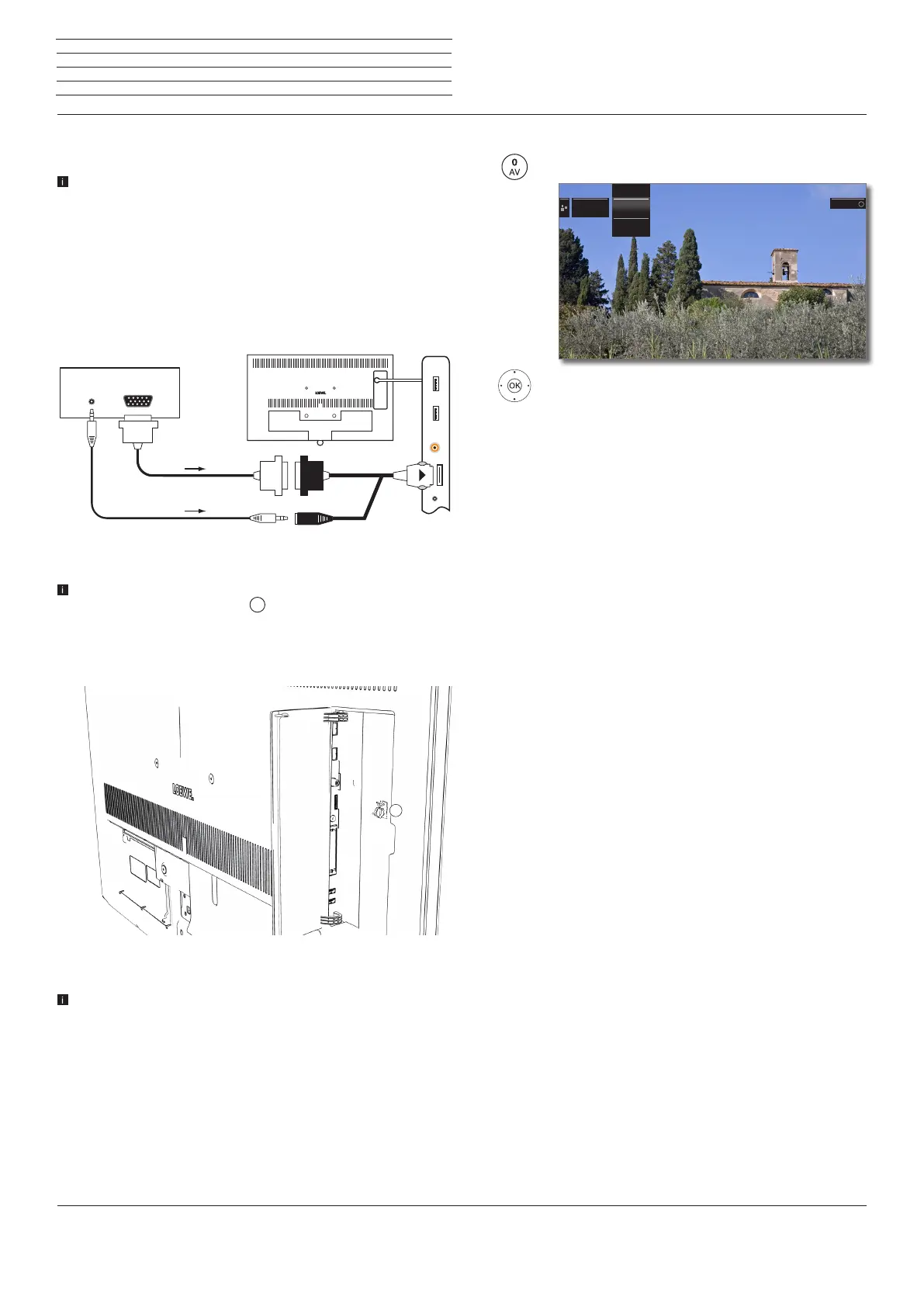
Connect the device to the TV set’s AVS socket with a VGA cable and
the VGA adaptor
(1
. Plug the adaptor plug into the AVS socket of the
TV set so that the arrow on the plug is visible.
Connect the analogue audio signal of the PC to the VGA adaptor via
the jack plug socket.
The adaptor set AV SL2xx includes an adhesive cable holder.
Stick it next to the AVS socket
. Secure the VGA cable with it to
prevent the VGA adaptor from being pulled out of the jack by the
heavy VGA cable.
For more information, refer to the installation instructions supplied
with the adaptor kit.
Alternatively, connect the digital audio output of the PC or auxiliary equip-
ment to the SPDIF IN socket of the TV set with a cinch cable.
The digital audio input can be assigned to the AVS or PC IN socket
in System settings → Connections → Assign digital audio
input (see page 118).
VGAAUDIO
AVS
PC TV set
Connection example of a PC
1
Playback from the device
Call AV selection.
56Select PC IN,
OK switch over.
Adjusting the geometry of the PC picture
You can set the position (vertical, horizontal) and the phase position of
your PC. The settings you find under System settings → Picture→
more ... → PC IN - Display (see page 87).
Connecting devices with component connection (YPbPr / YUV)
External units with component connection YPbPr (often informally
referred to as YUV; see also Glossary on page 152) can be connected
to the AVS socket of the TV set using two adaptors. In addition to the
VGA adaptor, a component VGA adaptor is required (available from
your dealer).
The other units are connected as described in the left column.
VIDEOVIDEO
PC INPC IN
AVSAVS
AV selectionAV selection Select with Select with
OK
n
External devices
(1
Adaptor set is available as an accessory (see page 145).



 To Next Page