Individual 40-55 - 9 -
User guide
1
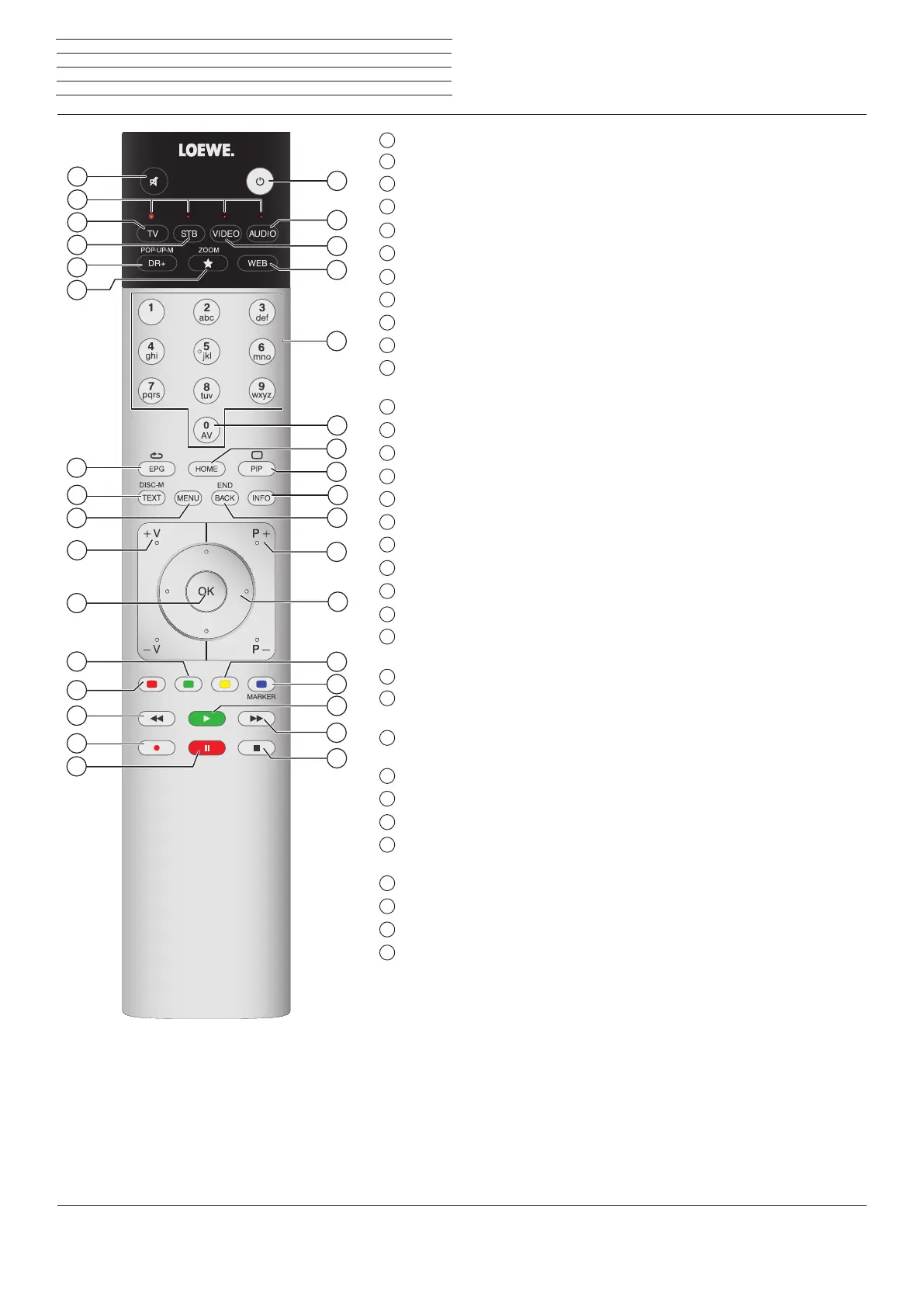
Sound mute/on .................................................................................................. (page 35)
2
LED display for currently operated device ......................................................(page 133)
3
Switch to TV mode .....................................................................................(page 15; 133)
4
Reassign remote control to SetTop-Box (PACE DS440N)
(1
5
DR+ archive on/off ............................................................................................. (page 50)
6
Define active object as favourite ...................................................................... (page 34)
7
Electronic Programme Guide on/off ................................................................ (page 39)
8
Teletext/MediaText
(2
on/off ......................................................................(page 42; 44)
9
Call function list ................................................................................................. (page 38)
10
V+/V- Increase/reduce volume ....................................................................... (page 35)
11
Call station list / expanded station list .......................................................(page 35; 36)
In the menu: confirm/call up ..............................................................................(page 17)
12
Green coloured key: screen on/off ...................................................................(page 69)
13
Red coloured key: call preferred value-added network service
(2
................... (page 44)
14
Jump / wind .................................................................................................(page 59; 60)
15
Direct recording (One Touch Recording) ......................................................... (page 48)
16
Start / interrupt timeshift television ................................................................ (page 47)
17
Finish timeshift .................................................................................................. (page 47)
18
Jump / wind .................................................................................................(page 59; 60)
19
Start / continue timeshift television ................................................................ (page 47)
20
Blue coloured key: call station function list with subfunctions ......................... (page 8)
Yellow coloured key: switching to previously received station ......................... (page 8)
22
In menu / in lists: selecting/setting ................................................................... (page 17)
34 with Motor Unit connected: Rotate TV set
23
P+/P– Select stations up/down ...................................................................... (page 35)
24
Press briefly: back to previous window (step back) ......................................... (page 17)
Press long: close all displays .............................................................................. (page 17)
25
Status display on/off ......................................................................................... (page 37)
In menu: context-relevant Info on/ off .............................................................(page 20)
26
PIP (picture in picture) on/off ........................................................................... (page 45)
Open/close
Home
view .................................................................................... (page 33)
AV selection ........................................................................................................ (page 84)
29
Select station directly ........................................................................................ (page 35)
In the menu: Enter numbers or letters .............................................................. (page 19)
30
Call MediaNet ................................................................................................... (page 75)
Reassign remote control to BluTech Vision 3D
(1
Switch to radio mode
(1
...................................................................................... (page 70)
33
Switch ON/OFF to standby mode .....................................................................(page 16)
System standby .................................................................................................. (page 16)
n
Remote control
The key assignment displayed here is valid for the main level of the TV set. The key assignment may vary in certain operating modes (see the cor-
responding chapter in this user guide).
(1
The assignment of these keys can be changed (see page 133). The description refers to the standard setting.
(2
Depending on the corresponding settings (see page 109).
1
2
3
4
5
6
7
8
9
10
11
12
13
14
15
16
32
18
19
20
21
22
23
24
25
26
27
28
29
30
31
33
17














 To Next Page