Individual 40-55 - 20 -
User guide
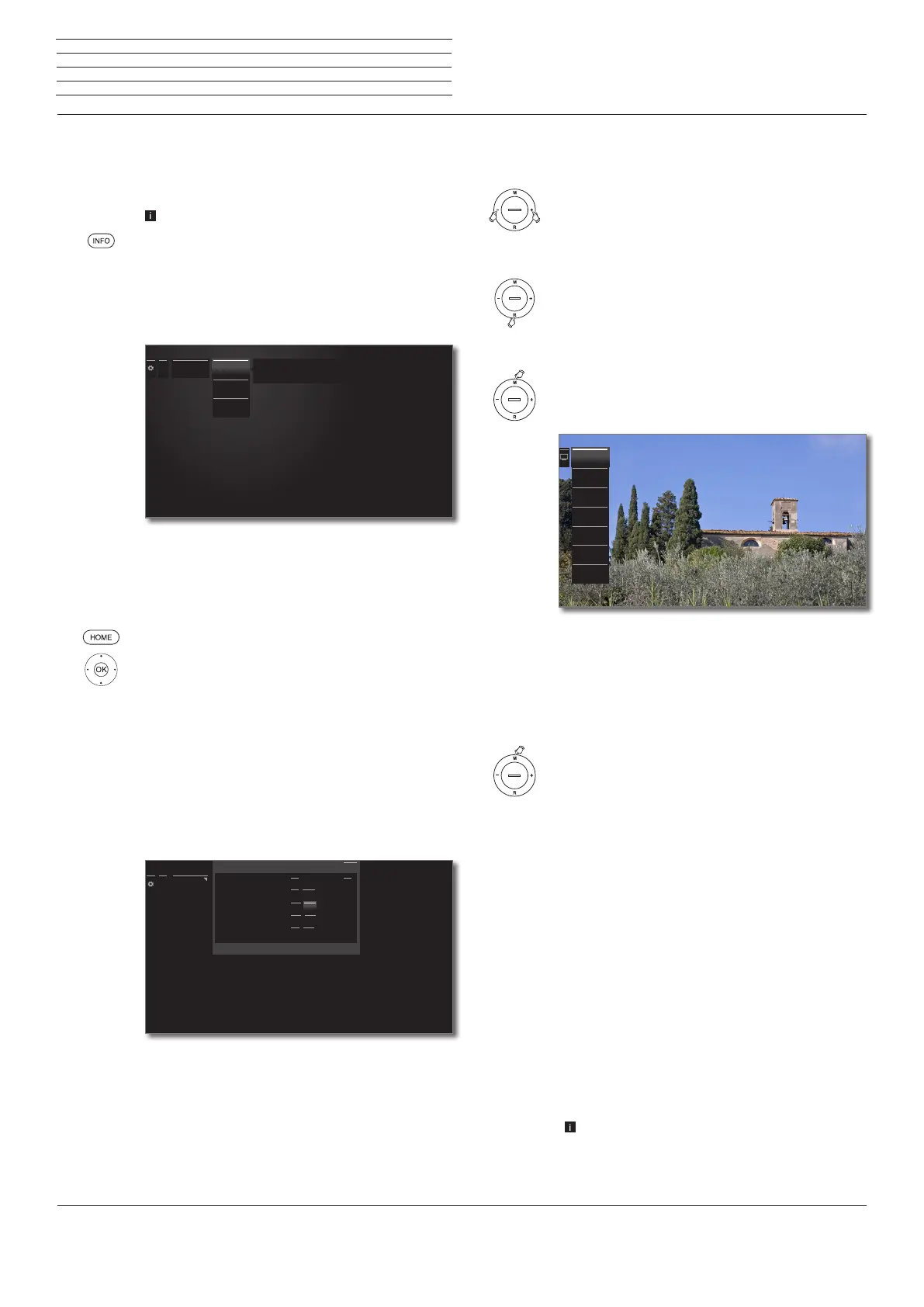
Info display
The info display provides an info text appropriate to the on-screen
display that can assist you further with the operation of your TV set.
An on-screen display is faded in.
The factory setting is that the info display is shown
automatically for each menu item. In this case you can
temporarily hide the info texts with the INFO key.
The automatic info display can be hidden via a menu
setting. Then it can be displayed temporarily by press-
ing the INFO key.
Permanently display or hide the automatic info display
Once you have become familiar with how to operate the TV set, you
can switch off the automatic info display.
HOME: Call Home view.
3456 Mark System settings,
OK call system settings.
65 Mark Control,
4 go to next column.
65 Mark more ...,
4 move to next column.
6 5 Mark On-screen displays,
4 call on-screen display settings.
6 5 Select Automatic info,
34 select on / off.
OK adopt settings.
...
Energy effi-
ciency
Home Mode
Premium
Mode
Shop Mode
The priority here is low energy consumption in home use. In this case, the TV
switches off automatically for the sake of saving energy, after it has been out
of operation for four hours.
......
On-screen
displays
Display time
Volume display
Automatic info
Permanent clock display
Automatic HDMI hint
On-screen displays
< 7s >
yes no
off on
off on
yes no
< 7s >
yes no
on
off on
yes no
With this you activate/deactivate the info text overlay for the menu item just selected.
Back
Operation without remote control
Changing Volume
+ / – Increase/reduce volume.
Switching radio on or off or switching to radio
R Radio on or switch between TV and Radio.
Calling direct control on TV set
M Call direct control on TV set.
R Scroll down.
M Scroll up.
– Scroll left.
+ Scroll right, adopt settings, confirm.
Close all displays
Press M longer.
Explanations of the settings:
Operating
mode
Switch between TV and radio operation.
Station
selection
Call Station selection.
AV selection Select AV interface.
3D Calling 3D settings.
Contrast Set contrast.
The power consumption of the TV set depends
directly on the value set here.
Picture
format
Selecting the picture format.
Service
The Service menu item is provided for service
purposes by dealers only.
Operating
mode
Station selec-
tion
AV selection
3D
Contrast
Picture for-
mat
Service
n
General information on menu operation


 To Next Page