Individual 40-55 - 82 -
User guide
Conditional Access module (CA module)
In order to receive coded digital stations, a Conditional Access module
(CA module) and a Smart Card must be inserted in the CI slot of your
TV set (see pages 11 and 12).
The CA module and the Smart Card are not part of the set of equip-
ment supplied with the TV set. They are usually available from your
dealer. Loewe does not provide any guarantee for the functioning of
the CA module.
The TV set must first recognise and set up the CA module during initial
operation. Therefore, it can take up to a minute until decoding starts
during initial operation.
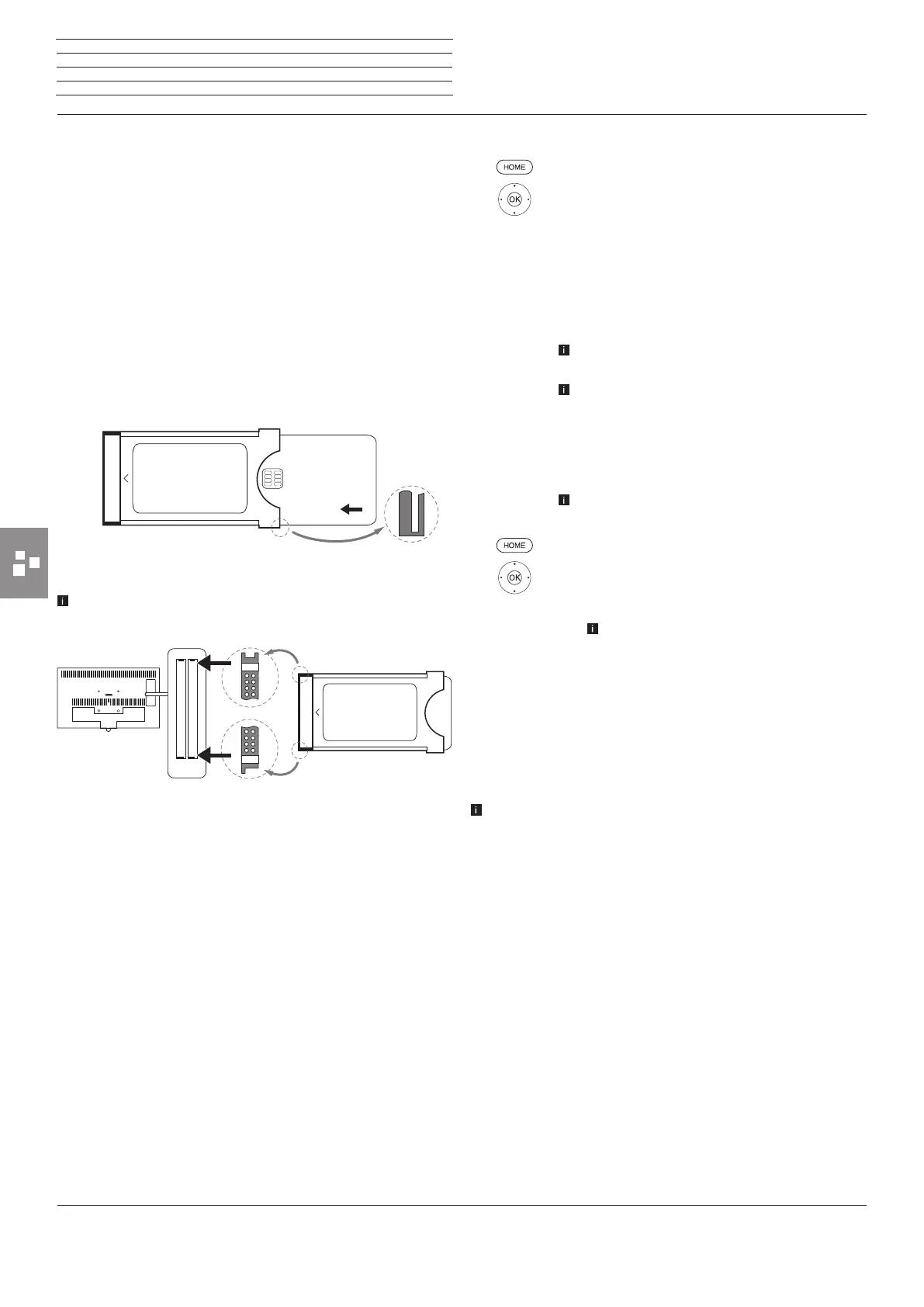
Inserting the Smart Card into the CA module
Push the The side of the card with the gold chip on it should be point-
ing towards the thicker side of the insertion slot (see illustration). Note
the direction of the arrow printed on the Smart Card.
Inserting the CA module into the TV set’s CI slot
Switch off TV set using the mains switch.
Remove the cover from the rear of the set.
Insert the CA module carefully into one of the two CI slots, ensuring
that the contact side goes in first. Do not use force. Make sure the
module is not twisted in the process. Push the CA module in as far as
it will go.
Finally, close the side cover.
Smart Card
CA module
Contact side
Searching for scrambled stations
HOME: Call Home view.
3465 Select System settings,
OK call System settings.
6 5 Mark Stations,
4 go to next column.
65Automatic scan TV+Radio,
4 go to next column.
34Select Change search settings,
OKwizard guides you through the search settings.
For a description of the search settings see starting
from page 94.
Under scrambled stations you have to select yes.
3 4 Next select Start search/update,
OK start updating the station list.
Calling CA module information
This menu is only available when a CA module is
plugged in.
HOME: Call Home view.
6 5 Mark Extras,
OK call Extras.
6 5 Select desired CA module.
The indicated name depends on the inserted
CA module.
4 go to next column.
6 5 Select CA module,
OK call information.
The content of this menu depends on the provider of
the CA module.
Removing the CA module
Switch off TV set using the mains switch.
Remove the cover from the rear of the set.
Pull the CA module out of the CI slot.
Replace the cover.
n
Extras
CA module














 To Next Page