Individual 40-55 - 94 -
User guide
Search for/update stations – handling of new and no longer
found stations
The number of new TV stations found is displayed after the automatic
search / update has been completed.
8 Proceed. The number of new radio stations found
is displayed.
8 Call list of new TV stations found.
5634 Select station.
OK Mark / unmark station.
8 stores the marked TV stations. The list of new radio
stations found is displayed.
5634 Select station.
OK Mark / unmark station.
8 Proceed.
Afterwards, a list of the stations which are saved but
which are temporarily not broadcasting or no longer
exist is displayed, if available.
The number of the memory location used is displayed
in front of the station. Please select the stations you
really want to delete.
5634 Select station.
OK Mark / unmark station.
8 Proceed. The marked stations will be deleted. The
list of radio stations no longer found is displayed.
5634 Select station.
OK Mark / unmark station.
8 End search wizard.
...
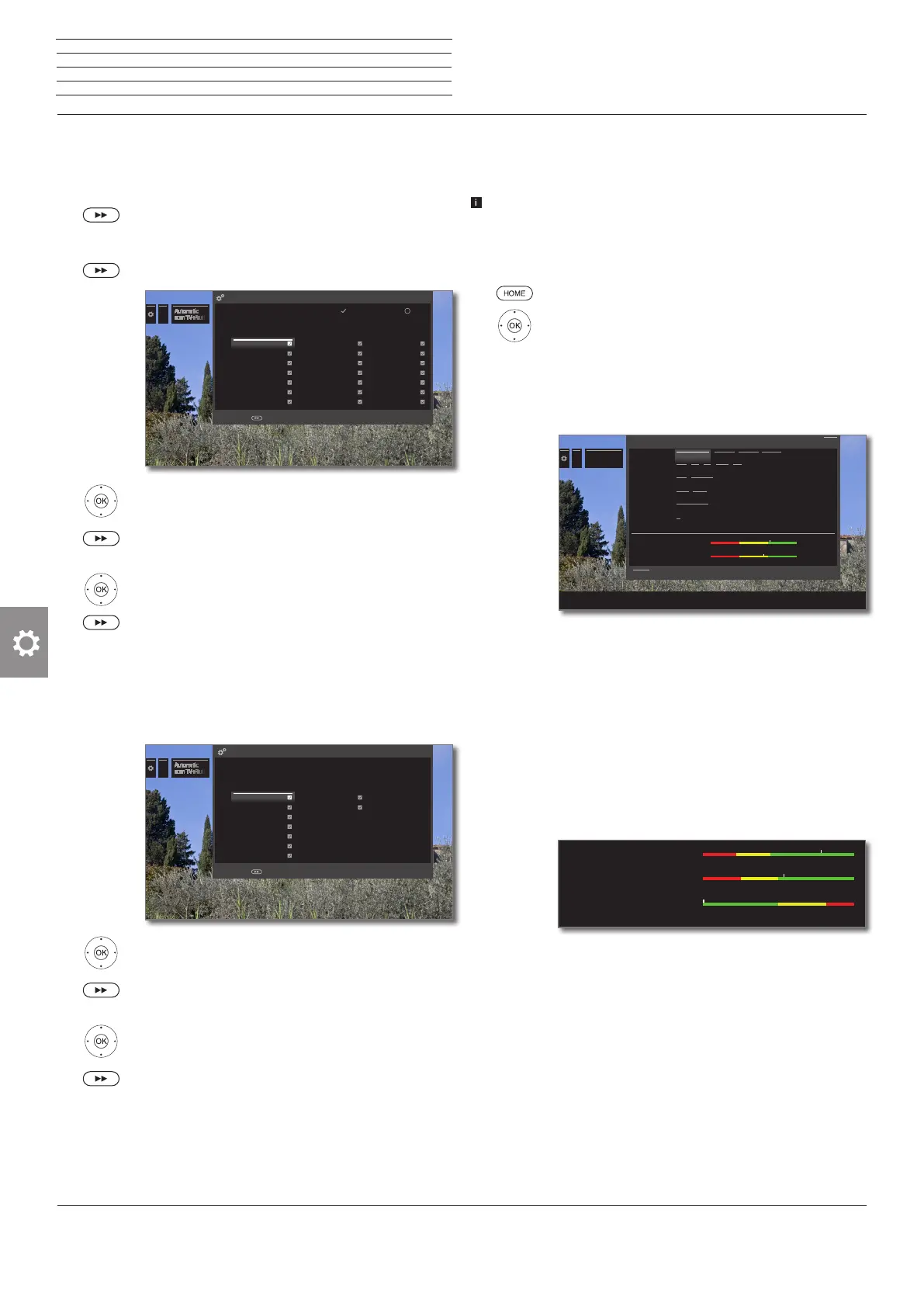
All newly found TV stations which are marked with a are then saved. With the
button, you can set or remove the marking.
Note: The newly found stations which you have already deleted are not marked.
Newly found stations
Proceed with
OK
3sat HD ANDALUCÍA TV arte
a.tv ANIMAX ARTE
Achtung Singles TV ANIXE HD ARTE Francais
Aktiv Direkt TV anixe iTV ARTE HD
Al Jazeera ANIXE SD Astrocanal TV
Al Jazeera English ARD Astro TV
Amore TV ARIRANG TV ATV+
...
The following stored TV stations were no longer found because they are not currently
broadcasting a programme or no longer exist. Please mark those you want to delete
completely. Those not marked are retained.
Stations no longer found
Proceed with
Channel TV Press TV
Direct 3 iM1
Direct 4
Direct 5
GoTV
ATV+
BVN
Manual Scan TV / Radio
Here, you can enter all the settings available for a station. However,
this requires detailed knowledge.
The manual search of radio stations is similar to that of TV sta-
tions. Therefore, the manual search for radio station is not dealt
with separately.
Calling manual search
HOME: Call Home view.
6 5 Mark System settings,
OK call System settings.
6 5 Mark Stations,
4 go to next column.
65Mark Manual Scan TV,
OKcall Manual Scan.
Select the menu item Signal source to decide in which
area you want to search for stations.
Depending on the selected source, various setting
possibilities will be available.
On the next page, the settings for analogue cable and
DVB-T/C/S sources are described separately.
Status bar for manual search
Status bars are displayed for manual search, which
show the reception quality of the individual stations
during the station scan. The markers in all bars should
preferably be in the green area.
C/N: (Carrier/Noise) The bar shows the signal-to-
noise ratio. The value indicated in dB should be prefer-
ably high.
Level: The bar shows the receiving level of the station.
The value displayed in dBµV should be preferably high.
BER: (Bit Error Rate) The bar shows the bit error rate
of the station. The value for BER should be as low as
possible.
...
Manual Scan
TV
Signal source Cable analog DVB-T DVB-C DVB-S
TV standard B/G I L D/K M
Colour standard PAL SECAM
Channel E 01 S 01
Frequency 044.00 MHz
Name
C/N 40.5 dB
Level 54 dBµV
Signal source Cable analog DVB-T DVB-C DVB-S
TV standard B/G I L D/K M
Colour standard PAL SECAM
Channel E 01 S 01
Frequency 044.00 MHz
Name
C/N 40.5 dB
Level 54 dBµV
Manual Scan TV
Here you select the range within which you wish to search for stations. You can automatically search for station after station.
Search
Back
...
Manual Scan
TV
Signal source Cable analog DVB-T DVB-C DVB-S
Frequency 044.00 MHz
Name
C/N 71.5 dB
Level 58 dBµV
BER 0 E-7
Manual Scan TV
Here you select the range within which you wish to search for stations. You can automatically search for station after station.
Search
Back
n
System settings
Stations













 To Next Page