3.7.C. Maintenance Menu
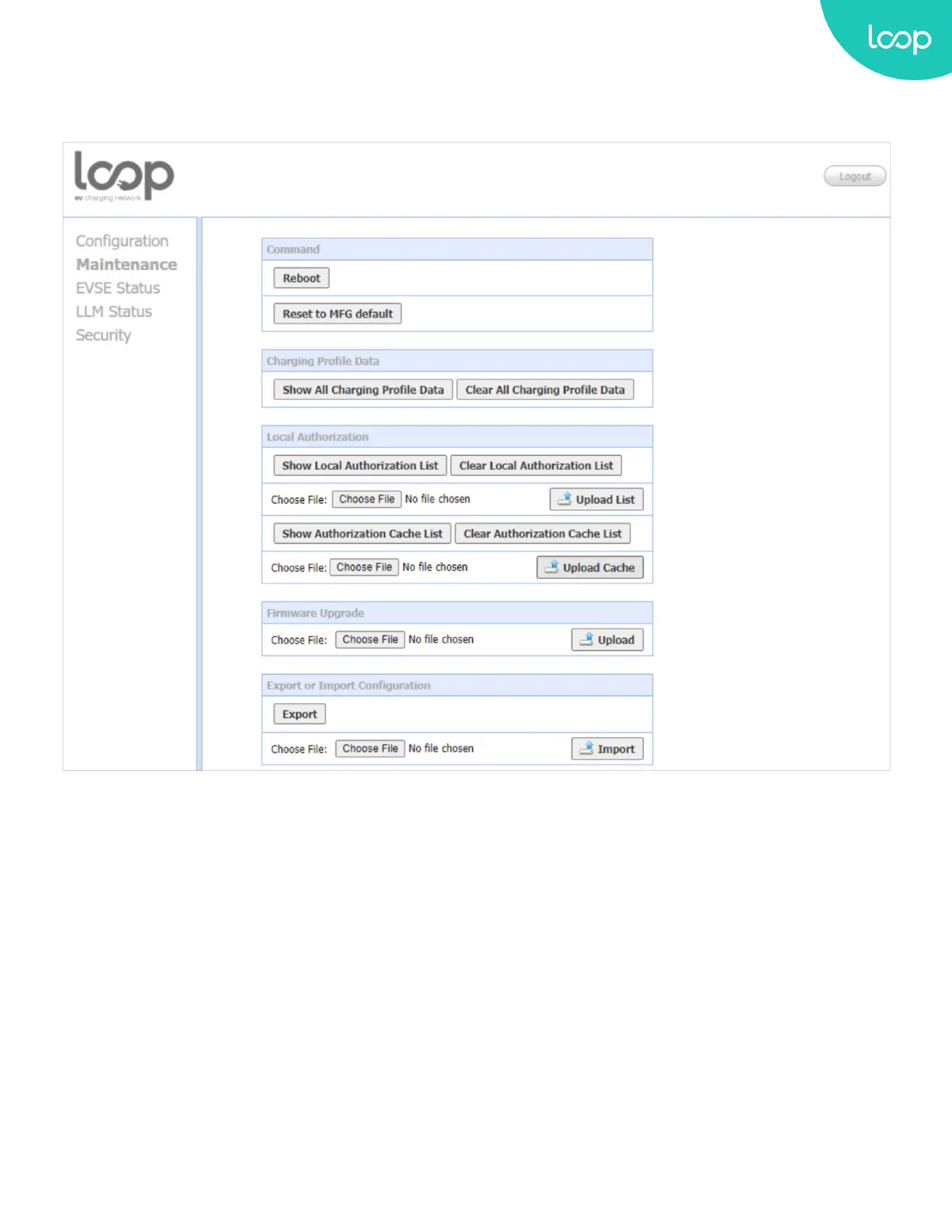
When you choose the Maintenance menu, a sub menu will appear:
+ The “Command” screen can be used to restart the Loop EV-Flex EVSE and reset settings to Manufacturing default.
+ The “Charging Prole Data” screen can be used to show and clear charging proles including “Charge Point Max
Prole”, “Tx Default Prole” and “Tx Prole”. Charging Prole is dened in OCPP 1.6 specication.
+ The “Local Authorization” screen can be used to display and clear the Local Authorization List and Authorization
Cache List. Both lists are dened in OCPP 1.6 specication.
+ The “Firmware Upgrade” screen can be used to upgrade the rmware of the Loop EV-Flex EVSE.
+ The “Export or Import Conguration” screen can be used to export or import desired conguration
26
Loop EV-Flex
TM
EVSE
EVS-32A-L2-001 (R-Model)
v.20.9.4
www.evLoop.io


 To Next Page