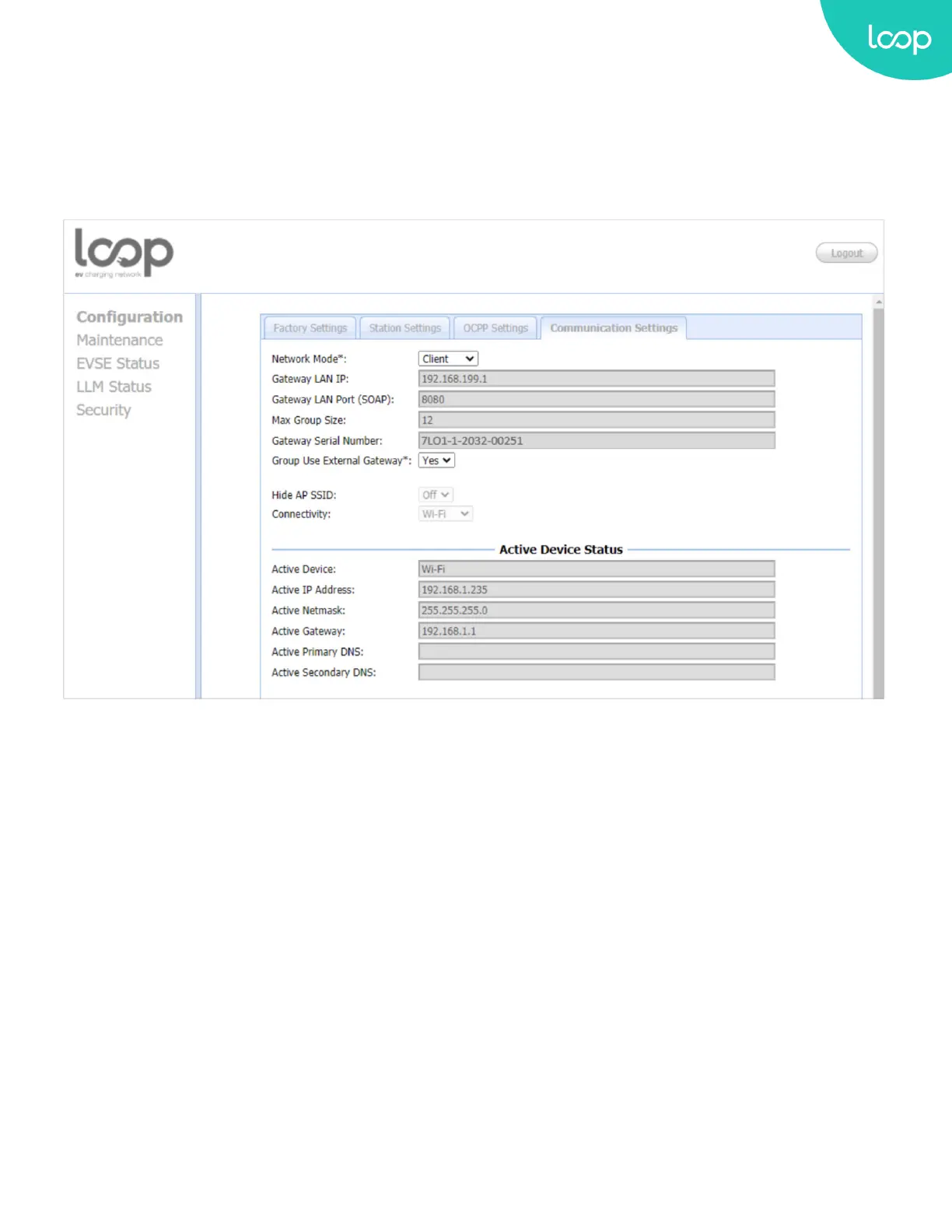
3.8.D. Communication Settings
Clicking on the “Conguration” and then “Communication Settings” link will bring up the following screen. Since
the page is too long to display, please use the scrollbar to view the entire page.
On this page you can set up the network connection. To nish, click the “Apply” button.
Network Mode: Species if enable the Local Proxy function. Available options are Gateway, Client and Direct.
+ Direct: Use Loop EV-Flex EVSE as a single device.
+ Gateway: Use Loop EV-Flex EVSE as a gateway charge point. Gateway connected to OCPP 1.6 Server via cellular or
Wi-Fi and connected to other Loop EV-Flex EVSEs (called Client) via Wi-Fi and forms a local charge point group. This
group is also a LAN (Local Area Network).
+ Client: Use Loop EV-Flex EVSE as a client charge point. Client connected to Gateway via Wi-Fi. Client connected to
OCPP1.6 Server through the gateway Loop EV-Flex EVSE (via cellular or Wi-Fi) and Gateway will dispatch incoming
remote command to proper client charge points (or Gateway itself).
41
Loop EV-Flex
TM
EVSE
EVS-32A-L2-001 (R-Model)
v.20.9.4
www.evLoop.io


 To Next Page