3.11. LLM Status
3.11.A. LLM Information
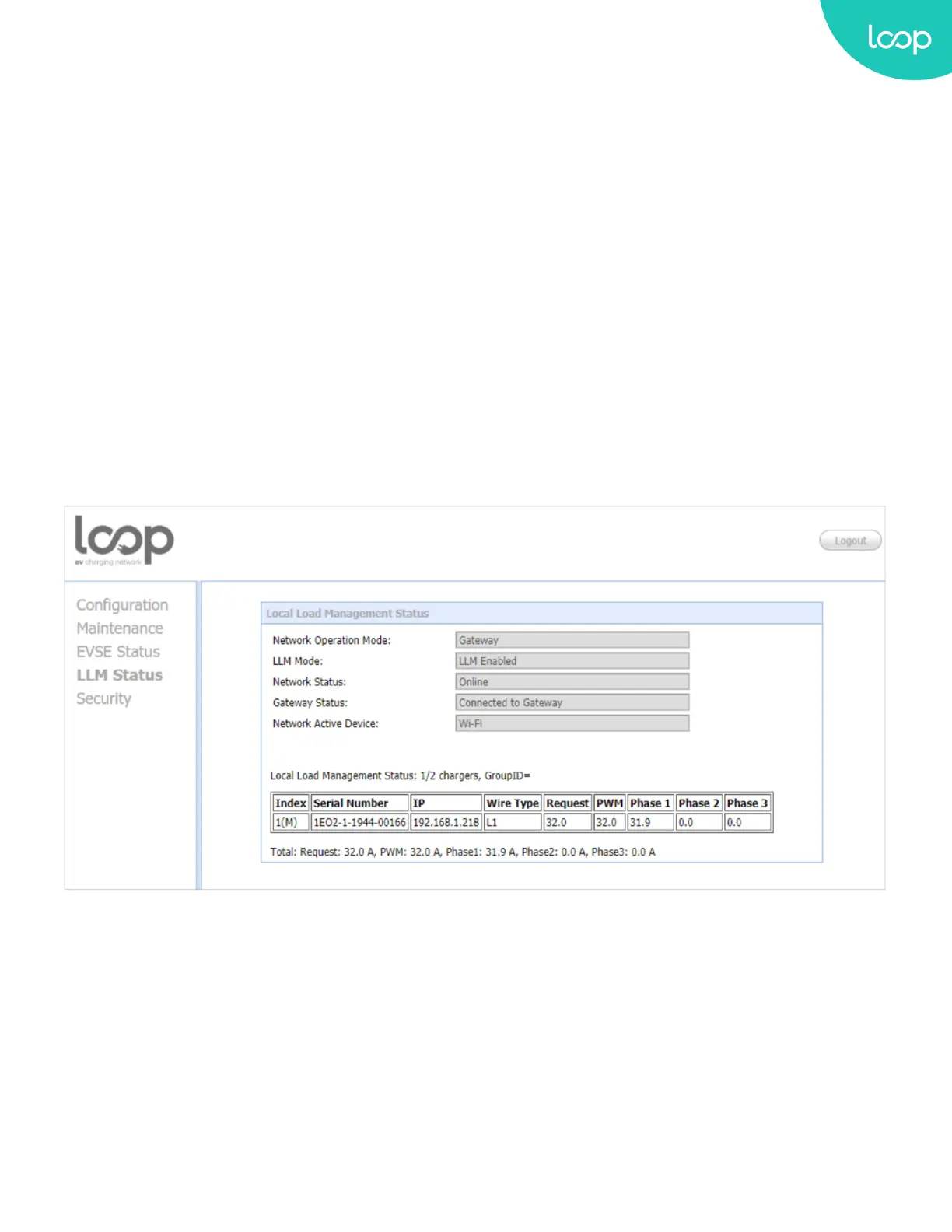
This page shows the Local Load Management information of the Loop EV-Flex EVSE. For more LLM description,
please refer to section 3.9.D.
Network Operation Mode: Indicates the Loop EV-Flex EVSE is in Direct mode, a Gateway or a Client.
LLM Mode: Indicates Local Load Management function is enabled or disabled.
Network Status: Indicates if the Loop EV-Flex EVSE is online or not.
Gateway Status: Indicates if the Loop EV-Flex EVSE is connected to the Gateway if it’s a Client. For Direct and
Gateway, it always shows “Connected to Gateway”.
Network Active Device: Indicates the Network connected via which device. It could be Oine,
Wi-Fi or Cellular.
Local Load Management Status: Display connected Loop EV-Flex EVSEs, total Loop EV-Flex EVSEs, Group ID of the
LLM group as well as a full table of detail information each Loop EV-Flex EVSE if this charge point is a Gateway.
55
Loop EV-Flex
TM
EVSE
EVS-32A-L2-001 (R-Model)
v.20.9.4
www.evLoop.io


 To Next Page