93
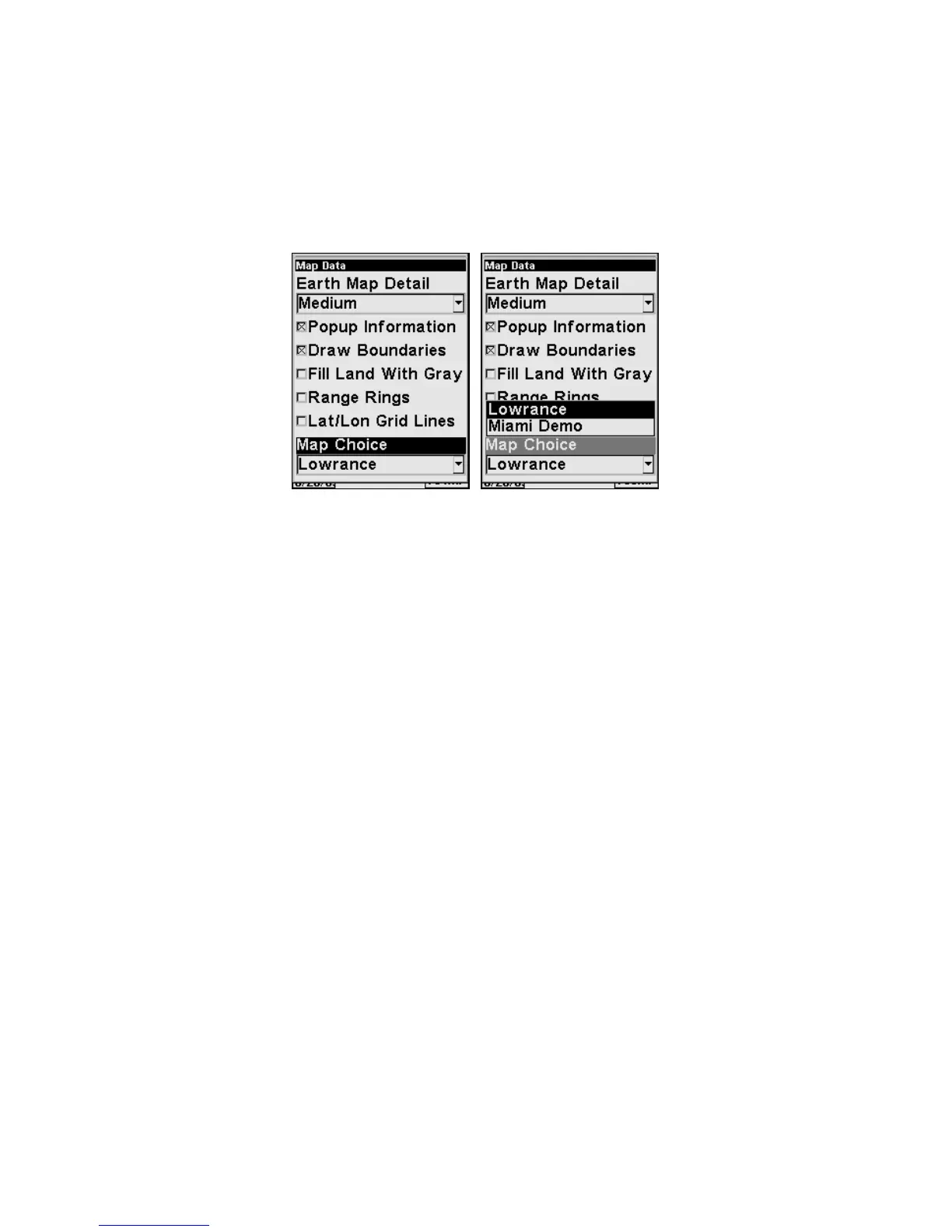
To display a Navionics chart:
1. Install the Navionics MMC in the memory card compartment and
turn on the unit. (For full card install instructions, see Sec. 2.)
2. From the Map Page, press
MENU|↓ to MAP DATA|ENT|↓ to MAP
CHOICE|ENT. Use ↑ ↓ to select the Map Name, then press
ENT|EXIT|EXIT.
Map Choice highlighted (left). Lowrance selected from Map Choice
menu (right).
WARNING:
You should never format the MMC containing your
Navionics chart. Formatting the MMC will permanently
erase the chart from the card.
Pop-up Help
Help is available for most all menu items on this unit. Selecting a menu
item and leaving it highlighted for a few seconds, a pop-up message ap-
pears, describing the function of the item. This feature is on by default.
To set up Popup Help, press
MENU|MENU|↓ to SYSTEM SETUP|ENT|↓
to
POPUP HELP. With the option highlighted, press ENT to turn it on
(check) or turn it off (uncheck). After the option is set, press
EXIT|EXIT
to return to the page display.








 To Next Page