116
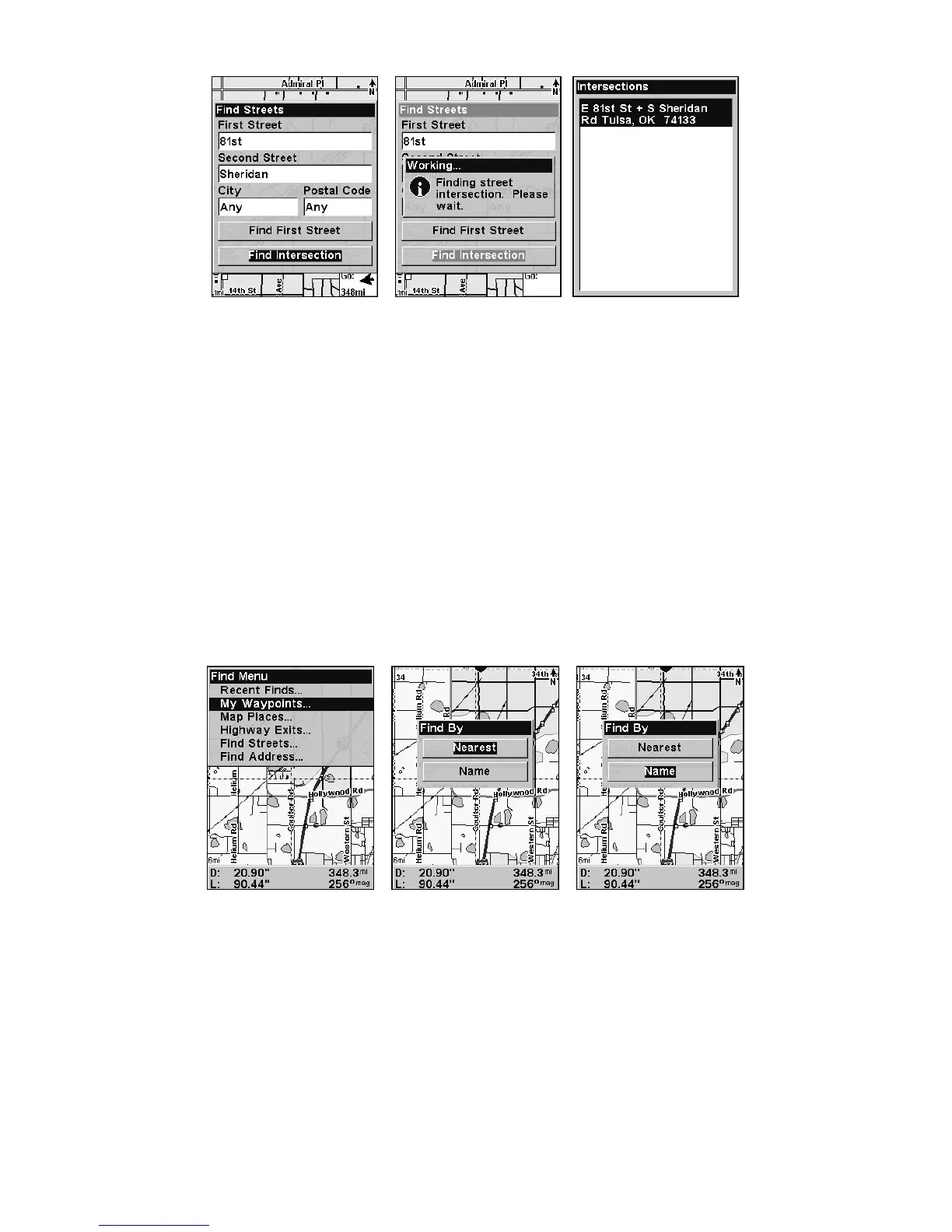
Find intersection selected (left); Working message (center);
Intersection list (right).
6. To search for the intersection of the two streets, press ↓ to FIND
INTERSECTION|ENT. When the Intersections list appears, press ↑ ↓ to se-
lect the intersection you are searching for and press
ENT. (We selected
the intersection of E 81st St and Sheridan Road in Tulsa, Okla.)
A window will appear giving you the option to
FIND or Go TO the inter-
section. To navigate to location, press
→ to select GO TO and press ENT.
Find Waypoints (Advanced Mode only)
1. Press FIND|↓ to MY WAYPOINTS|ENT.
2. If searching for the Nearest waypoint, press
ENT. If searching for a
waypoint By Name, press ↓|
ENT. (To search by name, jump to step 5
below.)
Find menu (left); Find By Nearest (center); Find by Name (right).
3. If you're looking for nearest, the iFINDER says it is calculating,
then a list of waypoints appears. The closest is highlighted at the top of
the list. The waypoint furthest from you is at the bottom of the list.








 To Next Page