32
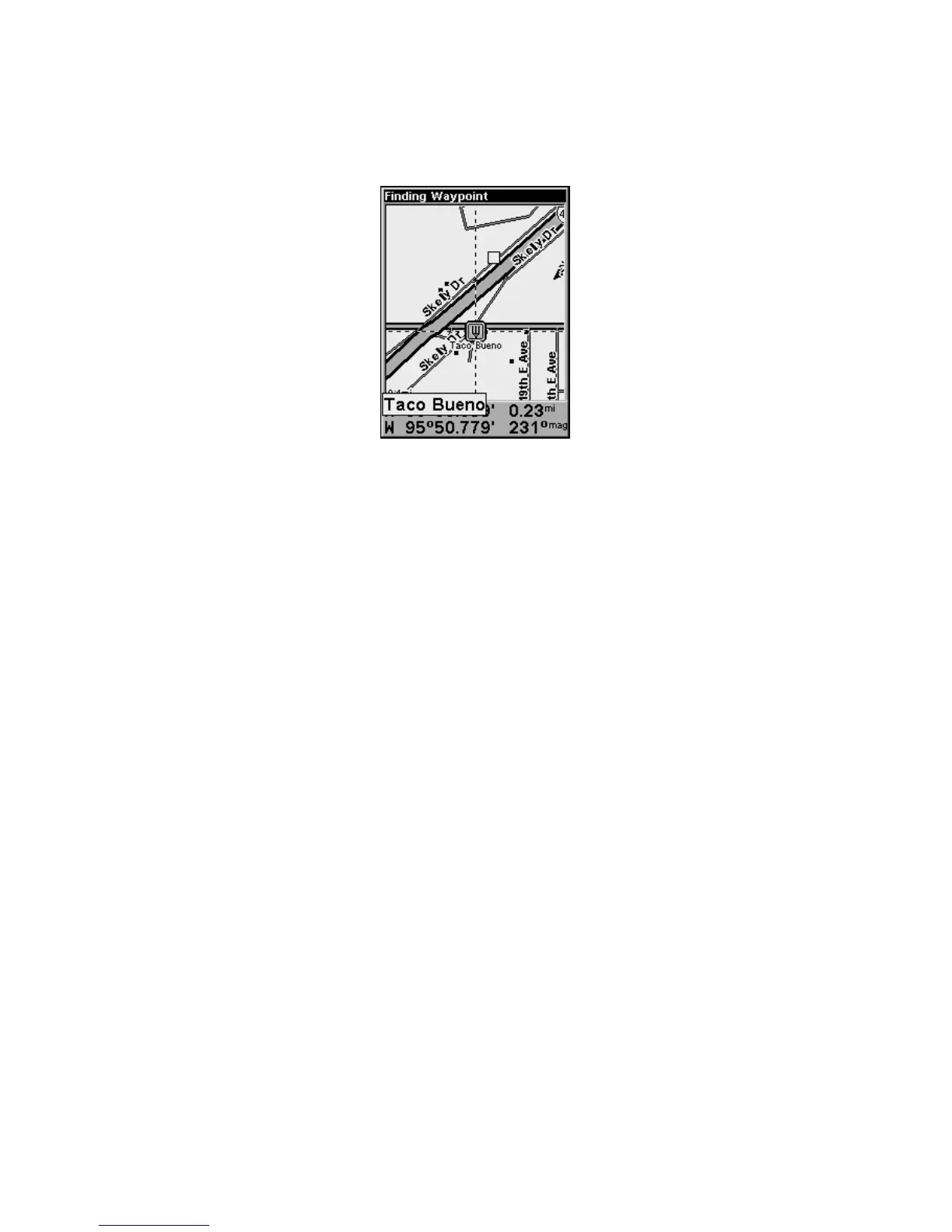
6. The iFINDER's map appears, with the cursor crosshairs highlighting
the restaurant's POI symbol. A pop-up name box identifies the POI. A
data box at the bottom of the screen displays the location's latitude,
longitude, distance and bearing.
Map screen showing Finding Waypoint,
the result of a restaurant search.
7. To clear the search and return to the main page display, press EXIT
repeatedly. Before you completely exited out of the Search menus, you
could have gone looking for another place.
NOTE:
Search works from mapping and POI data loaded in the unit. If you
have not loaded a high-detailed custom map covering the desired
search area, you may not find much.
Set Home Waypoint
A waypoint is an electronic address, based on the latitude and longi-
tude of a position on the earth. Easy Mode allows you to save two way-
points (Home and Man Overboard).
To save a Home Waypoint:
1. Press and release
ENT.
2. A message appears asking if you want to save as home waypoint.
Select
YES and press ENT. The waypoint is marked by an X, labeled
Home.








 To Next Page