87
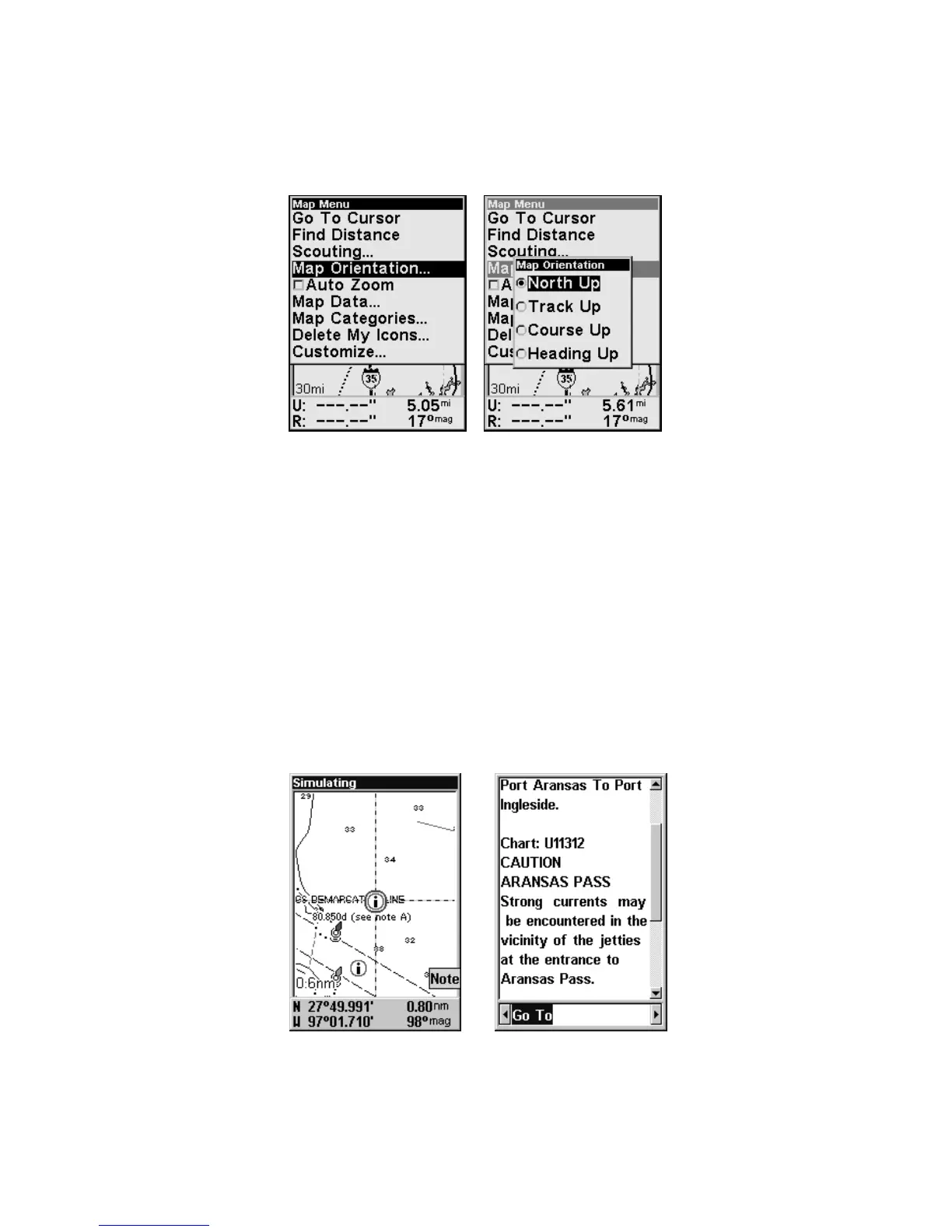
To change map orientation:
From the Map Page, press
MENU|↓ to MAP ORIENTATION|ENT. Press ↑ or ↓
to select an orientation option, then press
EXIT|EXIT to return to the
main page display.
Map Menu (left) with Map Orientation menu (right).
NauticPath USA Marine Charts
Your unit can display NauticPath electronic charts on MMCs. They
work just like a MapCreate custom map on a MMC.
Nautical Chart Notes
NauticPath charts contain notes or chart information, represented by cir-
cle-i Chart Note icons on the map display. An example is shown in the
following figure.
To view Chart Note information:
1. Use the arrow keys to move the cursor over a Chart Note icon. When
it's selected, a pop-up name box appears.
2. Press
FIND|FIND to display the Note Information screen.
NauticPath chart showing Chart Note icon selected by cursor (left).
Note information screen (right).








 To Next Page