73
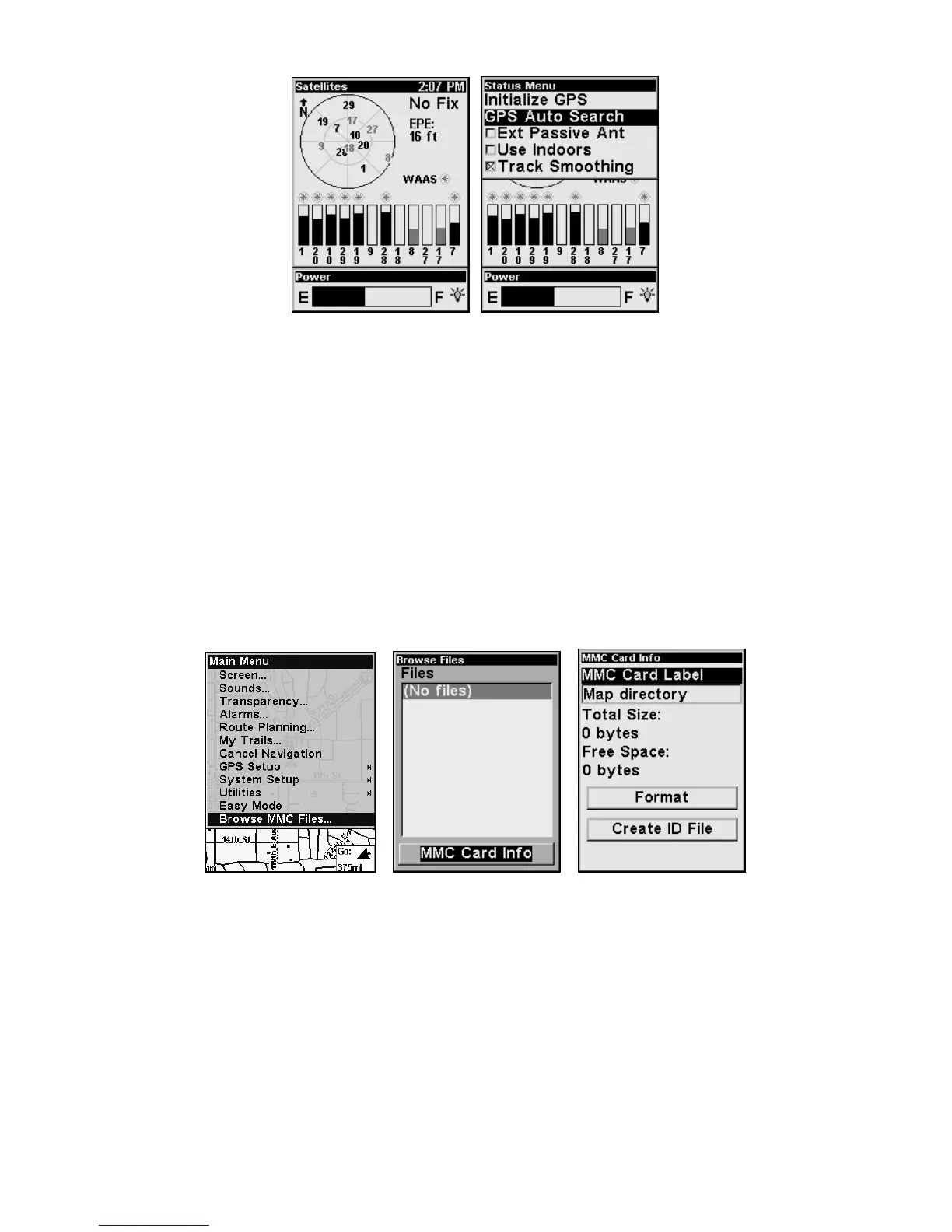
Satellite Status page (left); Satellite Menu (right).
You can force the unit to enter auto search mode. Here's how:
1. In Advanced Mode, press
PAGES until you are on the Satellites page.
2. Press
MENU|↓ to GPS AUTO SEARCH|ENT then ← to YES|ENT.
Check MMC Files and Storage Space
To check MMC Files:
1. In Advanced Mode, press
MENU|MENU|↓ to BROWSE MMC FILES|ENT.
Select
MMC CARD INFO and press ENT to access information about the
MMC card.
From the MMC Card information screen, you can format the card,
which erase the data or Create an ID File.
Main Menu (left); MMC File Browser (center and right).
Com Port Configuration
The iFINDER has one NMEA 0183 version 2.0 compatible communica-
tion port (com port). The Com Port Menu, accessed from the System
Setup Menu in Advanced Mode, allows you to configure the communi-
cations port to send data to another electronic device, like autopilot.








 To Next Page