24
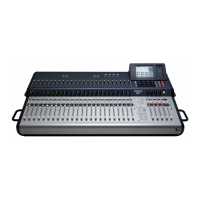
TT24 DIGITAL LIVE CONSOLE
TT24 DIGITAL LIVE CONSOLE
Ch 5: DSP and Internal Effect Allocation
5.2 Master L/R and C/Mono
The Master L/R and C/Mono bus has the following
signal path: six-band parametric EQ, 31-band graphic EQ,
compressor, and master fader.
5.2.1 L/R+Mono and LCR Modes
The TT24 has two master mix operating modes:
L/R+Mono: Stereo with an independent mono output.
LCR: True LCR panning from the channels and busses.
L/R+Mono
In L/R+Mono mode, the left and right stereo signals
are available at the LEFT and RIGHT outputs, the mono
signal from the CTR/MONO output. Channels can be as-
signed to both outputs. The channel sends to CTR/MONO
are pre-pan, so the channel pan setting has no effect.
The L/R and Mono master levels and processing are
linked by default, but they can be independent (see
page 13). When unlinked, the MASTER fader controls
the LR output and the C/Mono fader (channel 24 on the
MASTERS bank) controls the mono output (which can
also be controlled on the Master OVERVIEW Touch-
screen). When linked, all processing is linked and the
Master fader controls all levels. A relative offset be-
tween LR and CTR/MONO may be set using the Master
OVERVIEW Touchscreen faders or the faders for chan-
nel strips 22–24 in the MASTERS bank.
LCR
In LCR mode, the LEFT, CTR/MONO, and RIGHT
outputs present the LCR signal. Channels can be as-
signed to LR, Center, or LCR. A channel assigned to
Center only is routed pre-pan, so the channel pan does
not affect the Center signal. Channels assigned to LR
only are routed to the LEFT and RIGHT outputs using
stereo pan positioning. Channels assigned to LCR are
routed to LEFT, CTR/MONO, and RIGHT outputs using
true LCR panning.
The LCR master levels and processing are linked
by default but can be unlinked and processed inde-
pendently by pressing the LINK button in the Master
OVERVIEW Touchscreen. When unlinked, the MASTER
fader controls the LEFT and RIGHT outputs and the
C/Mono fader (channel 24 on the MASTERS bank) con-
trols the Center output (which can also be controlled on
the Master OVERVIEW Touchscreen). When linked, all
processing is linked and the MASTER fader controls all
levels. A relative offset between the LEFT-RIGHT and
CTR may be set using the Master OVERVIEW Touch-
screen or by using the faders for channel strips 22–24 in
the MASTERS bank.
TECH NOTE: The TT24 uses 12 SHARC DSP
chips with embedded algorithms. This DSP
approach differs from conventional digital
audio workstations in that the algorithms are
programmed as firmware on the DSP chips.
The incoming audio signal is digitized by its
ADC and then routed through the DSP chip
whether or not processing is engaged. This
ensures equal latency for all incoming audio
sources.
This chapter discusses how the TT24 allocates its DSP
and Internal Effects resources.
See Chapter 6: Touchscreen and TT Control for specif-
ic information about the DSP and Effects Touchscreens.
See Tabular Summary of DSP and Effects on page 28
for parameter reference.
5.1 Analog, Digital, and Line
Inputs
Analog Inputs
Analog input channels 1–24 route to their DSP
block immediately after the ADC and before routing to
outputs, groups, and auxes. The signal flow is: vari-
able-frequency high-pass filter, adjustable gate, EQ
and compressor (the EQ and compressor order can be
switched for each channel), channel fader, pan and as-
sign sections.
Digital Inputs
The ADAT Optical digital input channels 25–48 have
no DSP. Their signals enter the board, pass through
the channel meter and can be routed to the Mains, Aux
Sends, and Groups/Matrix as needed.
NOTE: The UFX II expansion card provides additional DSP for these
inputs.
Line Inputs
Each Line Input can access a four-band parametric
EQ. Odd/even adjacent inputs can be stereo linked (see
page 13).


 To Next Page