40
TT24 DIGITAL LIVE CONSOLE
TT24 DIGITAL LIVE CONSOLE
6.7 Dynamics
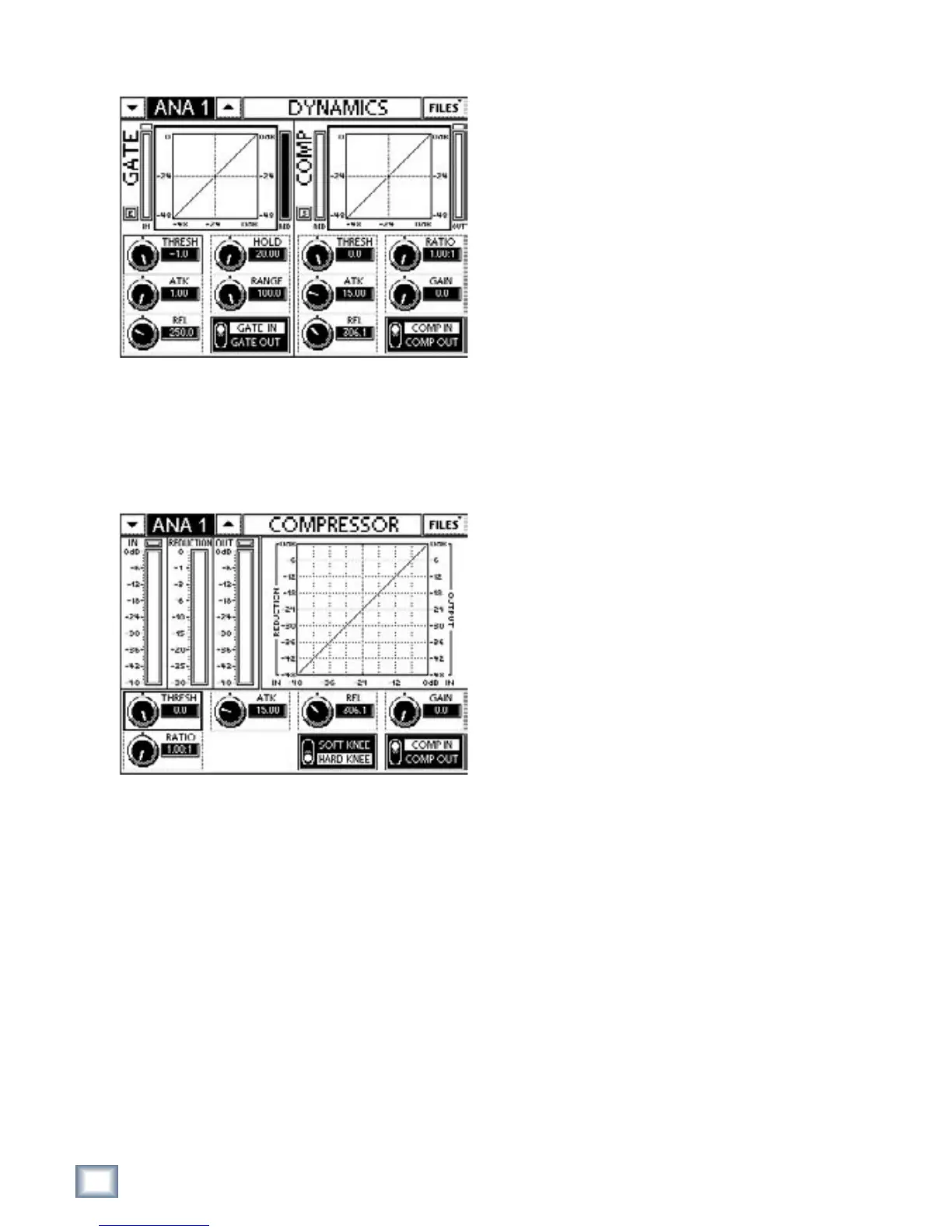
Figure 6-14 DYNAMICS
Press the DYN QuickMix button to display the
DYNAMICS Touchscreen. Touch the GATE or COMP
graphs to display their respective Touchscreens.
6.7.1 Compressor
Figure 6-15 COMPRESSOR Touchscreen
The IN/OUT meters show the levels coming in/out
of the compressor. The inverted REDUCTION meter
displays the compressor’s gain reduction.
The graph summarizes the compressor’s parameter
settings.
Threshold
The THRESH control adjusts the level above which
attenuation begins. It is adjustable in the range -60 to
0 dBFS in increments of 0.1 dBFS; the default value is
0 dB.
Ratio
The RATIO control sets the rate of gain reduction ap-
plied to the signal as it exceeds the threshold. The ratio
can vary between gentle compression and peak limiting.
The ratio range is 1:1 (no gain reduction) to the maxi-
mum of ∞:1 (peak limiting). The default setting is 1:1.
Attack
The ATK control varies the time the compressor takes
to begin gain reduction after the signal exceeds the
threshold. The ATK time range is 1–300 ms and the in-
crements are scaled such that the faster attack settings
have finer adjustments. The default setting is 15 ms.
Release
The REL controls the time the compressor takes to
stop applying gain reduction after the signal decreases
below the threshold. The REL time range is 50 ms to 3
s. The default setting is 200 ms. REL is scaled such that
the faster release settings have finer adjustments.
Gain
The GAIN control sets the gain applied to the signal
after the compressor. This allows makeup gain to com-
pensate for the compressor’s level reduction. The GAIN
range is 0–20 dB in increments of 0.1 dB. The default
setting is 0 dB.
Hard/Soft Knee
The HARD/SOFT KNEE switch toggles the compres-
sor knee characteristic. It is accessible only from the
COMPRESSOR Touchscreen (not from DYNAMICS).
HARD KNEE: As the signal exceeds the threshold, gain
reduction is immediately applied at the full ratio
setting.
SOFT KNEE: As the signal approaches the threshold,
gain reduction is gradually applied up to the full
ratio setting.


 To Next Page