Mackie TT24 Digital Live Console Quickstart Guide Quickstart Tutorial
25
7. Press the GRP/AUX QuickMix button to display the Group/Aux routing
screens.
Groups 1–8 buttons on the Touchscreen are used for channel routing.
The 12 V-Pots are used to adjust the Channel Aux send levels.
8. Push the V-Pot knobs to toggle each Aux send between pre- and post-fader.
3.4 Aux Functions
This section discusses how to setup, route, and mix the Aux buses. Each of the
12 Aux masters have their own EQ and compressor/limiter.
1. Display the Aux masters by pressing the AUX MSTR button (Figure 3-4)
to the right of the QuickMix knobs.
2. Select Aux master 1 by pressing the top
-
left QuickMix knob.
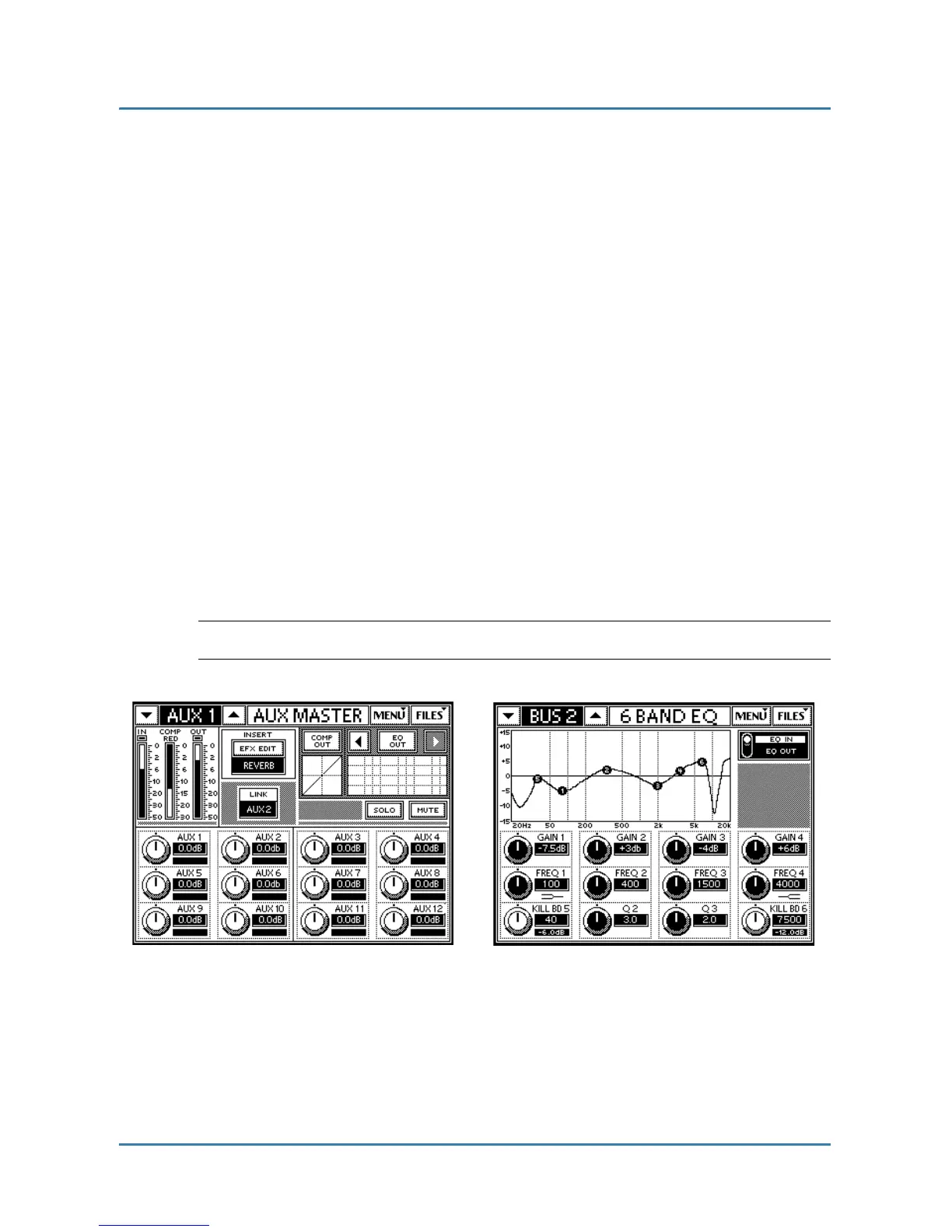
Figure 3-7 (left) shows Aux 1 selected.
3. Touch the EQ grid or press the EQ QuickMix button to display the EQ
output parameters for selected Aux send 1 (right of Figure 3-7).
NOTE: The EQ IN/OUT button is located on the upper right of the Touchscreen.
Figure 3-7 Aux Master (left) and EQ (right) screens


 To Next Page