51
Owner’s Manual
Owner’s Manual
6.15 File Management
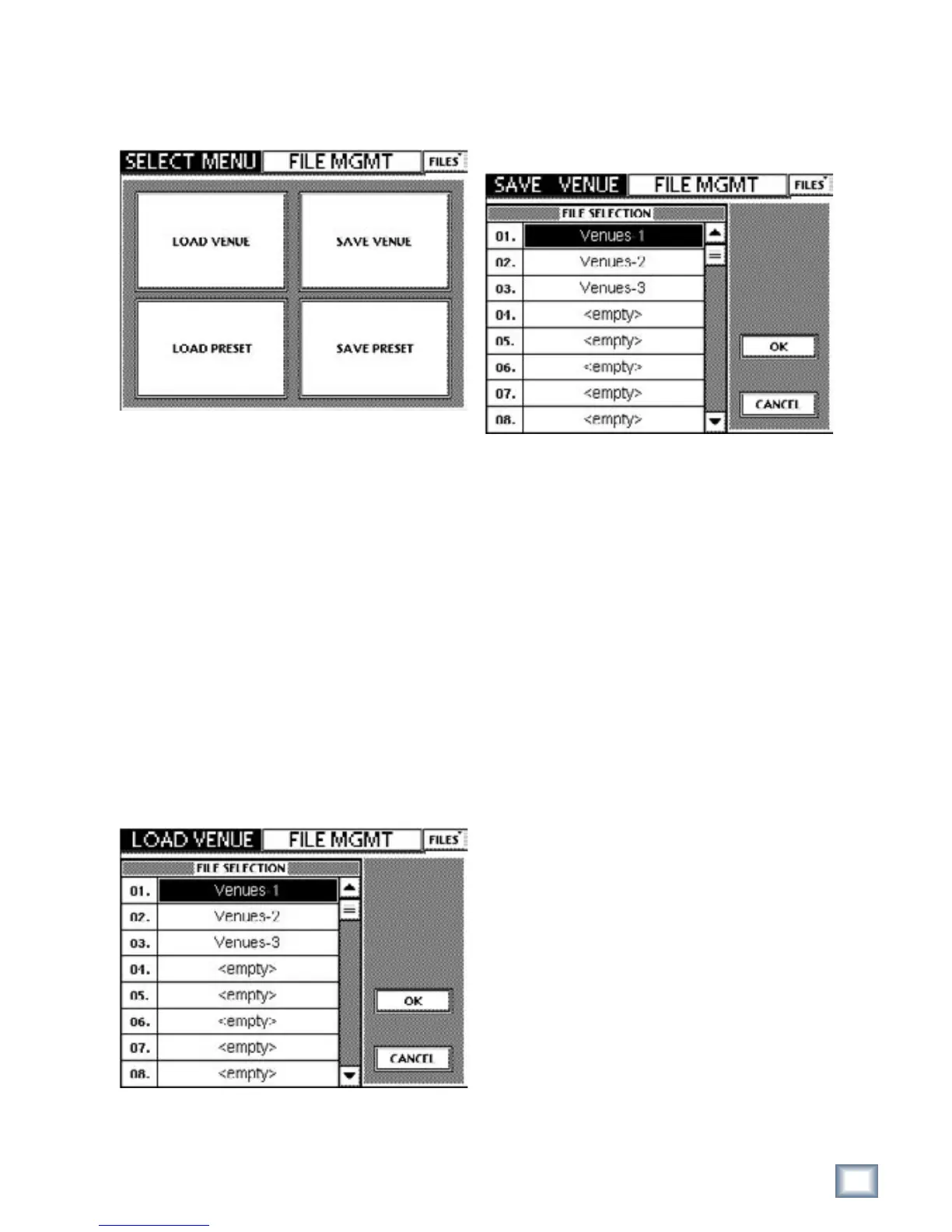
The TT24 has a file backup and restore system. Press
the FILES button in the upper right-hand corner of the
Touchscreen to open the File Management Select Menu.
Figure 6-39 FILE MGMT SELECT MENU
6.15.1 Load and Save Venue
The TT24 parameters related to the physical/acousti-
cal space and equipment can be saved to a Venue. These
parameters are selected in the SETUP Touchscreens:
Operation, General, and Digital.
Multiple venues can be stored on the TT24 for recall
of specific system settings. A venue consists of all pa-
rameters related to configuring the TT24. With a venue,
you can save a particular sampling rate, external word
clock, select follows solo, etc. (see “Parameters Saved in
a Venue” below).
Loading and saving venues using the Touchscreen
or TT control PC application is done from the TT24’s
internal memory.
Touch LOAD VENUE to select a venue from a list of
all venues on the console.
Figure 6-40 FILE MGMT LOAD VENUE
Use the up and down Touchscreen arrows to scroll if
the list is too large to fit. Touch the name of the desired
venue and touch the OK button.
Touch SAVE VENUE from Figure 6-33 to save the
current venue.
Figure 6-41 FILE MGMT SAVE VENUE
Touch an existing name to save over this Venue or
<empty> to save to a new Venue. Touch OK to exit.
Parameters Saved in a Venue
SETUP/Operation
• Center mode
SETUP/Operation
• Pre fader aux sends global
• PC auto follow
• Select follows solo
• Metric/US measurements
• Exclusive solo
• V-pot speed
SETUP/Digital
• Sample rate
• Clock source
• Digital input (S/PDIF or AES/EBU)
• Sample Rate convert
SETUP/MIDI
• Channel select
• MIDI send enable
• MIDI receive enable
• MIDI fader enable
• MIDI mute enable
UTILITY/USER BANK
• Channel assignment selection
UTILITY/TEST TONES
• Output assignments
• Output level
UTILITY/ TALKBACK
• Talkback Latch


 To Next Page