41
Owner’s Manual
Owner’s Manual
6.7.2 Gate/Expander
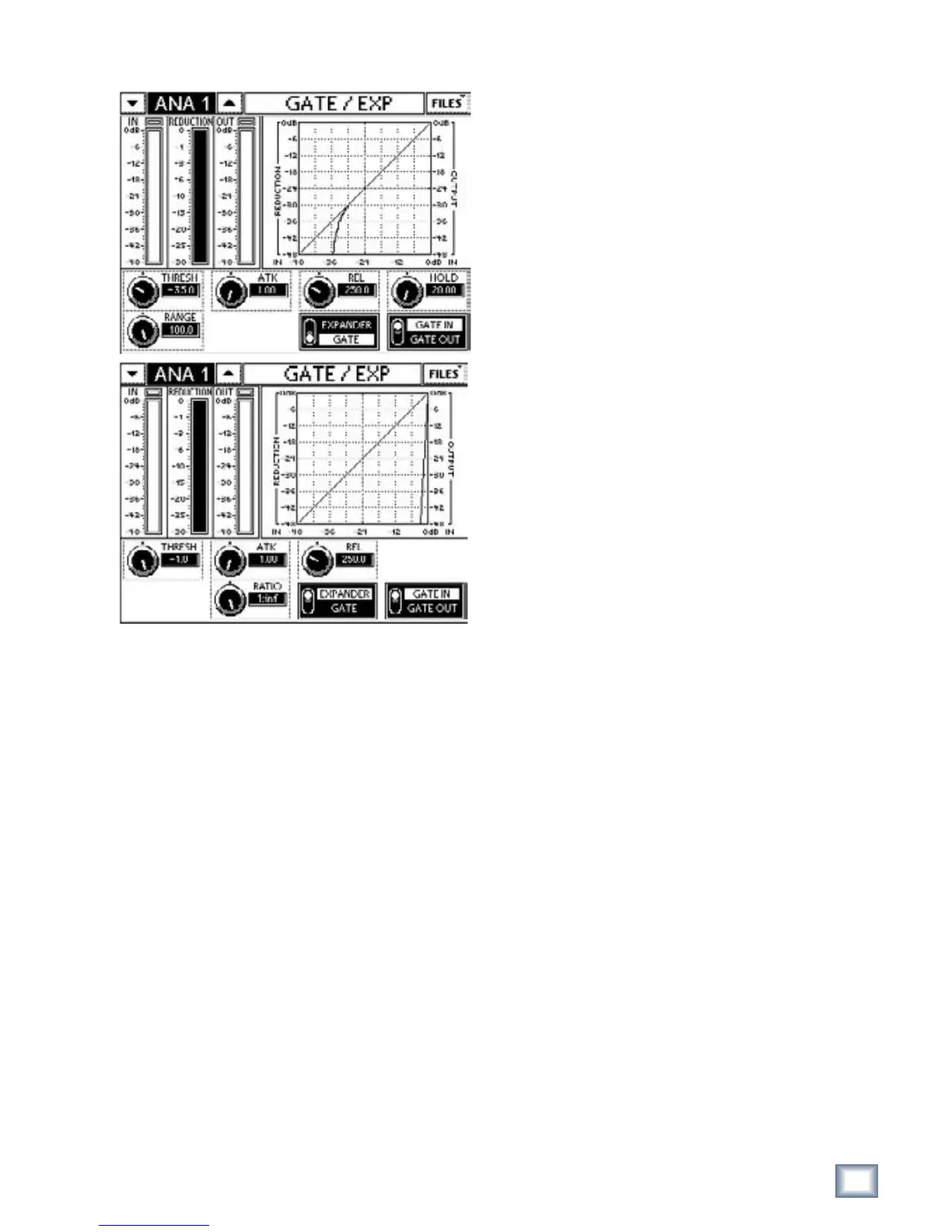
Figure 6-16 GATE (top) and EXP Touchscreens
The Gate/expander has five controls and an on/off
switch. There is a mode button to switch between the
gate and downward expander.
The IN/OUT meters show the levels coming in/out of
the gate/expander. The inverted REDUCTION meter
displays the gain reduction.
The graph summarizes the gate/expander’s parameter
settings.
Threshold
The THRESH control adjusts the level below which
attenuation begins. It is adjustable in the range -60 to -1
dBFS in increments of 0.1 dBFS. The default threshold
value is -1 dBFS.
Range/Ratio
In Gate mode, the RANGE control sets the amount of
attenuation that occurs when the signal drops below the
Threshold. The RANGE is variable from -100 dB to -1 dB
in increments of 0.1 dB. The default is -100 dB.
In Expander mode, this setting is called RATIO and
sets the expansion gain reduction ratio from 1:1 to 1:∞.
The default is 1:∞.
Hold
The HOLD control adjusts the time the Gate/Expand-
er stays open after the signal drops below the threshold
before gain reduction begins. HOLD is adjustable in the
range 0–5 s; the default is 0 s.
Attack
The ATK control adjusts the time for the gate to open
and pass the signal through once the signal exceeds the
threshold after reduction has occurred. ATK is adjust-
able in the range 1–30 ms. ATK is scaled such that the
faster settings can have finer adjustments. The default
ATK is 1 ms.
Release
The REL control adjusts the time for the gate to close
and begin gain reduction after the signal drops below
the threshold and the hold time has passed. REL is ad-
justable from 50 ms to 3 s and is scaled such that faster
settings can have finer the adjustments. The default
REL time is 250 ms.
Expander/Gate Mode
The EXPANDER/GATE switch toggles from Gate
to Expander. It is accessible only from the GATE/EXP
Touchscreen, not from DYNAMICS. In Expander mode,
the, HOLD, ATK and REL controls operate the same
as in Gate mode but the RANGE control is displayed
as RATIO. This can produce smoother sounding gain
reduction in many situations.
In Expander Mode, RANGE is replaced by RATIO
that sets the rate of gain reduction as the signal drops
below the Threshold. Ratio is variable between 1:20
(maximum gain reduction) to 1:1 (no gain reduction).
As RATIO approaches to 1:1, the resolution between
values increases.


 To Next Page