3
Magellan eXplorist GC Screens
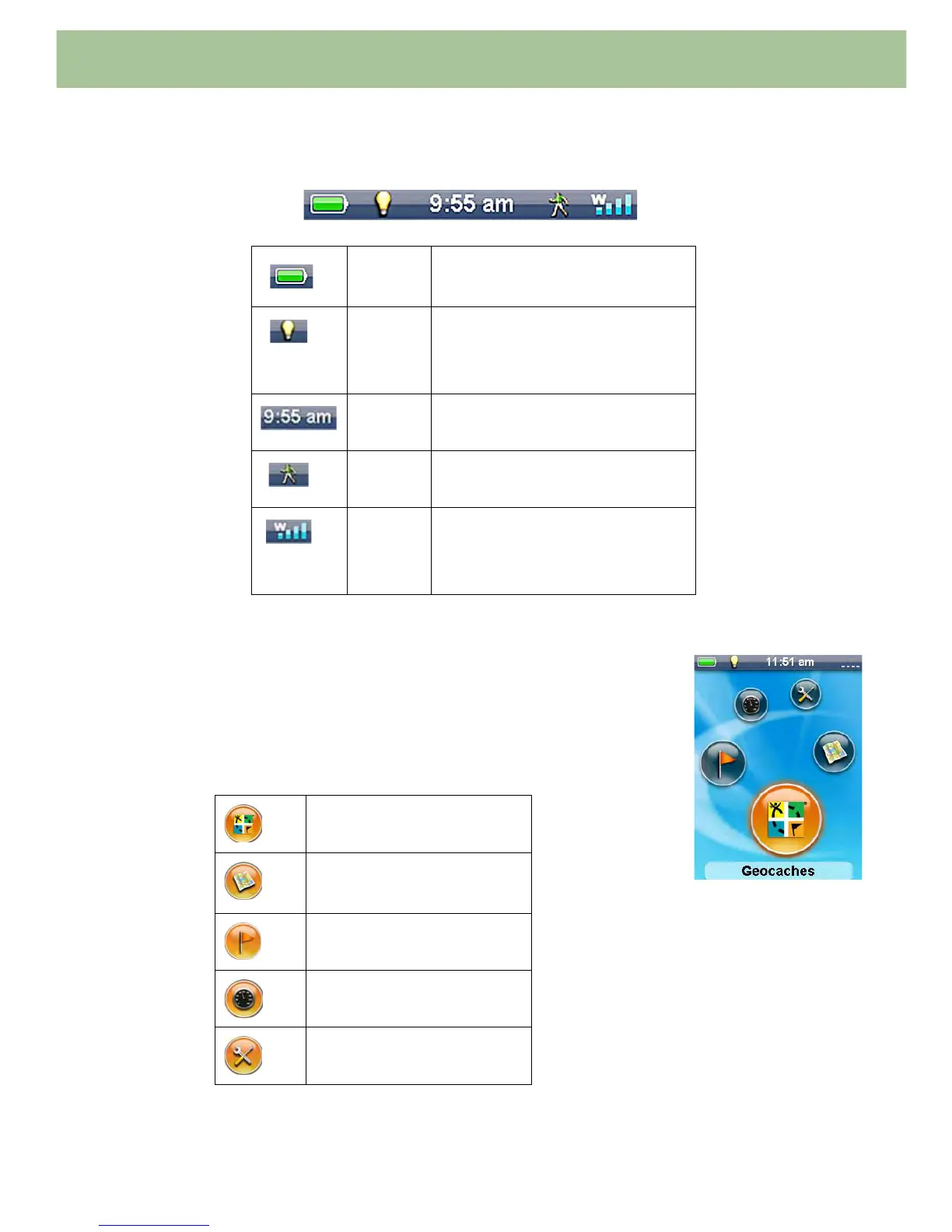
Status Bar
The Status bar appears on every screen in the receiver and provides information on the ‘inner workings’
of the Magellan eXplorist GC receiver.
The Main Menu Screen
The Main Menu screen is the hub for all of the activities in the Magellan
eXplorist GC receiver. From the Main Menu you can access the Map screen,
Geocaching functions, Waypoint functions, the Dashboard and Tools for setting
up your receiver to meet your requirements.
To access the different functions, use the joystick and move it left or right to
change the highlighted icon. With the icon highlighted, press ENTER.
Battery
Life
All green indicates full battery life.
Backlight
Status
Backlight is on when light bulb icon
is displayed. (Having the backlight
off will increase the battery life
significantly.)
Time of
Day
Displayed in 12-hour AM/PM or 24-
hour Military time.
Route
Status
Hiking man icon is displayed
whenever you are on a route.
Satellite
Status
Four blue bars indicates strong
satellite signal strength. “W”
indicates WAAS signals are being
received.
Geocaches
Map Screen
Waypoints
Dashboard
Tools















 To Next Page