Version 1.6
30 | System Programming
MG6250 • Section Programming Guide
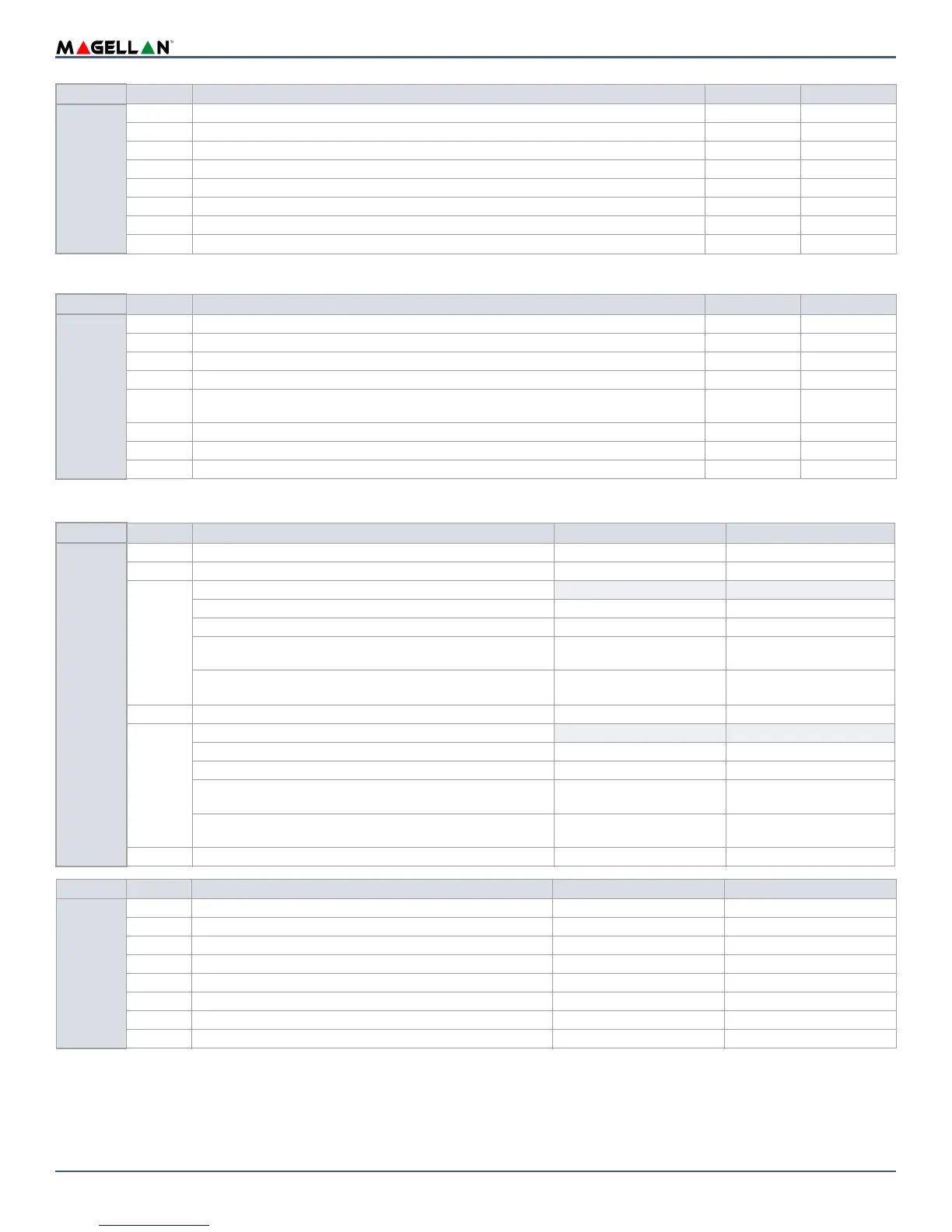
Arming/Disarming Options
Wireless Module Options
Section
Option Description
OFF ON
[2002]
1 Volume boost on entry/exit Disabled Enabled
2 Volume boost in speaker phone mode Disabled Enabled
3 Check-in supervision time 24 Hrs. 80 minutes
4 RF jamming supervision Disabled Enable
5Daylight savings time Disabled Enable
6Trouble latch Disabled Enable
7 Need to code view troubles/events Disabled Enable
8 Bell squawk when installer enters programming Disabled Enable
Section
Option Description
OFF ON
[2003]
1 Bell squawk when arming/disarming with remote control Disabled Enabled
2 Stay arming switches to Force Stay arming Disabled Enabled
3 Sleep arming switches to Force Sleep arming Disabled Enabled
4 Full arming switches to Force Full arming Disabled Enabled
5 Report system disarming Always
After alarm
only
6One-touch Stay arming Disabled Enabled
7 One-touch Sleep arming Disabled Enabled
8 One-touch Full arming Disabled Enabled
Section
Option Description
OFF ON
[2004]
1 Future use - -
2 Report Zone restore On bell cut-off On zone closure
3 & 4
Tamper recognition options (console tamper follows this option)
3 4
Disabled OFF OFF
Trouble only OFF ON
Disarmed: Trouble only
Armed: Follow zone’s alarm type
ON OFF
Disarmed: Audible alarm
Armed: Follow zone’s alarm type
ON ON
5 Generate tamper trouble if detected on bypassed zone Disabled Enabled
6 & 7
Wireless transmitter supervision option
6 7
Disabled OFF OFF
Trouble only OFF ON
Disarmed: Trouble only
Armed: Follow zone’s alarm type
ON OFF
Disarmed: Audible alarm
Armed: Follow zone’s alarm type
ON ON
8 Generate supervision trouble if detected on bypassed zone Disabled Enabled
Section
Option Description
OFF ON
[2005]
1 Input/Output 1 used as PGM 1 Zone 1
2 Input/Output 2 used as PGM 2 Zone 2
3 PGM 1 normal state N. O. N. C.
4 PGM 2 normal state N. O. N. C.
5 Future use - -
6 Live display mode for wireless keypad Disabled Enabled
7 End-of-Line (EOL) resistor No EOL Use EOL resistor
8 Future use - -


 To Next Page