MG6250 • Section Programming Guide
Version 1.6
Installation | 49
Installation
Wall-mount Installation
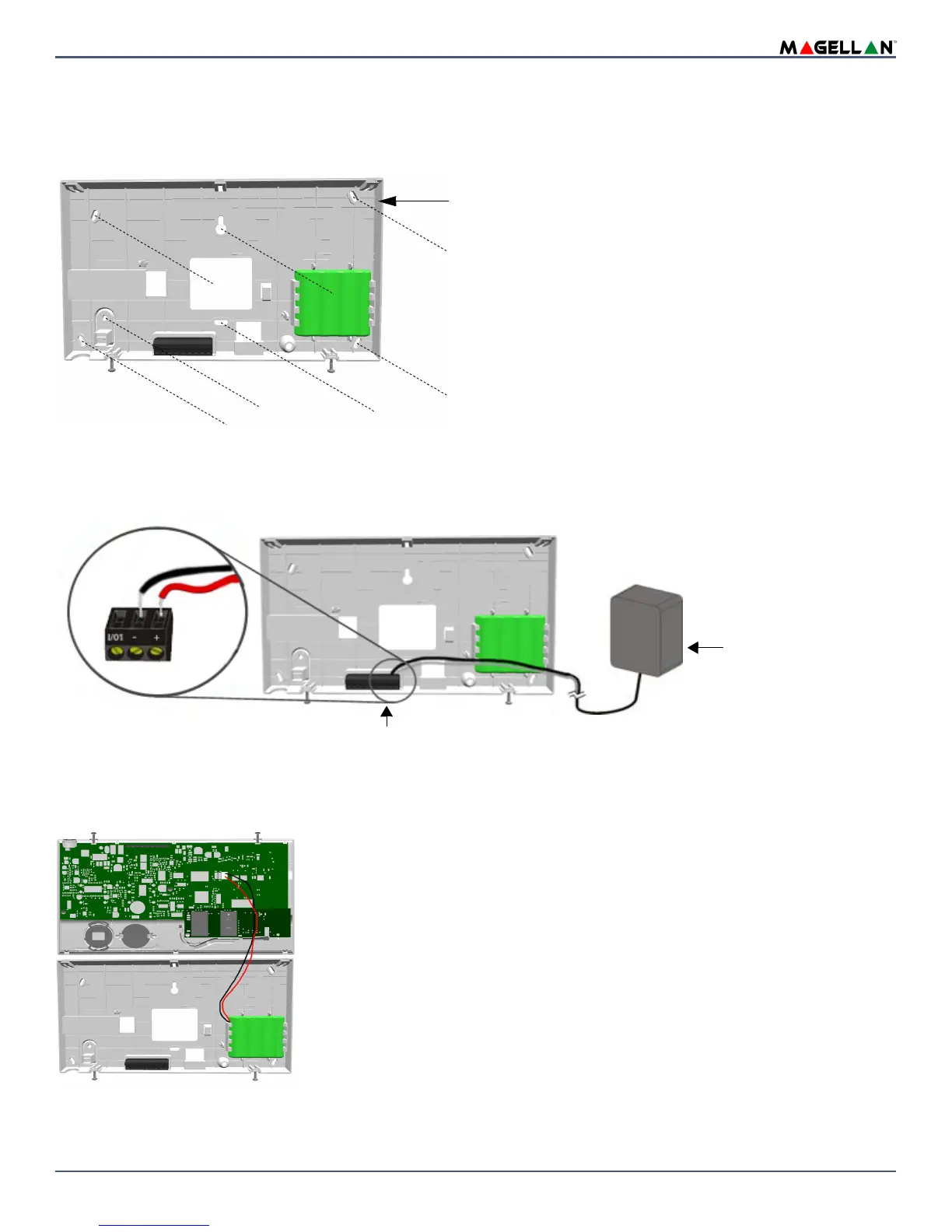
The MG6250 can be mounted on a wall. Secure the MG6250 back plate using appropriate mounting hardware as shown in figure 8.
Figure 8:
DC Power
The MG6250 can be powered through a DC power supply. Connect the transformer wires of the 7.5Vdc power supply to the + and - terminals to power the console
(as shown in figure 9).
Figure 9: Connecting the DC Power Supply
Backup Battery Pack
The MG6250 uses a backup battery pack to provide power during a power loss. A 4.8V, 1200mAH NiMH (Nickel Metal Hydride) rechargeable battery pack is included
with the console. Connect the battery pack as shown in figure 10.
Figure 10: Connecting the Backup Battery
To order a battery pack, the battery pack’s part number is: Paradox #0781200148.
NOTE: The backup battery can support the MG6250 during a power failure for 16 hours when in standby mode.
7.5Vdc Power Supply
WARNING: Using a higher
voltage power supply is not
recommended.
Insert the transformer wires into the + and - terminals.


 To Next Page