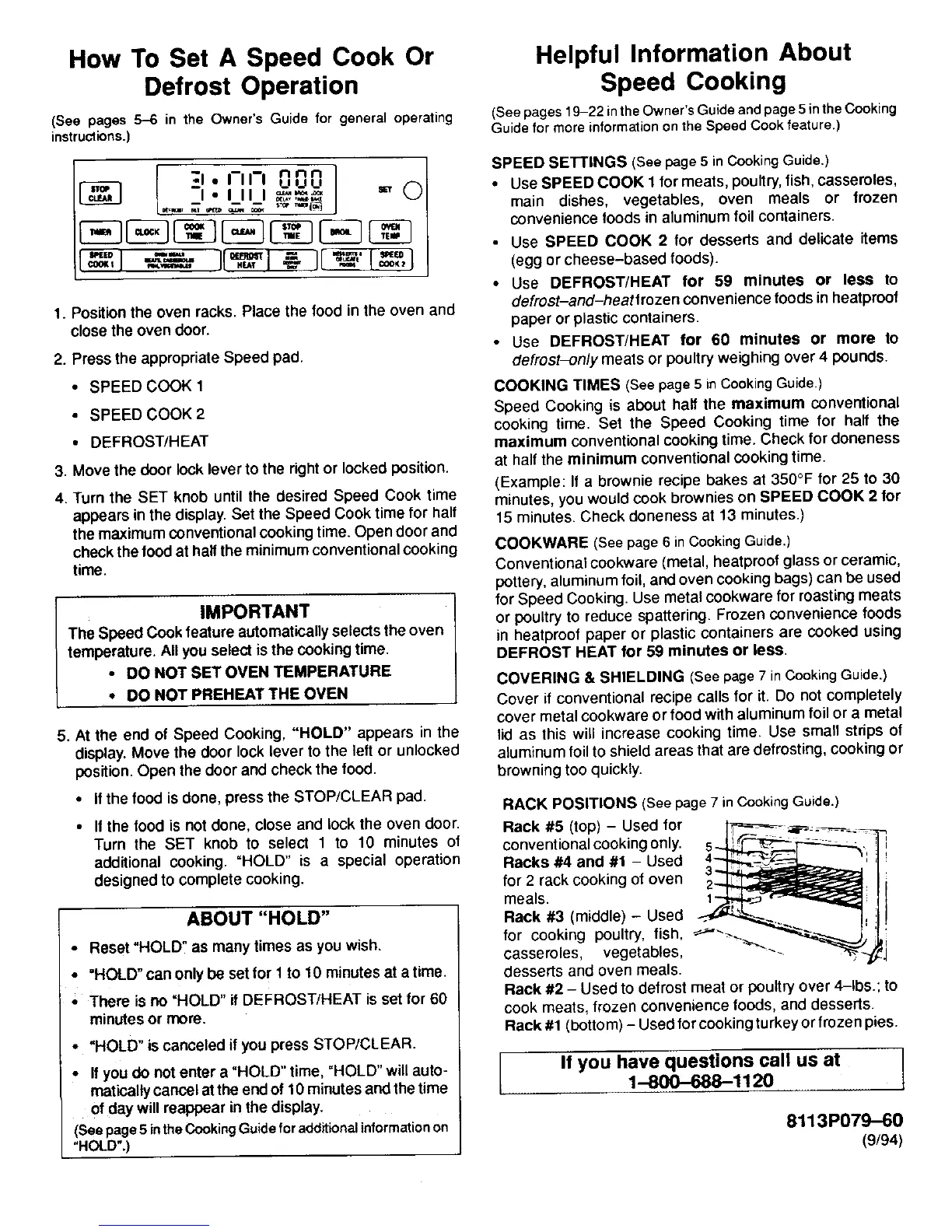
How To Set A Speed Cook Or Helpful Information About
Defrost Operation Speed Cooking
(See pages5-6 in the Owner'sGuidefor generaloperating (Seepages19-22intheOwner'sGuideandpage5intheCooking
instructions.) GuideformoreinformationontheSpeedCookfeature.)
I n n n SPEED SET'rINGS (Seepage5 inCookingGuide.)
_1 • I-Ill uuu _ (_ • UseSPEED COOK l formeats,poultry,fish,casseroles,
I ° I II I _,,,_ main dishes, vegetables, oven meals or frozen
L.-'I_ I---"LJ__ _ _ {--_ _ convenience foods inaluminum foil containers.
• Use SPEED COOK 2 for desserts and delicate items
i]__ (egg orcheese-based foods).
• Use DEFROST/HEAT for 59 minutes or less to
1. Positionthe oven racks.Place the food inthe oven and defrost-and-heatlrozen conveniencefoodsinheatproof
closetheoven door. paperor plasticcontainers.
• Use DEFROST/HEAT for 60 minutes or more to
2. Pressthe appropriateSpeed pad. defrost-only meats or poultry weighingover 4 pounds.
• SPEED COOK 1 COOKING TIMES (Seepage5 inCookingGuide.)
• SPEED COOK 2 Speed Cooking is about half the maximum conventional
cooking time. Set the Speed Cooking time for half the
• DEFROST/HEAT maximum conventional cooking time. Check for doneness
3. Move thedoor lock lever to the right or locked position, at halfthe minimum conventionalcookingtime.
(Example: If a brownie recipe bakes at 350°F for 25 to 39
4. Turn the SET knob until the desired Speed Cook time minutes, you would cook brownies on SPEED COOK 2 for
appears in the display. Set the Speed Cook time for half 15 minutes. Check doneness at 13 minutes.)
the maximumconventional cookingtime. Opendoor and
checkthe toodathalf the minimumconventional cooking COOKWARE (Seepage6in CookingGuide.)
time. Conventional cookware (metal, heatproof glass or ceramic,
pottery,aluminum foil, and oven cooking bags) can be used
for Speed Cooking. Use metal cookware for roasting meats
IMPORTANT or poultry toreduce spattering. Frozen convenience foods
The Speed Cook feature automatically selects the oven in heatproof paper or plastic containers are cooked using
temperature.All youselectisthe cookingtime. DEFROST HEAT for 59 minutes or less.
• DO NOT SET OVEN TEMPERATURE COVERING & SHIELDING (Seepage7inCookingGuide.)
• DO NOT PREHEATTHE OVEN Coverif conventionalrecipecallsfor it. Do not completely
cover metalcookwareorfood withaluminumfoilor a metal
5. Atthe endof Speed Cooking,"HOLD" appears in the lid as this will increase cooking time. Use small strips of
display. Move the door lock lever to the left or unlocked aluminum foil to shield areas that are defrosting, cooking or
position. Open the door and check the food. browning too quickly.
• Ifthe food is done, press the STOP/CLEAR pad. RACK POSITIONS (See page7 inCooking Guide.)
• If the food is not done, close and lock the oven door. Rack #5 (top) - Used for l_,_--_ ......
Turn the SET knob to select 1 to 10 minutes of conventionalcooking only. 5.JJ,t--cz--. _--._._
additional cooking. =HOLD" is a special operation Racks #4 and #1- Used 4_f-_---J.._ "_:
designed to complete cooking, fOrmeals.2rack cooking of oven /_
ABOUT "HOLD" Rack #3 (middle) - Used ,
• Reset"HOLD"as manytimesas youwish. for cooking pouNry, fish, ---"_-_.... _
casseroles, vegetables,
• "HOLD" canonly be setfor 1to 10 minutes at atime. desserts and oven meals.
• There is no "HOLD" if DEFROST/HEAT is set for 60 Rack #2 - Used to defrost meat or poultry over 4-1bs.;to
minutesor more. cookmeats, frozen conveniencefoods, and desserts.
Rack #1 (bottom)- Used for cookingturkey or frozen pies.
• "HOLD" is canceled if you press STOP/CLEAR.
• Ifyoudo not entera "HOLD" time, "HOLD"will auto- [ If you have q uestiOns call us at ]
maficaltycancelattheendof10 minutesandthetime 1-800--688--1120
of day willreappearinthedisplay.
(Seepage5intheCookingGuideforadditionalinformationon 8113P079-60
"HOLD".) (9/94)




 To Next Page