User’s Manual MAGNER150
- 34 -
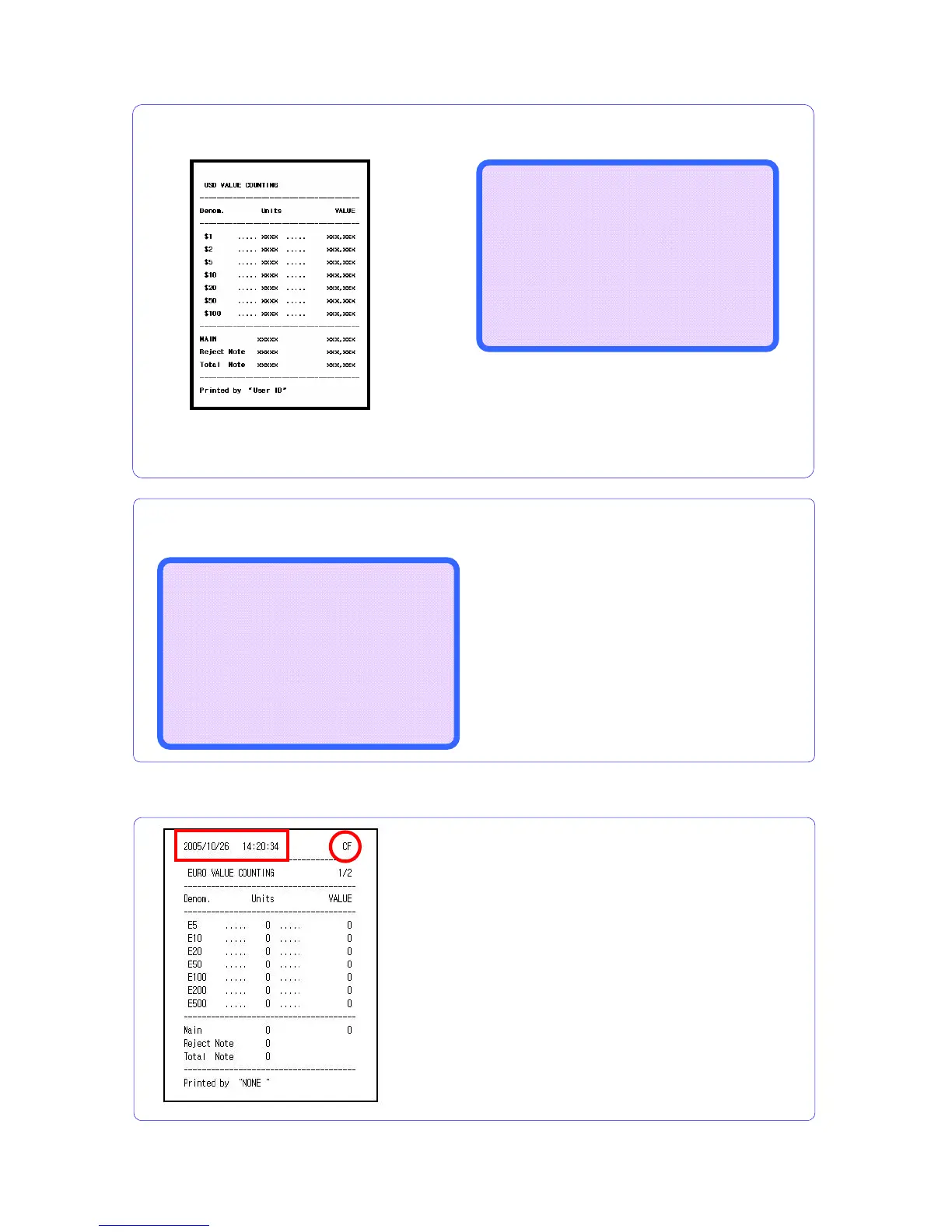
6-6. Form of the Receipt
If serial printer does not connect,
the result prints to the screen.
The machine prints the receipt.
If serial printer connected, the result
is printed to the printer.
--------------------------
|Please Check...........|
|Make rej. Pocket empty |
--------------------------
If the notes remain at the Reject Pocket while user presses PRINT Key, following
message is displayed.
USD VALUE COUNTING
------------------------------
$5 : XXX,XXX |
$10 : XXX,XXX |
$20 : XXX,XXX | Total Notes
$50 : XXX,XXX | : X,XXX,XXX
$100 : XXX,XXX |
$200 : XXX,XXX | Total Value
$500 : XXX,XXX | : XX,XXX,XXX
------------------------------
EXIT – RESTART KEY
After counting, press and hold down PRINT key,
①
②
① Printing date and time: This function is optional.
(Real time checking hardware is needed)
② CF enable or disenable is printed. When CF
function enables, “CF” is printed. And if CF function is
not enable, “--“is printed.



 To Next Page